Pico errors
This page explains the known Pico errors.
RFID is not recognized.
Meaning:
- When the RFID is scanned, neither the QR code nor the RFID logo is displayed.
Possible causes:
-
The RFID card is defective
-
The Pico has an error
Action:
-
Restart the Pico. If the restart solved the problem, we would be grateful for an email to support@smart-me.com. Please state the date of the incident and the serial number of the Pico.
-
Try with a new RFID card
Reduced charging power
If the Pico delivers less power than it should, a phase may not be connected correctly or a fuse may have tripped. By clicking "Normal" (Normal), you can view the voltages and currents, similar to the electricity meters.
Black screen (no display)
Meaning:
- The Pico screen shows nothing.
Possible causes:
-
The Pico has no power
-
The RCD has tripped
-
The Pico has an error in its local software
Action:
-
If the Pico is offline
-
Step 1: Disconnect the power and switch it back on.
-
Step 2: Check whether the application version is 1.xx (Check hardware version). If so, fill in the RMA with the error description: Black screen with application version 1.xx
-
Step 3: If this does not help, contact support.
-
-
If the Pico is online, it can be restarted via the smart-me portal. (Select the Pico / gear icon at the top right / Advanced actions (Erweiterte Aktionen) / Restart (Neustart))
-
If the RCD trips, it may be an isolated incident. If it happens more often, please contact us. Except with the "IONIQ 5" and "Zoé": in isolated cases, these cars trip the RCD at the end of the charging session, and as a manufacturer of charging stations, we cannot change this.

Car is plugged in and the charging station does not respond
When a car is plugged in, the following should normally happen with
-
Authentication None
- The standby screen disappears and a sequence with a charging start appears
-
Authentication eCarUp Backend
- The screen with "Auth RFID App" appears.
If this is not the case, please proceed as follows
-
On the car, check whether the cable is plugged in correctly.
-
On the Pico, make sure that the cable is pushed in all the way.
If it still does not respond, the station operator must check whether a cable is permanently attached to the station.
-
If this is the case, please make sure that the option "Cable always locked" (Kabel immer fest verriegelt) is activated in the smart-me portal.
-
If this is not the case, please do so.
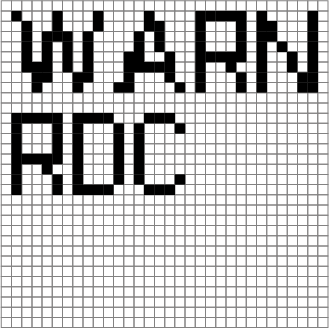
Warn RDC
Cable or car (usually)
Meaning:
- Problem with the RDC sensor (residual current device). An RCD is a personal protection device in the electrical installation.
Possible causes:
-
A damp charging cable that is permanently connected.
-
A charging cable that froze overnight and thawed again.
-
A defect in the cable or car. This can be tested by having another car charge at the station or by charging the car that causes the error at another Pico.
-
A defect in the Pico electronics, e.g. water damage.
Action:
- Once the error has been triggered, the station must be restarted to reset the error.
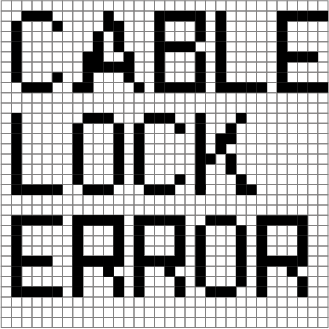
Cable Lock Error
Meaning:
- This error occurs when the cable cannot be locked (e.g. if the plug is not inserted correctly).
Action:
-
Restart the Pico once, either via the cloud or locally. This recalibrates the sensor for the cable lock.
-
In most cases, it is also sufficient to insert the cable properly (with some force) and try again.
Display in the portal
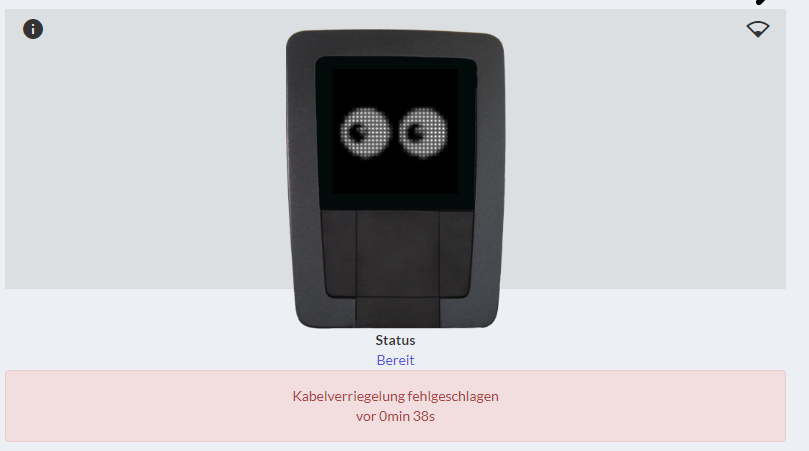
- Cable lock failed (Kabelverriegelung fehlgeschlagen)
Error 1
Meaning:
- No WiFi module was found
Action:
- If a restart does not bring the desired result, an RMA must be filled in. Error description: Error 1

Error 2
Meaning:
- Internal communication error
Action:
- If a restart does not bring the desired result, an RMA must be filled in. Error description: Error 2

Error 3
Meaning:
- An error with the MID electricity measuring device
Action:
- If a restart does not bring the desired result, an RMA must be filled in. Error description: Error 3

Error 4
Meaning:
- The RCD test on the Pico failed.
Action:
- See WARN RDC

P-Limit
Meaning:
-
Voltage too low <200V
-
Load shedding active: power limited

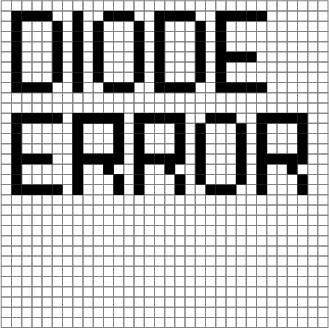
Diode Error
Possible causes:
- The charging cable is defective
Action:
-
Replace / check the charging cable
-
No action is required on the Pico. It can be used normally again after 30 seconds.
-
Check whether at least version 0.0.42 is installed on the Pico. Firmware update
Car is not charging (bar is only one pixel wide and red)
Display:
- The lower bar is only one pixel wide and red
Meaning:
- The charging station does not release any current.
Possible causes:
-
The load management cannot release any current to the station because a Pico is overloaded.
-
The Pico in the charging group cannot communicate via the mesh with other Picos in the same charging group.
Actions:
-
Check whether the nodes have sufficient current.
-
For a more detailed analysis, please call support.

High temperature
High temperature
Meaning:
- The high internal temperature of the Pico causes the maximum charging power to be throttled.
Possible causes:
- Direct sunlight: The device may be exposed to direct sunlight, which leads to excessive heat build-up.
Action:
-
Perform a firmware update if the version is lower than 0.0.29.
-
The display brightness of the Pico should be set to the minimum. This has the greatest effect, as less energy is generated directly inside the housing.
Car-specific problems
-
Hyundai Ioniq 5: In isolated cases, this car trips the RCD at the end of the charging session, and as a manufacturer of charging stations, we cannot change this, since the RCD trips independently of the charging station.
-
Zoé: The older models must be configured with a start current of 10A, as they do not start charging at 6A. A test has shown that with a single-phase charging cable, charging also starts when only 6A start current is available. In isolated cases, this car trips the RCD at the end of the charging session, and as a manufacturer of charging stations, we cannot change this, since the RCD trips independently of the charging station.
-
Renault Kangoo Electric: Only starts charging from 8A
-
Skoda Enyaq: It can sometimes take up to 1min 30sec until the charging session starts. Alternatively, deactivate the Car-ID.
-
Audi Q4: Charging does not start.
-
Solution 1: According to initial experience on 23.01.2026, the problem could also be solved with the latest Audi software.
-
Solution 2: Install at least version 0.0.33 on the Pico and deactivate the car-id.
-
-
Dacia Spring: Charging does not start. Solution: Install version 0.0.33 and deactivate the car-id on the Pico.
-
Hyundai Ioniq: The car only starts if the RFID card is held up first and the charging is then started. Alternatively, the Car-ID must be deactivated.
-
Leapmotor / T03: Cannot cope with the phase switching. If charging is interrupted by the car after one minute, the door must be opened and closed several times on the car side.
-
Subaru Solterra: Only starts charging from 8A and with the Car-ID deactivated
-
Mazda MX-30: Only starts charging if the Car-ID is deactivated.
-
Honda E:ny1: Only starts charging from 8A.
-
dongfeng box: Cannot cope with the phase switching. If charging is interrupted by the car after one minute, the door must be unlocked on the car side after 7 minutes, and it then starts charging again.