Billing error messages
This section systematically covers the error messages in Billing.
General
The configuration of smart-me Billing is described here: Billing
In smart-me Billing, error messages are displayed in two places:
-
When calculating the virtual tariffs (if configured)
-
When creating invoices
Calculation of the virtual tariffs
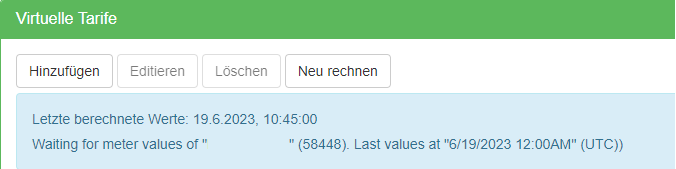
Where can I find the error messages for the calculation of the virtual tariffs? Log in to the portal: Billing (Rechnungsstellung) --> Configuration (Konfiguration) --> Edit property (Liegenschaft editieren) --> Virtual tariffs (Virtuelle Tarife) --> Blue box
Created invoices
Where can I find the error messages and warnings when creating invoices? Log in to the portal: Billing (Rechnungsstellung) --> Configuration (Konfiguration) --> Edit property (Liegenschaft editieren) --> Invoices (Rechnungen) --> Invoices (Rechnungen) --> Orange field with warnings (Only appears if there is an error)

List of error messages
Errors in the calculation of the virtual tariffs
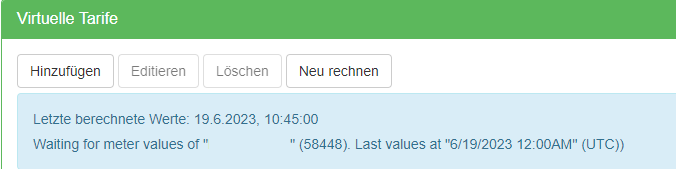
Calculation starting soon ... (Berechnung startet bald ...)
This message is displayed if no virtual tariffs have been calculated. This can have the following causes:
Billing has only just been set up
-
-
Cause: When Billing has just been created, you must press recalculate (neu rechnen) manually the first time
-
Solution: Press recalculate (neu rechnen)
-
Another error message is displayed below the message
-
-
Cause: The tariffs cannot be calculated if there are problems.
-
Solution: Resolve the error message below.
-
Recalculate (neu rechnen) has only just been pressed
-
-
Cause: It takes some time (1-2min) for the calculation to start.
-
Solution: Wait 1-2min
-
No tariffs are defined for the current year
-
-
Cause: Billing requires valid tariffs for the entire billing period
-
Solution: Define tariffs from 2000 to 2099, or at least from commissioning until the end of the current year
-
Not the entire period is defined with a tariff. E.g. there is no tariff for 2019, the year the meter was commissioned.
-
-
Cause: Billing requires valid tariffs for the entire billing period
-
Solution: Define tariffs from 2000 to 2099, or at least from commissioning until the end of the current year
-
For the solar or battery tariff, the solar meter or total consumption meter has not been added.
-
-
Cause: To calculate the split between grid and solar, solar tariffs require certain meters.
-
Solution: Check whether all solar and battery tariffs have the required meters assigned.
-
The folder structure of the property has one level (billing units only), but it should have two levels (property and billing units).
-
-
Cause: The Billing structure has two levels and requires at least one billing unit.
-
Solution: Check the folder structure
-
EVT001: There must be at least one normal virtual tariff active, but for ValuePeriod { ... } there is none
This message is displayed if there is not at least one valid grid tariff for the entire billing period. The curly brackets contain a point in time at which no grid tariff is valid (in UTC).
-
Solution 1: Define tariffs starting from the first transmitted value. E.g. from 5.8.2022 or earlier, 1.1.2000, then press "recalculate" ("neu rechnen").
-
Solution 2: Define tariffs for the current year (e.g. until 31.12.2024), then press "recalculate" ("neu rechnen").
-
Solution 3: For peak/off-peak tariffs: Check whether they cover 24h. If/Then Actions
-
Solution 3: Press "recalculate" ("neu rechnen") and enter the date from which a valid tariff is configured.
EVT002: Not more than one unconditional normal virtual tariff must be active at a time, but for ValuePeriod ... there are the following ones: - ...
This message is displayed if more than one grid tariff is valid at the same time. As a result, Billing cannot decide which tariff the consumption must be allocated to.
-
Solution 1: The tariffs have an overlapping start and end date for their validity.
-
Solution 2: For peak/off-peak tariffs: No condition is defined for either tariff. At least one of the two tariffs must have a condition (e.g. the peak tariff).
-
Solution 3: The if/then actions were configured incorrectly. This occurs especially when peak and off-peak tariffs are configured for both grid and solar electricity.
EVT003: For ValuePeriod ... the following virtual tariffs are active but erroneous: - Solar tariff ... is invalid because of: Solar Meter: Meter with id ....' does not exist
This message is displayed if there is a problem with the meter assigned to a solar tariff.
-
Solution 1: No meter has been assigned -> assign a meter
-
Solution 2: An old meter that has since been deleted was assigned -> assign a new meter
EVT004: The following residential commercial units are defective: - '....': the following assignments are defective: - Meter with id '....' does not exist
One of the billing units contains a deleted meter.
- Select the billing unit named in the error message, delete the deleted meter "not found" and assign a new meter if necessary
EVT005: There is no residential commercial unit.
This error message appears if no billing unit was found.
-
Cause: The two-level folder structure is missing. On the left under the property there is only a folder for the property and no subordinate billing unit
-
Solution 1: Check the folder structure. Info
-
Solution 2: Create the property again. To do this, click add property (Liegenschaft hinzufügen) again in Billing under Configuration (Konfiguration) and select the same node. No data is lost in the process.
No billing units are listed under the external keys (at the end of the page).
-
-
Cause: The billing units were added to the property afterwards via drag-and-drop.
-
Solution: The billing units must be created again. It is important to select the property folder each time and then choose "Add node" ("Knoten hinzufügen"). The name of the property folder must be displayed under "Parent folder" ("Übergeordneter Ordner").
-
EVT006: Failed to load meters of folder '...': - Erroneous virtual meter '....: - Meter with id '....' does not exist
The virtual meter consists of meters that have been deleted.
EVT007: Not all meters in the configuration may have the load profile or meter reading profile certification legally required for virtual tariffs. (Möglicherweise verfügen nicht alle Zähler in der Konfiguration über die für virtuelle Tarife gesetzlich vorgeschriebene Lastgang- oder Zählerstandgang-Zertifizierung.)
This notice is purely informative and is displayed if third-party devices or meters not certified by smart-me are used. It has no effect on the calculation.
With this notice, we want to ensure that the invoice issuer is aware that the conformity of measuring devices is their own responsibility. This applies to all third-party devices and the smart-me single-phase meter.
Note: This message cannot be deactivated.
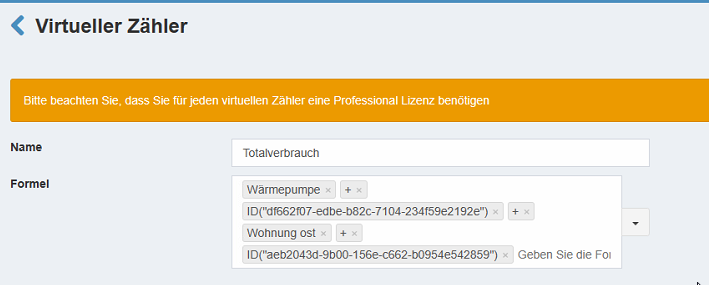
EVT020: Waiting for meter values of .... Last values at.... (UTC))
This message appears if not all the load profile data required to continue calculating the tariffs is available.
-
All meters must be online. Meter offline
-
Removed meters must be deactivated or deleted.
-
For vZEVs, the data is only sent daily. As a result, this message is always displayed until the next transmission. If the date is today, it can be ignored.
-
Meters must send load profile data. In the event of a defect, only live data may be sent, which is not suitable for billing. (15min load profile data is required.)
EBC010: The costs of the battery price component do not match the virtual tariff costs (Die Kosten der Batteriepreiskomponente stimmen nicht mit den virtuellen Tarifkosten überein)
This message only appears if tenant electricity is activated. It occurs if the tariff structure has been changed but the price components under Other items (Sonstige Positionen) have not yet been updated.
EBC011: The costs of the grid or solar price components do not match the virtual tariff costs (Die Kosten der Netz- oder Solar-Preiskomponenten stimmen nicht mit den virtuellen Tarifkosten überein)
This message only appears if tenant electricity is activated. It occurs if the tariff structure has been changed but the price components under Other items (Sonstige Positionen) have not yet been updated.
EBC012: The costs of the solar price components do not match the virtual tariff costs. (Die Kosten der Solar-Preiskomponenten stimmen nicht mit den virtuellen Tarifkosten überein.)
This message only appears if tenant electricity is activated. It occurs if the tariff structure has been changed but the price components under Other items (Sonstige Positionen) have not yet been updated.
Errors in created invoices

EBC001: Consumption of the virtual tariffs does not match the consumption. (Verbräuche der virtuellen Tarife stimmen nicht mit dem Verbrauch überein.)
This message is displayed if the sum of the virtual tariffs does not correspond to the consumption of the meters. This problem occurs if the virtual tariffs are not allocated correctly.
Possible causes:
The tariffs were not calculated for the entire billing period
-
Cause: The calculation of the virtual tariffs has stopped due to an error message.
-
Solution: Check the virtual tariffs in the property configuration in Billing. If an error message is displayed in the blue box, it must be resolved. If no message is displayed but the date "Last calculated value" ("Letzter berechneter Wert") is within the billing period, the calculation is still running and you need to be patient. Important: the calculation can take several hours, depending on the number of tariffs and meters.
The billing period includes the installation day
-
Cause: Our Billing works with complete days.
-
Solution: The installation day must not be within the billing period. You can cross-check this by creating a report of the meters and checking whether it contains measured values for the entire period.
The billing period includes today or a future day.
-
Cause: Our Billing works with complete days and calculates the virtual tariffs continuously.
-
Solution: Not all values are available for today (the day is still in progress), and no data is available for the future. As a result, no virtual tariffs can be calculated.
The invoice is created empty
-
Cause: The folder structure is incorrect or no virtual tariffs were calculated for the entire billing period.
-
Solution: Check the virtual tariffs in the property configuration in Billing. If an error message is displayed in the blue box, it must be resolved. If a recalculation was made from a later date (e.g. billing is created for 2025; recalculation was made from 2026), no tariffs were calculated for the period. You must recalculate again, including the billing period.
A meter was offline for more than 2 months
-
Cause: If there is a gap, no virtual tariffs can be calculated.
-
Solution: Check whether all data is available; if it is, you must recalculate. If data is not available, no invoice can be created for this period.
The configuration has changed (folder structure, meter assignment, tariff structure/times)
-
Cause: No recalculation was made
-
Solution: You must recalculate.
A meter is billed at more or less than 100%.
-
Cause: A meter (e.g. the common area meter) was split by percentage, but the shares do not add up to 100%
-
Solution: The meter must be billed at 100%. Note: If a meter is split across three units, one of the units must have 33.34%. (3x 33.33% is only 99.99%)
vZEV data has been updated
-
Causes: For vZEVs, the energy supplier sends corrected data monthly.
-
Solution: You must recalculate.
EBC002/EBC003: No values found for the start date or end date. (Keine Werte zum Startdatum oder Enddatum gefunden.)
This message concerns multi-energy meters.
Possible causes:
-
A meter relevant for billing is offline.
-
The billing period (From) corresponds to the installation day and/or the billing period (To) is set to today.
-
The billing period (From) is before the installation day and/or the billing period (To) is in the future.
-
A meter was offline for more than 2 months and the billing period starts or ends in the period for which the data is no longer available. (Gap)
-
The selected year is wrong.
EBC004: Invoices are generated empty or not at all. (Rechnungen werden leer oder gar nicht generiert.)
Possible causes:
-
No valid billing address has been entered for the billing unit concerned (note the period) → otherwise our system assumes that no tenant lives in the apartment and accordingly does not create an invoice.
-
No meters have been assigned to the billing unit for billing.
-
The folder structure is incorrect (see 2. Create folder structure and assign meters)
-
For virtual tariffs: The tariffs are not valid in the desired invoice period (adjust the period of the tariffs if necessary).
-
No billing address has been entered for the period.
EBC005: The added or subtracted value results in an un-representable DateTime. Parameter name: value Index was outside the bounds of the array.
Your bexio login is no longer valid. You need to log in again.
QR bill data is invalid: currency should be "CHF" or "EUR" (currency_not_chf_or_eur)
The currency is not set to CHF or EUR.
Login--> Billing (Rechnungserstellung) --> Settings (Einstellungen) --> Change currency and set it to "CHF" --> Save (Speichern).
QR bill data is invalid: amount should be between 0.01 and 999 999 999.99 (amount_outside_valid_range)
The amount to be billed is negative. This can happen with Other items (Sonstige Positionen), e.g. refunds.
This cannot be avoided. The invoice is still created (without a QR code).
Error messages specific to peak demand tariffs
EPK001: Meter for grid electricity has not been configured (Zähler für Netzstrom wurde nicht konfiguriert)
Possible causes:
- In smart-me Billing, the balance meter was not assigned in the peak tariff.
Solving the problem:
- smart-me Billing --> Configuration (Konfiguration) --> Peak demand tariffs (Spitzenverbrauch Tarife) --> Edit (Editieren) --> Add balance meter (Bilanzzähler hinzufügen) --> Save (Speichern).
EPK002: Peak load cost entries are missing for the billing period (Spitzenlastkosteneinträge fehlen für den Abrechnungszeitraum)
The costs of the peak tariff have not been entered in smart-me Billing.
Solution: smart-me Billing --> Configuration (Konfiguration) --> Peak demand tariffs (Spitzenverbrauch Tarife) --> Add costs (Kosten hinzufügen) --> Add price / kW (Preis / kW hinzufügen) --> Save (Speichern).
EPK003: The grid consumption in the billing period could not be determined. (Der Netzverbrauch im Abrechnungszeitraum konnte nicht ermittelt werden.)
The balance meter has not delivered any data.
-
Cause: Without a balance meter, the peaks cannot be calculated if the type is set to "Consumption measurement" ("Verbrauchsmessung")
-
Solution: Check whether the values are available.
The balance meter has not delivered data for an entire month.
-
Cause: Values for the entire month are required to be able to bill peaks.
-
Solution: Configure the peak tariff only from one month later. For the month with the gap, a peak demand can be created with "Assigned costs" ("Zugewiesenen Kosten").
EPK004: At least one billing unit must have consumption in the billing period. (Mindestens eine Abrechnungseinheit muss einen Verbrauch im Abrechnungszeitraum haben.)
Only the solar tariff is billed
-
Cause: Peak demand is only applied to the grid tariff.
-
Solution: Check whether the solar tariff has been configured correctly.
No consumption was measured
-
Cause: The meters did not measure any consumption for the period
-
Solution 1: Check when the meters were commissioned and whether data is available for the entire period.
VEWA-specific error messages
The values are not displayed on the invoice at all, or are displayed as 0kWh, even though consumption has occurred.
A tariff (placeholder) must be entered for each energy type: heat, domestic hot water, etc.
Login --> Create invoice (Rechnung erstellen) --> Settings (Einstellungen) (top centre) --> Edit property (Liegenschaft editieren) --> Enter tariffs for heat / domestic hot water / etc. with 0 CHF. --> Save (Speichern).
Word & Excel files are created empty (0 bytes)
These files can only be used outside of VEWA. If VEWA is activated, the buttons for them remain visible but only output empty files.
No values for meter. Substitute values are used. (Keine Werte für Zähler. Es werden Ersatzwerte verwendet.)
This error can occur and is not critical in every case. However, you should pay attention to how far the substitute value deviates from the requested value.
The error message appears after a deviation of 48h at the latest.
Note: If necessary, check the reading interval of the M-Bus gateway so that it reads more often than every 2 days, to rule out that the error occurs systematically.
EVW001: Missing tenancy or vacancy! (Fehlendes Mietverhältnis oder Leerstand!)
Please enter the missing tenancy or vacancy.
Without this entry, the costs are allocated in full to the entered contracts, and the reference total energy is also formed only from these contracts. (Less energy than was actually consumed)
EVW002: Double occupancy of the billing unit! (Doppelbelegung der Abrechnungseinheit!)
Check the vacancies and tenancies for double occupancy.
Without the correction, the costs are allocated in full to the entered contracts, and the reference total energy is formed from too many contracts. (More energy than was actually consumed)
Address cannot be maintained
ID Address Email Description Valid from Valid to Valid to (ISO) Valid from (ISO)Third party key
Possible causes:
-
smart-me Billing was created with 3 levels.
-
A folder was moved afterwards and still has old configurations saved.
Solution: See EVT005
Topics explained in more detail:
Why does the virtual tariff produce a difference if the meter did not deliver any data at the time of the billing start (From) or billing end (To)?
Possible reasons:
-
Commissioning was not completed
-
The meter was offline and did not subsequently deliver the load profile data
-
The meter was defective
Data basis for detecting the error:
smart-me Billing performs a check when creating an invoice. It compares the sum of the virtual tariffs (e.g. peak, off-peak, solar tariff) with the electricity consumption. If there is a difference, an error message is displayed.
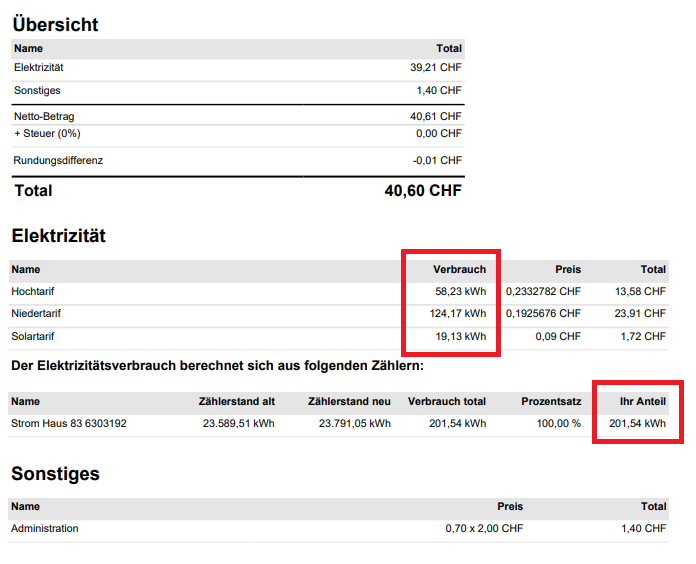
Display of meter readings
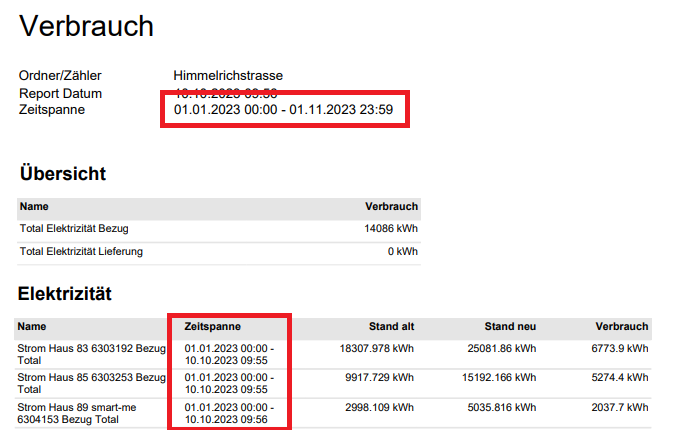
When an invoice is created, the determined meter readings are not displayed with a timestamp in smart-me Billing. To check whether the meter delivered data at the desired time, a report must be created.
For the report, you can select the property and generate a detailed consumption report PDF. This exports the data of all billing units (apartments) at once.
Select property --> Select Report at the top right --> Report type (Reporttyp) --> Detailed consumption report (PDF) (Verbrauchsreport detailliert (PDF))
You can now check whether the period of the report deviates from the period of the reference value, the sum of one or more meters. If this is the case, no load profile data is available for the selected period.
Display of virtual tariffs
When an invoice is created, the determined virtual tariffs are displayed in the tariffs in smart-me Billing.
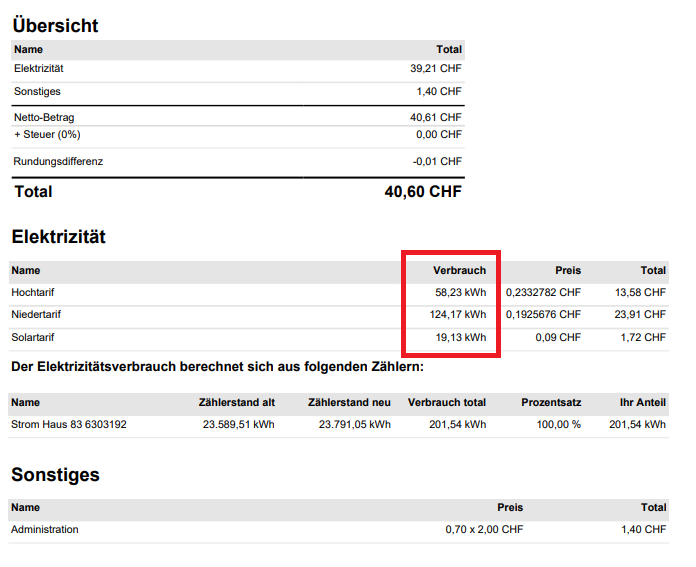
Different handling of meter readings and virtual tariffs:
Meter readings: For the electricity consumption, smart-me Billing uses the physical meter readings generated on the meter. If no meter reading is available at the time the billing starts or ends, smart-me Billing uses the meter reading closest to the desired date.
Virtual tariffs: smart-me Billing calculates the virtual tariffs on the basis of the load profile data (physical meter readings). If no load profile data is available, e.g. for 1 week, it is interpolated. This means that our system takes the meter readings and assumes that consumption is constant every 15 minutes (load profile data). The virtual consumption is then calculated from this.
Simplified calculation example with correct data:
Apartment 1 sent a meter reading (load profile data) on 01.10.2023 00:00 and on 31.10.2023 00:00
-
Meter reading on 1.10.2023 00:00: 5200 kWh
-
Meter reading on 31.10.2023 00:00: 5250 kWh
-
The meter reading is determined. 5250-5200 = 50 kWh
The virtual consumption is calculated. The split between peak, off-peak and solar tariff is 50 kWh
Simplified calculation example with missing data:
Apartment 1 sent a meter reading (load profile data) on 01.10.2023 00:00; this continued up to and including 25.10.2023 00:00. From 25.10.2023 00:00 to 15.11.2023 00:00, no load profile data is available.
-
Meter reading on 1.10.2023 00:00: 851 kWh
-
Meter reading on 25.10.2023 00:00: 902 kWh
-
Meter reading on 15.11.2023 00:00: 950 kWh
The meter reading for 31.10.2023 00:00 is not available. The meter reading closest to the date is 25.10.2023 00:00, so this is used for display and calculation in smart-me Billing.
The meter reading is determined. 902-851 = 51 kWh (The consumption of 51 kWh is shown on the invoice under "Your share" ("Ihr Anteil"))
The virtual consumption is calculated. Between 1.10.2023 00:00 and 25.10.2023 00:00, a consumption of 51 kWh is split between the peak, off-peak and solar tariff. Since data is missing from this point on, the missing load profile data is interpolated. The outage lasts 21 days. During this time, 950-902 = 48 kWh were consumed. With interpolation, this results in 2.29 kWh per day. In smart-me Billing, in addition to the 51 kWh, 6 days at 2.29 kWh are therefore billed, which results in 51 + 13.71 = 64.71 kWh.
There is now a difference between the meter reading of 51 kWh and the virtual tariff of 64.71 kWh in smart-me Billing. This leads to the error message.