Swisseldex SDAT data import
Prerequisite
You need one smart-me Professional subscription per metering point to use the import.
Data export by the energy supplier
The energy supplier sends the data to the swisseldex server. smart-me can then process the data.
General information about smart-me as the recipient on the swisseldex server:
-
Contact email address: support@smart-me.com
-
Contact phone number: +41 41 511 09 70
-
Language: German
-
Role: Supplier
-
Name: ST_SMART_ME
-
EIC: 12X-00000020BN-B
-
Is sufficient for sending data if the registered Datahub partner sending us data has a license.
-
-
Role: End consumer
-
Name: CO_SMART_ME
-
EIC: 12X-00000020BN-B
-
Is required for sending data if the registered Datahub partner sending us data does not have a license. The registered market partner with the distribution grid operator role must fill in the corresponding routing slip from swissldex: Routing slip_communication partner, copy from smart-me 10.04.2025
-
-
If a data format can be selected, Ebix must be selected. smart-me currently only supports the Ebix format for the import
Setting up the import in the target account
-
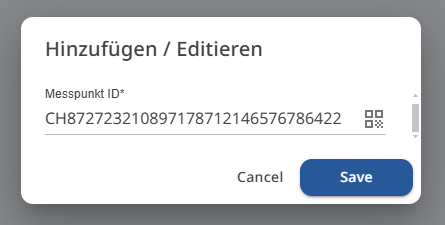
The request for and release of the relevant metering points must be submitted to the energy supplier. They are then made available to smart-me AG on Swisseldex. The energy supplier transmits each metering point with its unique metering point ID. The ID consists of the CH code and a 33-digit number.
Example: CH637482974368378932BKL7389576492
-
Log in to your vZEV or ZEV account at www.smart-me.com.
-
Open the import area of your vZEV or ZEV account at https://ftp.portal.smart-me.com/.
-
Accept the access permissions
-
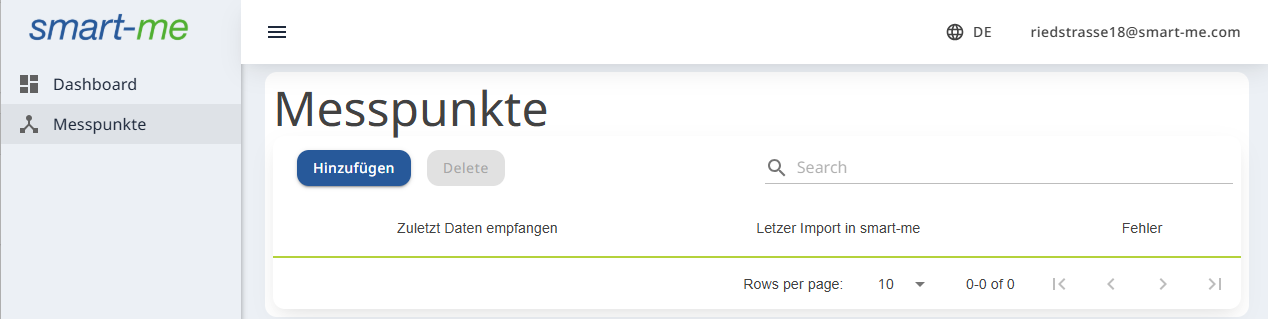
Navigate to the Metering points (Messpunkte) area
-
Add all the CH numbers you were given as metering points.
-
Once data for the metering points has been imported for the first time, the metering points are visible in the meter configuration so that you can add them to the structure.
How data processing and data replacement work
Data upload and tariff calculation
As soon as data imported via Swisseldex is available, it is automatically imported into smart-me and assigned to the corresponding metering point number (meter).
The virtual tariffs are calculated automatically, and continue to be calculated, as soon as data is available for all metering points relevant to the tariff calculation of the ZEV or vZEV.
Value replacement
To replace incorrect data, simply upload the import file again via Swisseldex. smart-me automatically imports the data and overwrites the existing values.
After such a value replacement, the virtual tariffs must be recalculated from the replacement date onwards.