Ebix Data Import
smart-me offers automatic data import using the Ebix format
Requirements
Only smart-me Gold Partners can use the automatic data import. Further information about this licence model is available from Sales.
Ebix (SDAT)
The XML files (Ebix) for standardised data exchange in the electricity market can be imported into smart-me.
Supported Schemas
-
ValidatedMeteredData_1p1.xsd
-
ValidatedMeteredData_1p2.xsd
-
ValidatedMeteredData_1p3.xsd
-
ValidatedMeteredData_1p4.xsd
Data Upload
The files can be uploaded to the smart-me FTP servers via FTP or FTPS (TLS):
Server: ftp.smart-me.com
Path: /Ebix/
Username: "Email address of a sub-account of the partner"
Password: "The corresponding password"
The file size for the import is limited to 50 megabytes.
Assignment to a User Account
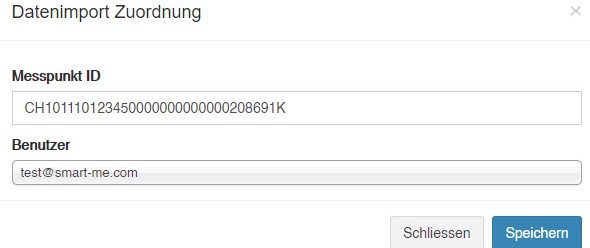
As soon as Ebix files have been uploaded to the servers by a user of the partner, the metering point ID is shown under "Configuration->Partner->Data Import" ("Konfiguration->Partner->Daten Import"):

The metering point can be assigned to a different user by clicking on edit (editieren):