Garaio REM
Key information on billing with Garaio REM and smart-me
-
The billing and allocation of costs according to VEWA is carried out in the smart-me system.
-
Every billing unit in Garaio REM that is to be queried must have a matching counterpart in smart-me.
-
For the billing to be correct, the tenancies and vacancies must be recorded in all units for every billing period!
-
Garaio REM supports only one billing period per ancillary costs group, so electricity must be billed in the same period as all other ancillary costs.
-
The tenant list from Garaio REM is automatically reconciled with smart-me.
-
Garaio REM cannot import values without a prior posting of values in the main cost centre.
Current implementation
Currently supported:
- Export of one collective cost centre per main cost centre as a per mille value - Total heating costs (combined heat and domestic hot water as a per mille value) - Total heating and cooling costs (combined heat, cooling and domestic hot water as a per mille value) - Separate heat costs, domestic hot water costs, cooling costs, cold water costs as a per mille value - Separate or combined grid electricity costs (grid electricity consumption and peak electricity) - Separate or combined local electricity costs (solar, battery)
Not supported:
-
Transferring several collective cost centres per main cost centre separately (can be supported later if there is strong demand in the field)
-
Transfer of consumption in kWh or as a price This function is not supported by Garaio REM in a way that adds value. For this to work, the total kWh or the total price must have been posted in Garaio REM beforehand.
Garaio REM import / export file and key definition in smart-me
Defining keys in smart-me from a DTA-REM file
In the file exported from GaraioREM you will find the relevant IDs for linking the export file with smart-me.
The relevant IDs are shown in blue and must be entered as follows.
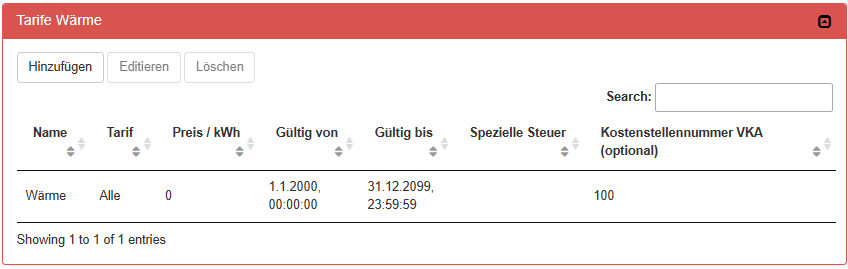
External key for a main cost centre:
HauptkostenstellenID (100)
With separate cost centres, heat is linked to ID = 100
With combined cost centres, several tariffs can be linked to the same ID.
e.g. heat and domestic hot water = 100
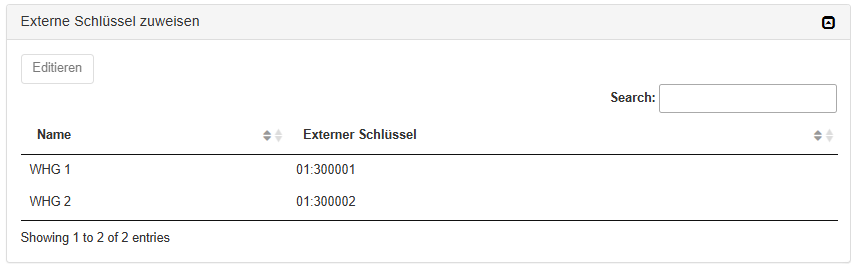
External key for a residential unit in smart-me:
HausID +":"+ObjektID (01 and 30001 = 01:30001)
During export, the result is entered as a per mille share at the position (marked in brown) for the entire collective cost centre and for the individual consumption per tenancy.
DTA-REM file example
<?xml version="1.0" encoding="UTF-8"?>
<DTA_REM xmlns:xsi="http://www.w3.org/2001/XMLSchema-instance" xmlns:xsd="http://www.w3.org/2001/XMLSchema" xmlns="http://DTA\_REM.org">
<Header Type="DTA_IMPORT" Version="1.0" Author="GARAIO REM" Date="2024-07-30">
<Liegenschaft LiegenschaftID="11004" LiegenschaftBezeichnung1="Musterstrasse 7/9" LiegenschaftBezeichnung2="" LiegenschaftPLZ="1000" LiegenschaftOrt="Muster" PeriodeNebenkostenAbrechnungVon="2023-07-01" PeriodeNebenkostenAbrechnungBis="2024-06-30">
<Hauptkostenstelle HauptkostenstelleID="100" KostenstelleVonBezeichnung="Heizkosten (verbrauchsabh.)" AnlageNummerExtern="">
<Sammelkostenstelle VerbrauchskostenstelleAnID="101" VerbrauchskostenstelleAnBezeichnung="Heizkosten (verbrauchsabh.)" Verbrauchsart="01" Promilleanteil="1000.0"/>
<Haus HausID="01" HausBezeichnung1="Musterstrasse 7" HausPLZ="1000" HausOrt="Muster" LiegenschaftIDVT="11004">
<Objekt ObjektID="300001" ObjektArtBezeichnung="Wohnung" ObjektAnzahlZimmer="4.5" ObjektFlaecheGesamt="112.72">
<Mietverhaeltnis ObjektverhaeltnisID="132109" NutzerID="1043151" BeginnNutzungPeriode="2023-07-01" EndeNutzungPeriode="2024-01-31" Mieter1Name="Bicker" Mieter1Vorname="Raphael" Mieter1Strasse="Musterstrasse 23" Mieter1PLZ="1000" Mieter1Ort="Muster">
<Verbrauchskostenstelle KostenstelleID="101" KostenstelleBezeichnung="Heizkosten (verbrauchsabh.)" Verbrauchsart="01" Promilleanteil=""/>
</Mietverhaeltnis>
<Mietverhaeltnis ObjektverhaeltnisID="152930" NutzerID="1072127" BeginnNutzungPeriode="2024-02-01" EndeNutzungPeriode="2024-06-30" Mieter1Name="Kündig" Mieter1Vorname="Kevin" Mieter1Strasse="Musterstrasse 7" Mieter1PLZ="1000" Mieter1Ort="Muster">
<Verbrauchskostenstelle KostenstelleID="101" KostenstelleBezeichnung="Heizkosten (verbrauchsabh.)" Verbrauchsart="01" Promilleanteil=""/>
</Mietverhaeltnis>
</Objekt>
<Objekt ObjektID="300002" ObjektArtBezeichnung="Wohnung" ObjektAnzahlZimmer="2.5" ObjektFlaecheGesamt="65.3">
<Mietverhaeltnis ObjektverhaeltnisID="132112" NutzerID="1080314" BeginnNutzungPeriode="2023-07-01" EndeNutzungPeriode="2023-07-31" Mieter1Name="Baumann" Mieter1Vorname="Christine" Mieter1Strasse="Musterstrasse 30" Mieter1PLZ="1000" Mieter1Ort="Muster">
<Verbrauchskostenstelle KostenstelleID="101" KostenstelleBezeichnung="Heizkosten (verbrauchsabh.)" Verbrauchsart="01" Promilleanteil=""/>
</Mietverhaeltnis>
<Mietverhaeltnis ObjektverhaeltnisID="150711" NutzerID="100104556" BeginnNutzungPeriode="2023-08-01" EndeNutzungPeriode="2024-06-30" Mieter1Name="Nimonaj" Mieter1Vorname="Flamur" Mieter1Strasse="Musterstrasse 7" Mieter1PLZ="1000" Mieter1Ort="Muster">
<Verbrauchskostenstelle KostenstelleID="101" KostenstelleBezeichnung="Heizkosten (verbrauchsabh.)" Verbrauchsart="01" Promilleanteil=""/>
</Mietverhaeltnis>
</Objekt>
Best practice configuration
Each energy type has its own main cost centre and a collective cost centre with the unit per mille
-
Grid electricity (grid tariffs and peak tariffs)
-
Local electricity (battery and / or solar electricity tariffs)
-
Heat
-
Domestic hot water
-
Cold water
The cost posting on the Garaio REM side for local electricity and grid electricity can be handled using the overall summary and by entering the price in the smart-me tariff. The total price can then be posted in Garaio for the local electricity and grid electricity cost centres.
Posting to cost centres in Garaio REM
If prior postings to the cost centres are required in Garaio REM, they can be taken from the summary CSV of each invoice created.
This is usually the case for solar electricity, grid electricity and the electricity costs of the heat pump / heating / boiler.
When allocating solar electricity, this will often be necessary, as this information originates in the smart-me system.
For the other cost centres, external invoices are usually available and can be posted.
-
Open smart-me Billing via the Billing (Rechnungsstellung) tab
-
Select the property
-
Select the billing period and create an invoice
-
Once the invoice for the matching period has been created, open the Summary CSV (Zusammenfassung CSV)

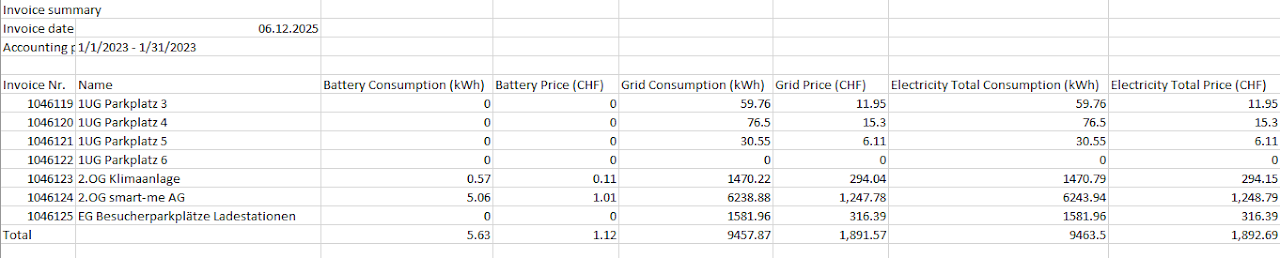
It contains the kWh and m3 sold and the price per tariff, per billing unit and in total.
With this total value of the respective tariff, a posting can be made in Garaio and then distributed accordingly in per mille with the DTA-REM file.
Effect of the configuration on the exported figures
VEWA option not activated:
- Export in per mille per cost centre In this case, 1000 per mille corresponds to the total consumption in kWh. The per mille in the contract refer the consumption to this total.
VEWA option activated:
-
If a single tariff is configured, 1000 per mille corresponds to the total price (total consumption * tariff price), but at the same time also to the total consumption in kWh.
-
If several tariffs are configured, e.g. grid electricity and solar electricity, 1000 per mille corresponds to the total price or to the total kWh of the respective tariff. This allows the tariffs to be transferred separately into cost centres, with individual postings of the kWh or the price in Garaio REM. If you want to export the tariffs combined into one collective cost centre, entering a price for the tariff in smart-me is essential for the weighting.
This is already the case, for example, if a single tariff (grid) and a peak tariff (grid) are to be transferred combined.