AbaImmo
DTA-VHKA exchange files with AbaImmo
Key notes on billing with AbaImmo and smart-me
-
The billing and allocation of costs according to VEWA takes place in the smart-me system.
-
Every billing unit in AbaImmo that is to be queried must exist congruently in smart-me
-
For the billing to be correct, the tenancies and vacancies must be recorded in all units for every billing period!
-
The tenant list from AbaImmo is automatically reconciled with smart-me.
-
A prerequisite for use is that electricity as well as heating and ancillary costs have the same billing period.
Current implementation
Currently supported:
-
Transfer of kWh, m3, per mille or price value of a single tariff for heating, cooling, domestic hot water and cold water, and single-rate electricity tariff
-
Transfer of per mille or price values as a sum of tariffs, e.g. electricity
Not supported:
- Separate transfer of electricity tariffs (e.g. peak electricity, grid electricity and solar electricity separately)
Best practice configuration
The simplest way to arrange the data transfer in a ZEV (association for own consumption) is as follows:
-
Electricity is transferred as a CHF amount; for this, the prices for the individual tariffs must be entered in smart-me.
-
Heating, cooling, domestic hot water and cold water are most easily transferred as a per mille value.
-
The property's electricity costs for heat pumps and boilers are not transferred. The costs can be entered in advance as a booking in AbaImmo.
Configuration in AbaImmo and exchange process
-
Navigate to Y471, select the property number and activate the VHKA interface.
-
Create a billing period for electricity and/or heating and ancillary costs.
-
Under Y471, navigate to "Zähler" (meters) and create meter queries matching the property.
e.g.:
- Heat meter, property-specific, heating costs, consumption only
- Domestic hot water, property-specific, hot water costs, consumption only
- Cold water, property-specific, water costs, consumption only
-
Navigate to the Y621 application settings
-
In the "HK/NK" tab, create a meter reading company with the name "smart-me"
-
Navigate to Y11 property master data
-
In the Standard/Ablesefirma VHKA (standard/meter reading company VHKA) tab, now assign the meter reading company "smart-me" to the desired properties
-
Now assign the meter reading company "smart-me" to each object of the property that is to be queried, using the VHKA number from AbaImmo.
This assignment controls whether the request in the query file is executed or ignored.
-
Now navigate to Y2312 Process VHKA interface
-
Now select the desired property and the storage location for the VHKA file.
-
Now export the file so that you can then upload it to smart-me.
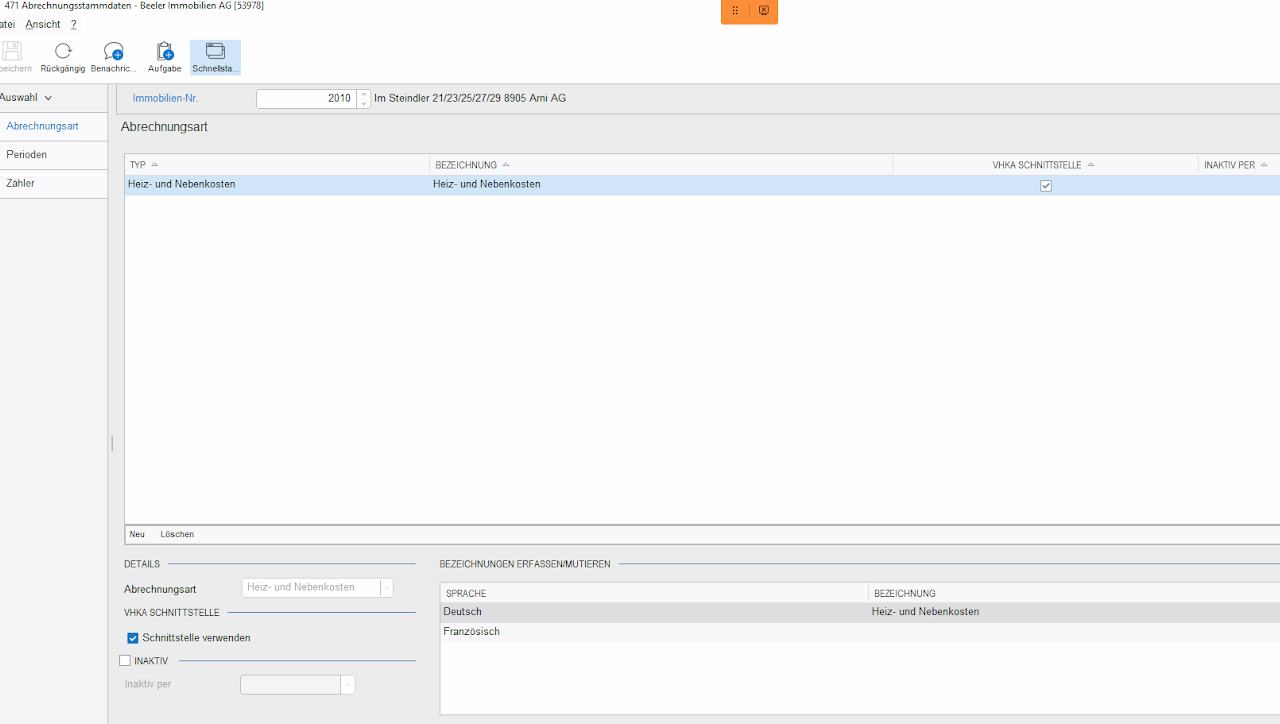
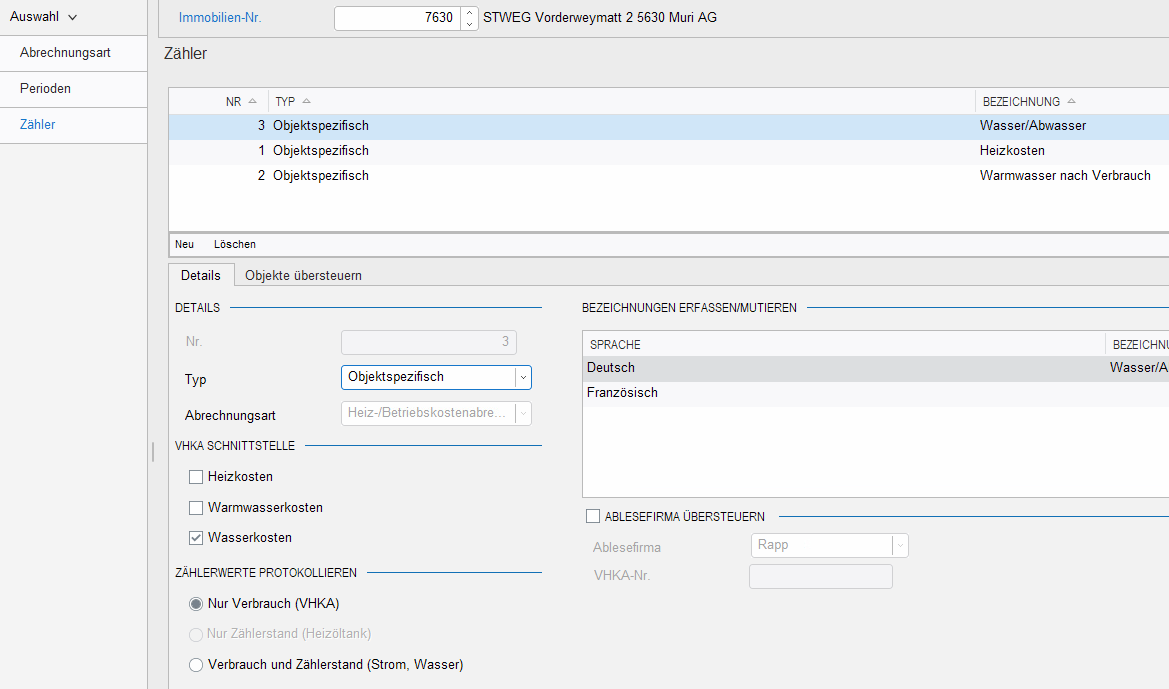
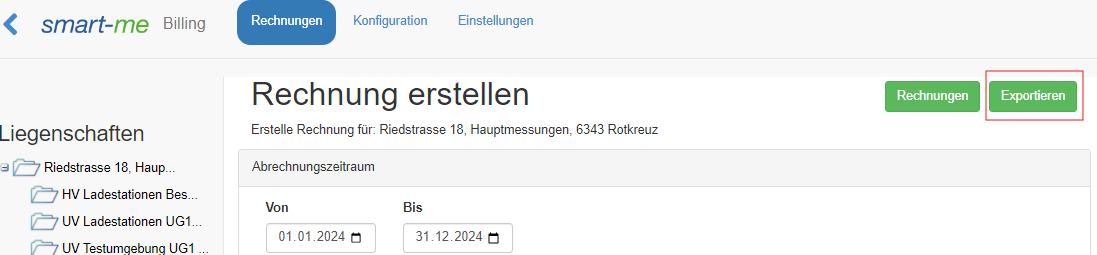
12. In smart-me Billing (Rechnungserstellung), navigate to "Configuration" ("Konfiguration") and check whether VEWA is activated or inactive.
--> If it is activated, you must check whether a billing period matching the query file from AbaImmo exists; if not, create a corresponding one.
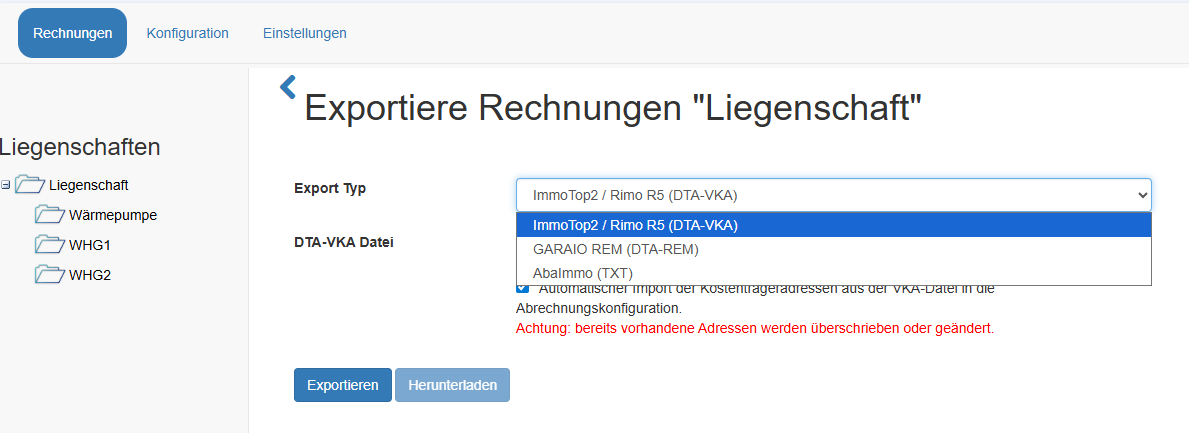
13. Now navigate to "Invoices" ("Rechnungen"), select the property and click "Export" ("exportieren") on the right
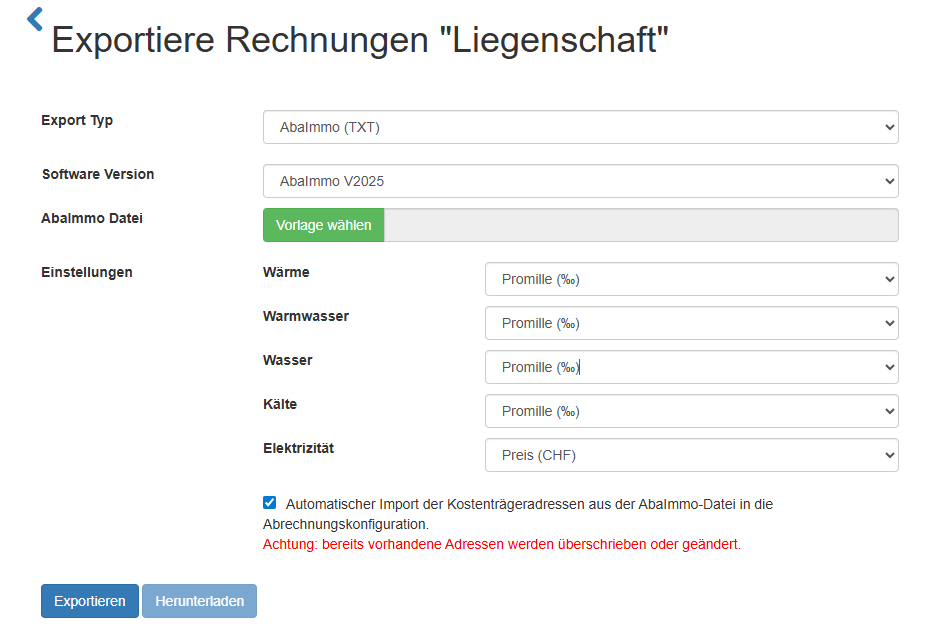
14. Select the export type "AbaImmo" and configure the information according to your selection. Note that electricity is only available from V2025.
15. Now select the file to upload and click "Export" ("exportieren"). Once the calculation is complete, the file is ready for download.
- Download the completed file to your computer using "Download" ("Herunterladen").
17. Now upload the downloaded file in AbaImmo under Y2312 Process interface (import).
18. View the uploaded data under Y2311. (Select the property number)

Data reconciliation between AbaImmo and smart-me
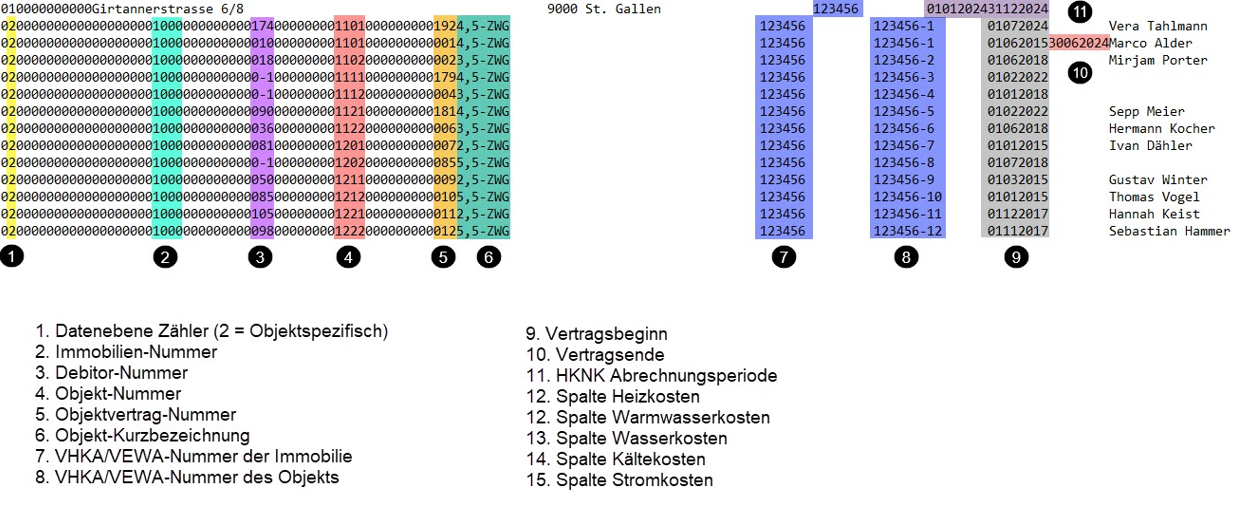
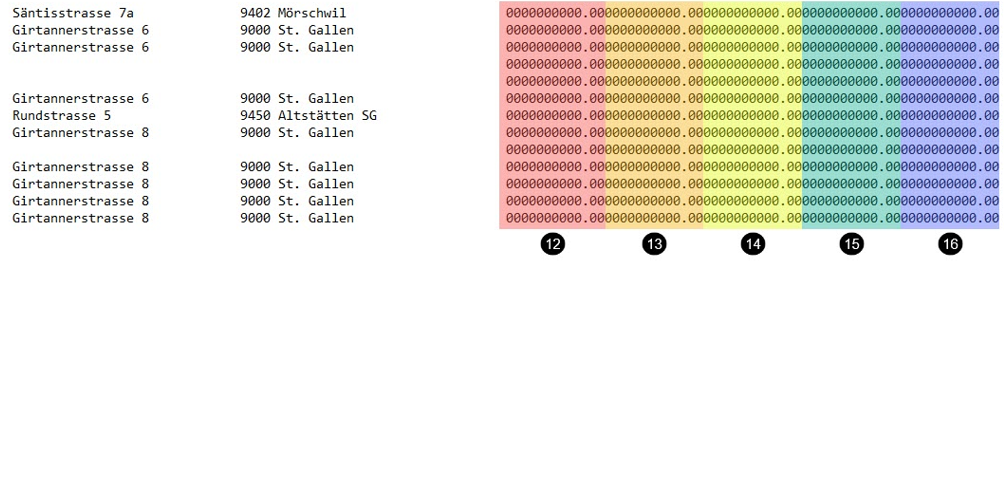
For the file to be read correctly, the respective Abacus ObjektID must be stored in smart-me under the external keys in smart-me Billing.
-
Open the exported file in an editor.
-
Find the ObjektID (4) in the file for each of the apartments.
-
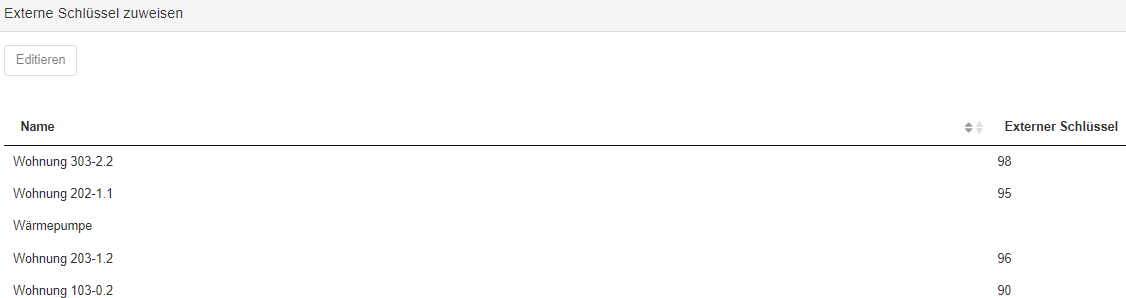
Enter the ObjektID (4) for the matching residential unit in smart-me Billing under External keys (Externe Schlüssel).
Linking the ObjektID with billing units
For each billing unit in smart-me, an ObjektID from the file must be available. The AbaImmo ObjektID must now be linked to the apartment via the external keys.
According to the example above, the 4.5-room apartment with the ID "1101" in the 4th position is now linked in smart-me to apartment 303-2.2.
Performing cost centre bookings in AbaImmo
If preceding bookings to the cost centres are required in AbaImmo, they can be taken from the summary CSV of each created invoice.
This is usually the case for electricity, which is only transferred as a single item. For bookings in this case, the solar electricity and the grid electricity must be booked. Individual shares can be taken from the CSV to distribute the revenue.
This will often be necessary when allocating solar electricity, as the source of this information lies in the smart-me system.
For the other cost centres, there are usually external invoices that can be booked.
-
Open smart-me Billing via the Billing (Rechnungsstellung) tab
-
Select the property
-
Select the billing period and create an invoice
-
Once the invoice for the matching period has been created, open the summary CSV (Zusammenfassung CSV)

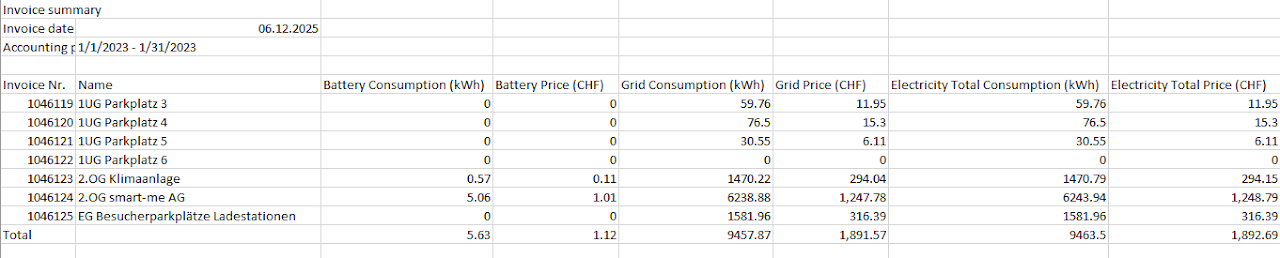
It contains the kWh and m3 sold in each case and the price per tariff, per billing unit and in total.
With this total value of the respective tariff, a booking can be made in AbaImmo and then distributed accordingly with the DTA-VHKA file using per mille values.