API
Requirements
The basic functions of the API are available in the Basic model for non-commercial use. For commercial use and a higher rate limit, the Professional license is required.
API description
The API interface provides simple and secure access to the data of smart-me devices and the platform. Through this interface, consumption data, device status, measured values and other information can be retrieved in real time and integrated into external systems.
All API calls are documented here and can be tried out directly.
Obis codes
Obis codes are standardized identifiers for measured values in energy meters. Each Obis code clearly describes which value is being measured (e.g. current power consumption, meter reading, voltage per phase).
Decoding tip: On this website you can read up on the coding system. If you click on a medium there, you can see what each digit of the code stands for.
DeviceID
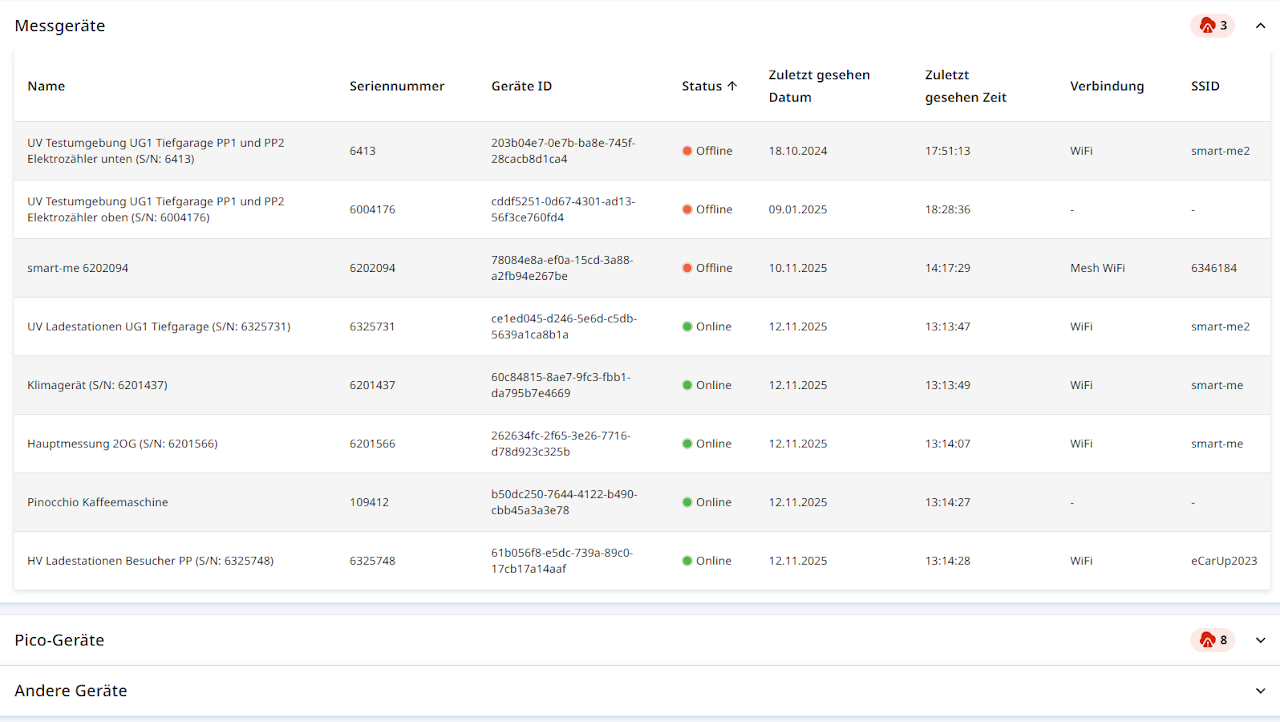
The DeviceID is a unique, name-independent assignment to a metering point. It is shown both in the API and in System Health (Systemgesundheit) (Professional feature)
Authentication
Basic Auth (not recommended / deprecated)
Basic Auth is currently available as an authentication method. However, this option will be removed in the medium term due to insufficient security. API keys are a suitable alternative. The client secret is username:password encoded in Base64.
Every API call must include the authentication in the HTTP header: Authorization: Basic <client secret>
Example: curl -X "PUT" "https://api.smart-me.com/Devices/6a7fae30-c598-4778-8f1f-a14620550274" -H "accept: */*" -H "Authorization: Basic d2VyX2Rhc19sZXNlbl9rYW5uOmhhdF96dXZpZWxfemVpdA=="
API keys (recommended)
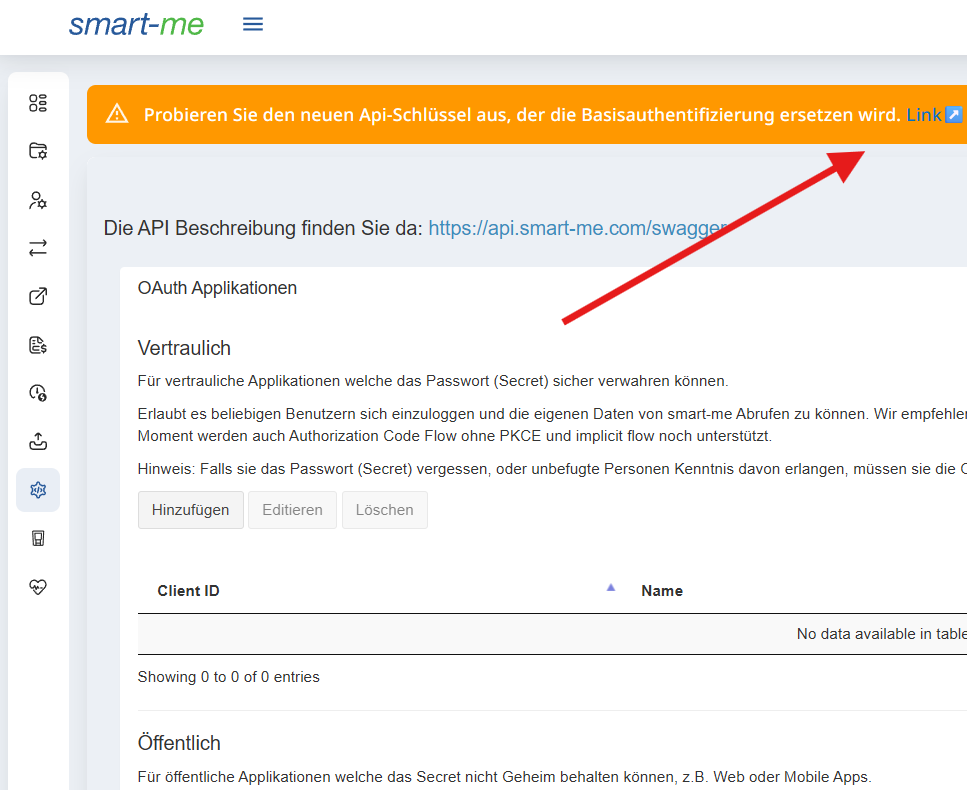
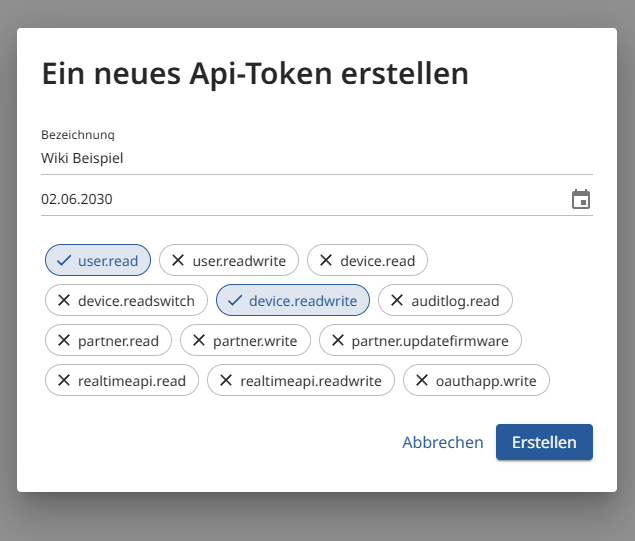
API keys allow authentication similar to Basic Auth for simple access to an account. A key is created in the smart-me portal and given certain permissions (claims (see below)). The key can then be added to the HTTP header in the same way as the Basic Auth secret.
Every API call must include the authentication in the HTTP header: Authorization: ApiKey <api key>
Example: curl -X "PUT" "https://api.smart-me.com/Devices/6a7fae30-c598-4778-8f1f-a14620550274" -H "accept: */*" -H "Authorization: ApiKey MTRH5eUjFXV8U4i1viZF2jHNoUNsnDTx"
Keys can be created in the web portal under API, Api Keys:
Claims
Both ApiKeys and oAuth 2.0 support claims in order to grant only limited permissions.
You can find a list of the endpoint-to-claims mapping here:
Claims
OAuth 2.0 (recommended)
smart-me supports the OAuth 2.0 authorization framework. External applications can request access to an account without knowing the login credentials. You can find more information below.
OAuth information
smart-me supports the OAuth 2.0 authorization framework. External applications can request access to an account without knowing the login credentials.
Setting up OAuth in the smart-me portal
To use oAuth, you need an account with the Professional license model. If you do not yet have an account with the Professional license model, you need to purchase 1 license.
-
Click API on the left
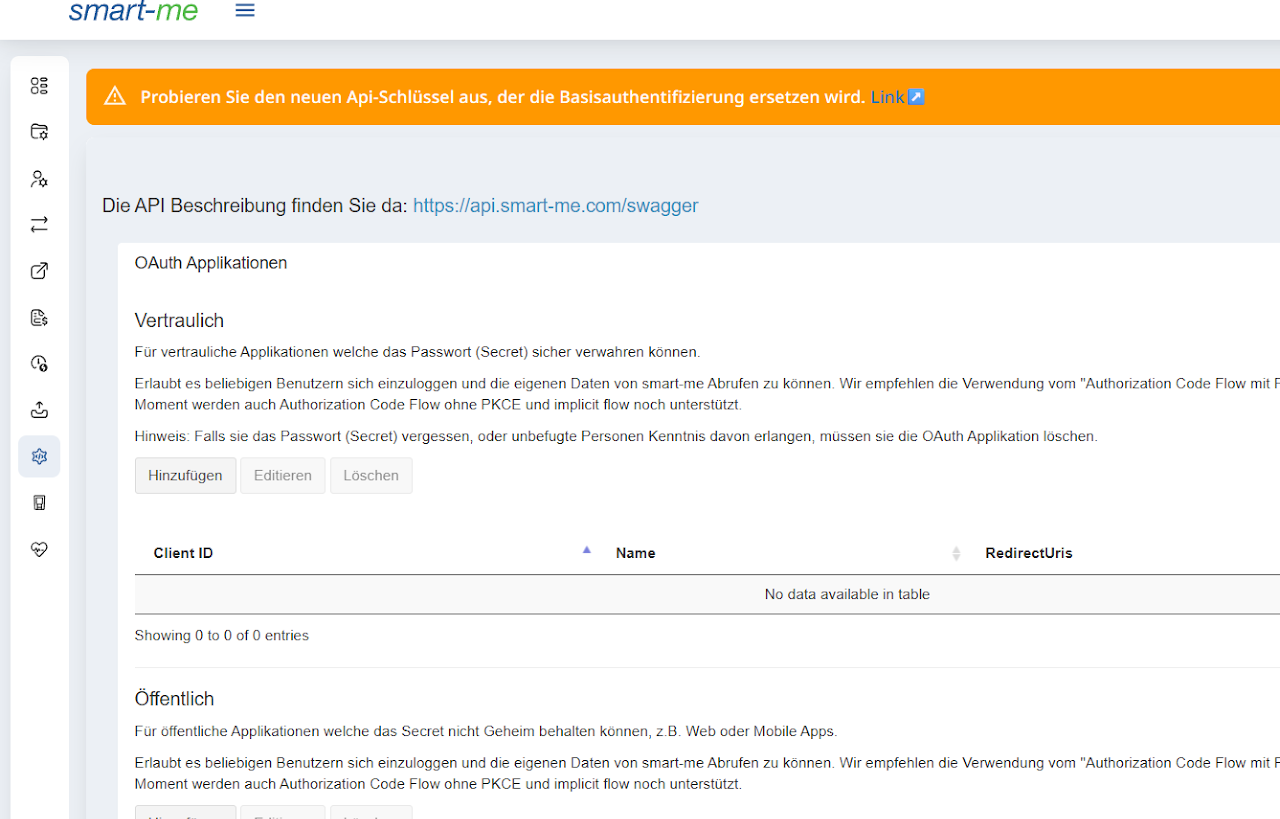
Add oAuth applications
-
Confidential (limited to 3 client IDs)
-
Client ID and client secret are generated
-
For confidential applications that can store the password (secret) securely.
-
We recommend using the "Authorization Code Flow with PKCE" and the "Device Code Flow".
-
-
Public (limited to 3 client IDs)
-
Client ID is generated
-
For public applications that cannot keep the secret confidential, e.g. web or mobile apps.
-
We recommend using the "Authorization Code Flow with PKCE" and the "Device Code Flow"
-
-
Device (limited to 50 client IDs)
-
Client ID and client secret are generated
-
Can be used as a replacement for Basic Authentication in embedded devices that have no graphical interface.
-
Only supports the OAuth flow "client credentials".
-
Required information:
-
-
Name
-
Redirect URLs
-
Required permissions
-
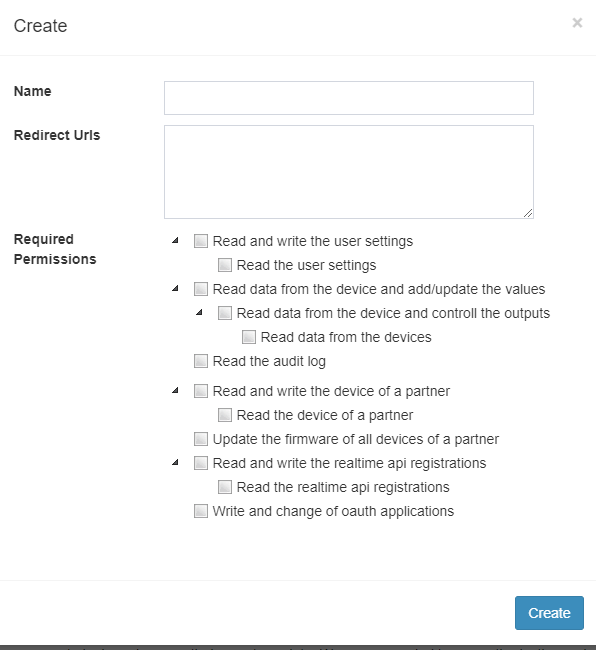
Grants & endpoints
The implementation of OAuth is not described in our wiki. You can find the information needed to implement oAuth on this page: https://oauth.net/2/
Supported Grants (Flows) for oAuth Confidential and Public Applications:
- Authorization Code without PKCE (deprecated)
- Authorization Code with PKCE
- Implicit Flow (deprecated)
- Device Code
- Refresh Token
Supported Grants (Flows) for oAuth Device (Client Credentials) Applications:
- Client Credentials
smart-me Endpoints
- Authorization: /api/oauth/authorize/
- Token: /api/oauth/token/
- Device Code: /api/oauth/device
Real-time API (webhook)
The smart-me real-time API (webhooks) lets you subscribe to new data from a device. You can subscribe to a single device or to all devices of a user. When a device sends new data to the cloud, a webhook sends this data as a POST request to a newly configured URL. You can find more information here.
Proto file
syntax = "proto3";
import "google/protobuf/timestamp.proto";
import "bcl.proto";

message DeviceDataArray {
  repeated DeviceData DeviceDataItems = 1;
}

message DeviceData {
  Guid DeviceId = 1;
  .bcl.DateTime DateTime = 2;
  repeated DeviceValue DeviceValues = 3;
}

message DeviceValue {
  bytes Obis = 1;
  double Value = 2;
}
Proto file without BCL
syntax = "proto2";
package com.company;

message TimeSpan {
  required sint64 value = 1; // the size of the timespan (in units of the selected scale)
  optional TimeSpanScale scale = 2; // the scale of the timespan [default = DAYS]
  enum TimeSpanScale {
    DAYS = 0;
    HOURS = 1;
    MINUTES = 2;
    SECONDS = 3;
    MILLISECONDS = 4;
  TICKS = 5;

    MINMAX = 15; // dubious
  }
}

message DateTime {
  optional sint64 value = 1; // the offset (in units of the selected scale) from 1970/01/01
  optional TimeSpanScale scale = 2; // the scale of the timespan [default = DAYS]
  optional DateTimeKind kind = 3; // the kind of date/time being represented [default = UNSPECIFIED]
  enum TimeSpanScale {
    DAYS = 0;
    HOURS = 1;
    MINUTES = 2;
    SECONDS = 3;
    MILLISECONDS = 4;
 TICKS = 5;

    MINMAX = 15; // dubious
  }
  enum DateTimeKind
  {
     // The time represented is not specified as either local time or Coordinated Universal Time (UTC).
     UNSPECIFIED = 0;
     // The time represented is UTC.
     UTC = 1;
     // The time represented is local time.
     LOCAL = 2;
   }
}

message Guid {
  required fixed64 lo = 1; // the first 8 bytes of the guid (note:crazy-endian)
  required fixed64 hi = 2; // the second 8 bytes of the guid (note:crazy-endian)
}

message DeviceData {
   required Guid DeviceId = 1;
   required DateTime DateTime = 2;
   repeated DeviceValue DeviceValues = 3;
}
message DeviceDataArray {
   repeated DeviceData DeviceDataItems = 1;
}
message DeviceValue {
   required bytes Obis = 1;
   required double Value = 2;
}
Gold partner API
To use our gold partner API, you need the smart-me Goldpartner license model. Further information on this license model can be requested from our sales team.
Endpoints
Get all devices
-
Gets all devices assigned to the partner
-
GET /PartnerAllDevices
Get all devices from one Account
-
Gets all devices assigned to one of the users assigned to the partner (Get Id with "Get users" )
-
GET /PartnerAllDevices/{id} - only for one device
Get all device informations
-
Gets all information for all devices assigned to the partner user or to a sub-user of the partner
-
GET /PartnerAllDeviceInformations
-
GET /PartnerAllDeviceInformations/{id} - only for one device
Get fast send device values
-
Force a device to send the data every second (if supported). This for about 30s
-
GET /partner/fastsenddevicevalues
Get Folder menu
-
Gets the folder menu items for a user of a partner
-
GET /partner/foldermenu/{id}
Update folder menu
-
Creates and updates the folder menu items for a user. Attention: All existing configuration (folder, billing, export, ...) is deleted!!
-
POST /partner/foldermenu/{id}
Get users
-
Get the information about all users of the partner
-
GET /partner/user
Update user
-
Updates the email and/or the password of a user. The user must be created by the partner.
-
POST /partner/user/{id}
Sign up user
-
Creates a new user and assign it to the partner user
-
POST /SignUpPartner
Get values in past multiple
-
Gets multiple values of a device. The device must be installed in an account assigned to your partner account.
-
GET /partner/ValuesInPastMultiple/{id}
Get values in past multiple interpolated
-
Gets multiple interpolated Values of device
-
GET /partner/ValuesInPastMultipleInterpolated/{id}
Get visualization configuration
-
Gets the visualization configuration for all folders of a user
-
GET /partner/visualizationconfiguration/{id}
Update firmware
-
Update the Firmware (if available) for the given devices
-
POST /UpdateFirmwarePartner
PartnerVisualization
-
Gets the visualization configuration for all folders of a user
-
GET /partner/visualizationconfiguration/{id}
Examples
API examples
REST API samples
This lets you retrieve any data sets that we provide. https://api.smart-me.com/swagger/index.html
Python (controlling inputs and outputs)
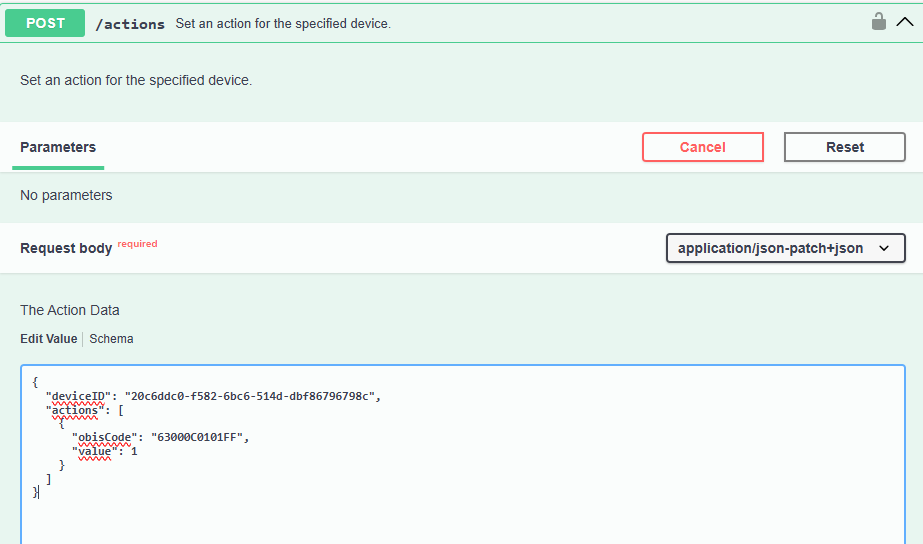
# deviceID ist die eindeutige ID des Gerät
# "ObisCode": "63000C0101FF" ist der Output 0 (Halbleiter 0.4 Watt)
# "ObisCode": "63000C0102FF" ist der Output 1 (Relais 1500 Watt bei 230 Volt)
# "value": 0 ist aus
# "value": 1 ist ein

import requests
import json

# API Endpoint und Zugangsdaten
url = "https://xxxx:xxxx@api.smart-me.com/actions"

# JSON-Daten, die gesendet werden sollen
data = {
  "deviceID": "20c6ddc0-f582-6bc6-514d-dbf86796798c",
  "actions": [
    {
      "obisCode": "63000C0101FF",
      "value": 1
    }
  ]
}

# Header für die POST-Anfrage
headers = {
    'Content-Type': 'application/json'
}

try:
    # POST-Anfrage senden
    response = requests.post(url, headers=headers, data=json.dumps(data))

    # Überprüfen, ob die Anfrage erfolgreich war
    response.raise_for_status()

    # Die Antwort der API ausgeben
    print("Status Code:", response.status_code)
    print("Antwort vom Server:", response.text)

except requests.exceptions.RequestException as e:
    # Fehlerbehandlung
    print("Ein Fehler ist aufgetreten:", e)
HTML / JavaScript (show all devices with meter reading and last connection)
<html>
	<style>
	table, th, td {
	  border:1px solid black;
	}
	</style>
	<head>
		<title>smart-me REST API Sample</title>
		<script src="https://code.jquery.com/jquery-3.6.4.min.js"></script>
	</head>
	<body>
		<div>
		  <label for="username">Username:</label>
		  <input type="text" id="username" name="username" />
		</div>
		<div>
		  <label for="pass">Password:</label>
		  <input type="password" id="pass" name="password" minlength="8" required />
		</div>
		<button id="myButton">Start Request</button>
		<h1>Get all devices</h1>
		<ul id="DeviceList">
		</ul>
		<script type="text/javascript">
			function GetAllDevices() {
			var smartmeUserName = document.getElementById("username").value;
			var smartmePassword = document.getElementById("pass").value;
			//var smartmeUserName = "xxx";
			//var smartmePassword = "xxx";
				var targetUrl = "https://api.smart-me.com/Devices/";

				$.ajax({
					url: targetUrl,
					type: "get",
					cache: false,
					headers: {
						"Authorization": "Basic " + btoa(smartmeUserName + ":" + smartmePassword)
					},
					dataType: "json",
					error: function(jqXHR, exception) {
						alert(exception);
					},
					success: function(json) {
					$("#DeviceList").append(("<table>"))
					$("#DeviceList").append(("<tr align=left><th>Serial</th><th>Name</th><th>CounterReading</th><th>CounterReadingUnit</th><th>Last Connection (Zulu Time) </th></tr>"))
						json.forEach(function(element) {
							$("#DeviceList").append(("<tr><td>") + element.Serial + "</td><td>" + element.Name + "</td><td>" + element.CounterReading + "</td><td>" + element.CounterReadingUnit + "</td><td>" + element.ValueDate + "</td></tr>");
						});
					$("#DeviceList").append(("</table>"))
					}
				});
			}
			myButton.onclick = GetAllDevices;
		</script>
	</body>
	<footer>
		<p>DISCLAIMER: This script is provided as-is, without any warranty or guarantee of any kind. The author accepts no liability for any issues, damages, or consequences that may arise from the use of this script. Users are responsible for reviewing and understanding the script before implementation. Additionally, no support or assistance will be provided for the installation, customization, or troubleshooting of this script. Use at your own risk.</p>
		<p>HAFTUNGSAUSSCHLUSS: Dieses Skript wird im Ist-Zustand ohne jegliche Garantie oder Gewährleistung bereitgestellt. Der Autor übernimmt keine Haftung für Probleme, Schäden oder Folgen, die sich aus der Verwendung dieses Skripts ergeben können. Die Benutzer sind dafür verantwortlich, das Skript vor der Implementierung zu überprüfen und zu verstehen. Außerdem wird keine Unterstützung oder Hilfe bei der Installation, Anpassung oder Fehlerbehebung dieses Skripts geleistet. Die Verwendung erfolgt auf eigene Gefahr..</p>
	</footer>
</html>
Python (authorization examples)
import requests
from requests.auth import HTTPBasicAuth

# --- Endpoint ---
endpoint_url = 'https://api.smart-me.com/Devices'

# --- Basic Auth ---
basicAuth_user = 'max.musterman@smart-me.com'
basicAuth_pass = 'supersecretpassword'
basicAuth_response = requests.get(
    endpoint_url,
    auth=HTTPBasicAuth(basicAuth_user, basicAuth_pass)
)
print('Basic Auth:', basicAuth_response.status_code) #Returns 200 if successful

# --- API Key ---
api_key = 'secretapikey1234567890'
apikey_headers = {'Authorization': f'ApiKey {api_key}'}
apikey_response = requests.get(endpoint_url, headers=apikey_headers)
print('API Key:', apikey_response.status_code) #Returns 200 if successful

# --- OAuth 2.0: Get Token with Client ID and Secret ---
token_url = 'https://api.smart-me.com/oauth/token'
client_id = 'client_id_1234567890'
client_secret = 'client_secret_1234567890'
token_data = {
    'grant_type': 'client_credentials',
    'scope': 'device.read'
}
token_response = requests.post(
    token_url,
    data=token_data,
    auth=HTTPBasicAuth(client_id, client_secret)
)

access_token = token_response.json().get('access_token')

# --- OAuth 2.0 Bearer Token ---
oauth_headers = {'Authorization': f'Bearer {access_token}'}
oauth_response = requests.get(endpoint_url, headers=oauth_headers)
print('OAuth:', oauth_response.status_code) #Returns 200 if successful
API client library for .NET
To integrate the smart-me API functionality into your .NET application, you can use this library. It makes HTTP requests to the smart-me REST API. All HTTP request and response bodies are mapped to .NET classes.
Real-time API (webhook) examples
The smart-me Realtime API sends the data serialized with Google protobuf
Proto file
package RealtimeApi.Containers;
import "bcl.proto"; // schema for protobuf-net's handling of core .NET types

message DeviceData {
   required bcl.Guid DeviceId = 1;
   required bcl.DateTime DateTime = 2;
   repeated DeviceValue DeviceValues = 3;
}
message DeviceDataArray {
   repeated DeviceData DeviceDataItems = 1;
}
message DeviceValue {
   required bytes Obis = 1;
   required double Value = 2;
}
Proto file without BCL
syntax = "proto2";
package com.company;

message TimeSpan {
  required sint64 value = 1; // the size of the timespan (in units of the selected scale)
  optional TimeSpanScale scale = 2; // the scale of the timespan [default = DAYS]
  enum TimeSpanScale {
    DAYS = 0;
    HOURS = 1;
    MINUTES = 2;
    SECONDS = 3;
    MILLISECONDS = 4;
  TICKS = 5;

    MINMAX = 15; // dubious
  }
}

message DateTime {
  optional sint64 value = 1; // the offset (in units of the selected scale) from 1970/01/01
  optional TimeSpanScale scale = 2; // the scale of the timespan [default = DAYS]
  optional DateTimeKind kind = 3; // the kind of date/time being represented [default = UNSPECIFIED]
  enum TimeSpanScale {
    DAYS = 0;
    HOURS = 1;
    MINUTES = 2;
    SECONDS = 3;
    MILLISECONDS = 4;
 TICKS = 5;

    MINMAX = 15; // dubious
  }
  enum DateTimeKind
  {
     // The time represented is not specified as either local time or Coordinated Universal Time (UTC).
     UNSPECIFIED = 0;
     // The time represented is UTC.
     UTC = 1;
     // The time represented is local time.
     LOCAL = 2;
   }
}

message Guid {
  required fixed64 lo = 1; // the first 8 bytes of the guid (note:crazy-endian)
  required fixed64 hi = 2; // the second 8 bytes of the guid (note:crazy-endian)
}

message DeviceData {
   required Guid DeviceId = 1;
   required DateTime DateTime = 2;
   repeated DeviceValue DeviceValues = 3;
}
message DeviceDataArray {
   repeated DeviceData DeviceDataItems = 1;
}
message DeviceValue {
   required bytes Obis = 1;
   required double Value = 2;
}
Parsing example
Sample data
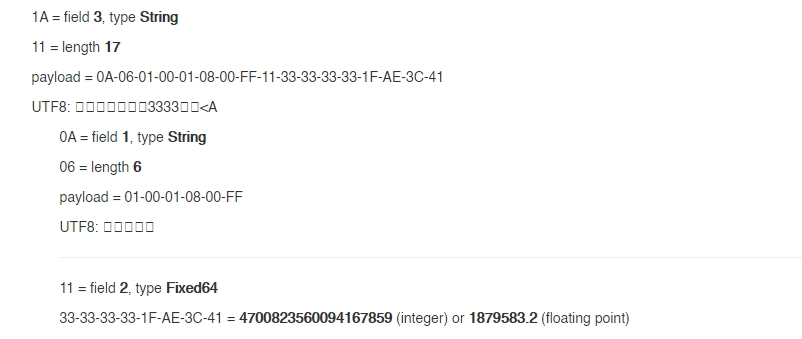
0A5A0A1209E9FCD03B8E9F834111B3D10C1622A22CA1120B08C0C9EAD3A98FE93710051A110A060100010800FF11333333331FAE3C411A110A060100020800FF1100000000000000001A110A060100010700FF11713D0AD7A3303840

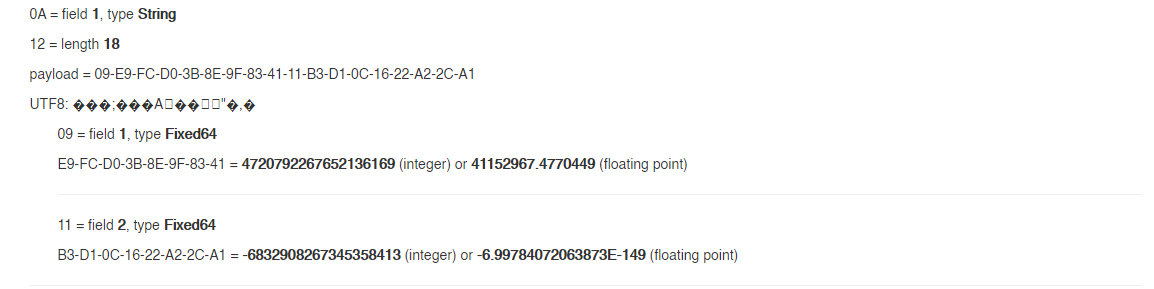
Device ID (UUID / GUID)
UUID Data: 0xE9, 0xFC, 0xD0, 0x3B, 0x8E, 0x9F, 0x83, 0x41, 0xB3, 0xD1, 0x0C, 0x16, 0x22, 0xA2, 0x2C, 0xA1
GUID: 3bd0fce9-9f8e-4183-b3d1-0c1622a22ca1
Datetime (UTC)
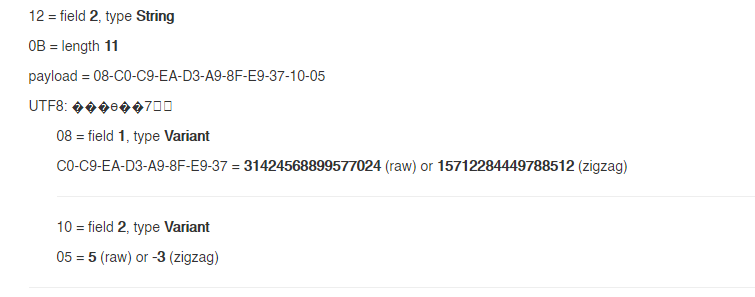
Field 1 contains the offset in ticks since 01.01.1970
Seconds since 01.01.1970: 15712284449788512 / 10000000 = 1571228444 (Unix time stamp UTC)
-> 16.10.2019 12:20:44 (UTC)
Device values
Field 1 contains the OBIS code, field 2 contains the value.
01-00-01-08-00-FF: (1-0:1.8.0*255):Active energy total import: 1879583.2 mWh = 1879.5832 Wh