3-Phase Meter Telstar CT
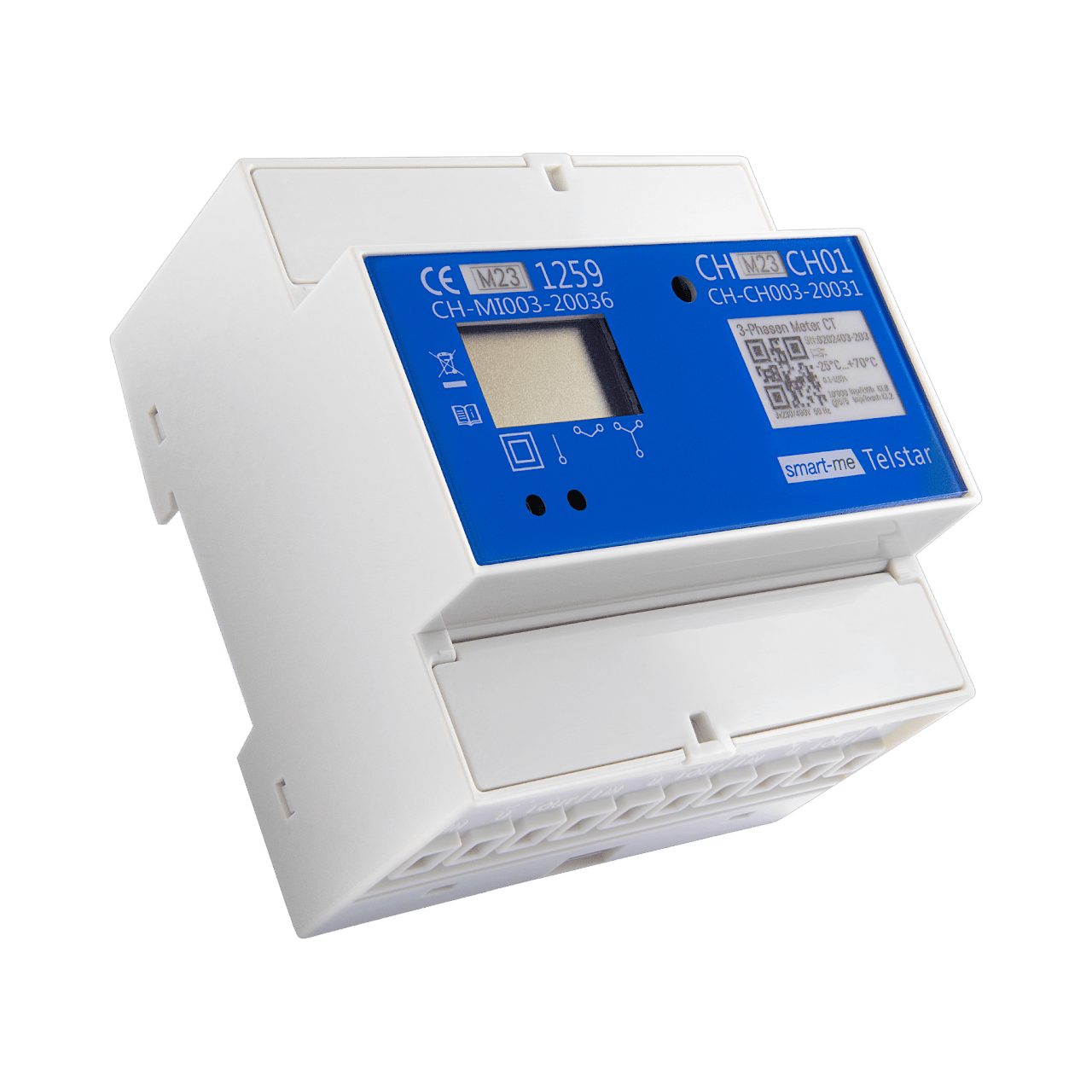
The smart-me Telstar CT is a MID-certified energy meter with an integrated WiFi interface for transmitting real-time data and a connection for external current transformers. The meter automatically synchronizes the measured values to the smart-me Cloud in encrypted form. The data can be exported to third-party systems and processed further in the smart-me Portal or via our open interface. The meter has two digital outputs for controlling potential-free devices.
Required accessories
Current transformers and accessories
Functions
-
Installation with the free smart-me app.
-
Transformer connection for external current transformers with output currents from 0.01A to 6A
-
Billing with the smart-me Billing Tool
-
Control with if/then actions or event actions
-
Potential-free contact outputs for controlling external devices, one of them with an 8A relay
-
Potential-free contact input for tariff signal or digital input
-
Interfaces via API, CSV, MSCONS and IS-E
-
Encrypted real-time data connection to the smart-me Cloud
Technical data
| Feature | Value |
|---|---|
| Product certification | CE, MID 2014 / 32 / EU, CH load profile / reactive energy, RED |
| Accuracy class for active energy/reactive energy | B (MID) / 2 (IEC) |
| Direction | +A (consumption), -A (delivery), +R, -R |
| Quadrants | Q1, Q2, Q3, Q4 |
| Mains voltage | 3x230/400VAC 50Hz |
| Current measuring range Imin-Iref(Imax) | 0.01-1(6)A |
| Conductor cross-section | 0.5 - 6 mm² |
| Transformer ratio | 1:1 to 20'000:1 or 5:5 to 20'000:5 |
| Measuring category | CAT III |
| Temperature range | -25°C to +70°C |
| Rel. humidity | Annual average 75%, non-condensing short-term 95%, non-condensing |
| Measured values | Active energy (kWh), active power (kW) Reactive energy (kvarh), reactive power (kvar) Current (A), voltage (V), power factor (cosφ) |
| Self-consumption | < 0.8W per phase |
| Tariffs | 2 via digital tariff input E1, unlimited virtual tariffs in the smart-me Cloud |
| S0 output | 1'000 Imp/kWh |
| Digital input E1 | Potential-free tariff input (12VDC / 230 VAC) |
| Digital outputs S0-0, S-1 | Potential-free outputs (SG Ready), 12 VDC / 230 VAC S0-0: max. 0.4W S-1: max. 8A@230VAC or 5A@12VDC |
| Communication | WLAN IEEE 802.11 b/g/n (2.4 GHz) |
| Data volume | < 75MB/month |
| Wi-Fi security standard | WEP, WPA-PSK/WPA2-PSK |
| Data rate | < 0.1 Mbit/s |
| Data storage | 2 months |
| Protection class | II |
| Degree of protection housing/terminals, use | IP20 / IP51 (installed in control cabinet), indoor |
| Mounting | DIN rail |
| Dimensions | 5 modules, L:90mm W:90mm H:65.7mm |
| Server location | Switzerland |
Technical requirements for the current transformers
A wide range of current transformers can be used with the Telstar CT. The basic requirements are as follows:
-
Current transformer ratio: 1:1 to 20'000:1 to 5:5 to 20'000:5 The secondary number can be any integer between 1 and 5. The primary number can be any integer between 1 and 20'000.
-
Output current: 1A to 5A
-
Output power: at least 1VA or higher (5VA recommended)
-
Type: split-core or solid-core
-
Accuracy class: 1 or better*
*If the meters are to be used for billing, calibrated current transformers are required that meet at least class 0.5 or lower.
You can find recommendations for current transformers and accessories on the page: Current transformers and accessories
Display
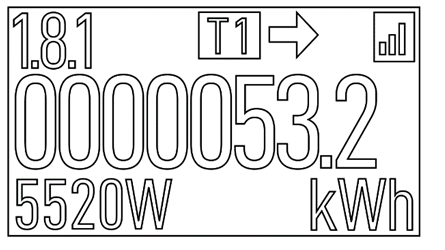
Value / symbol description
-
1.8.1 OBIS-code for the displayed meter reading
-
T1 Active tariff (tariff 1 or tariff 2)
-
Arrow Direction of current (right consumption / left delivery)
-
Reception (bars) WiFi signal strength
-
0000053.2 Meter reading
-
5520W Currently measured power with unit
-
kWh Unit of the displayed meter reading
-
M Function no longer used (can be ignored)
The meter has a scrolling display. The items described below are shown one after another. After the last item, the first item is displayed again.
Meter reading (OBIS code followed by meter reading)
- 1.8.1 (A+) Active energy consumption tariff 1
- 1.8.2 (A+) Active energy consumption tariff 2
- 2.8.1 (A+) Active energy delivery tariff 1
- 2.8.2 (A+) Active energy delivery tariff 2
- 1.8.0:5A (A+) Active energy total consumption 5A basis
- 2.8.0:5A (A-) Active energy total delivery 5A basis
- 5.8.0 (Q1) Inductive reactive energy consumption total
- 6.8.0 (Q2) Capacitive reactive energy consumption total
- 7.8.0 (Q3) Inductive reactive energy delivery total
- 8.8.0 (Q4) Capacitive reactive energy delivery total
Transformer factor (OBIS code followed by information)
-
0.4.2 Transformer factor (incl. S0 pulses / kWh)
-
Firmware (OBIS code followed by information)
-
C.1.6 Ch: 2218 Firmware checksum
-
0.2.0 V 1.1 Firmware version
Error display (OBIS code followed by error messages)
- C.60.9 Fraud flag (possible fraud attempt detected)
- PhL: 1 only phase L1 connected
- PhL: 2 only phase L2 connected
- PhL: 3 only phase L3 connected
- PhL: 23 phase L1 not connected
- PhL: 13 phase L2 not connected
- PhL: 12 phase L3 not connected
- Correct phase sequence: numbers are lit steadily
- Incorrect phase sequence: numbers flash
Dimensions and connections
*.DXF and *.DWG data can be found in the ZIP archive in the downloads.
Dimensions [mm]


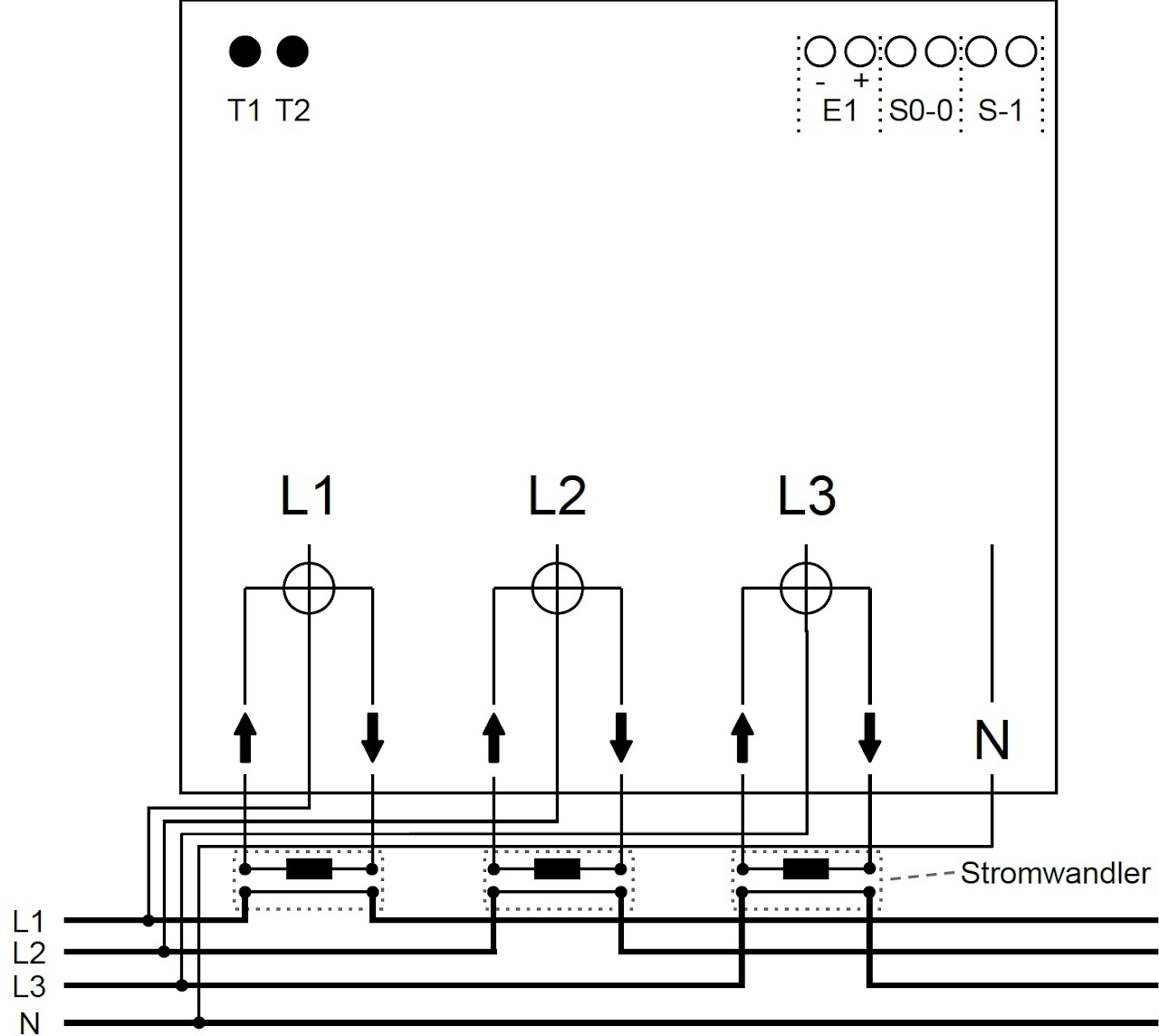
Wiring diagram
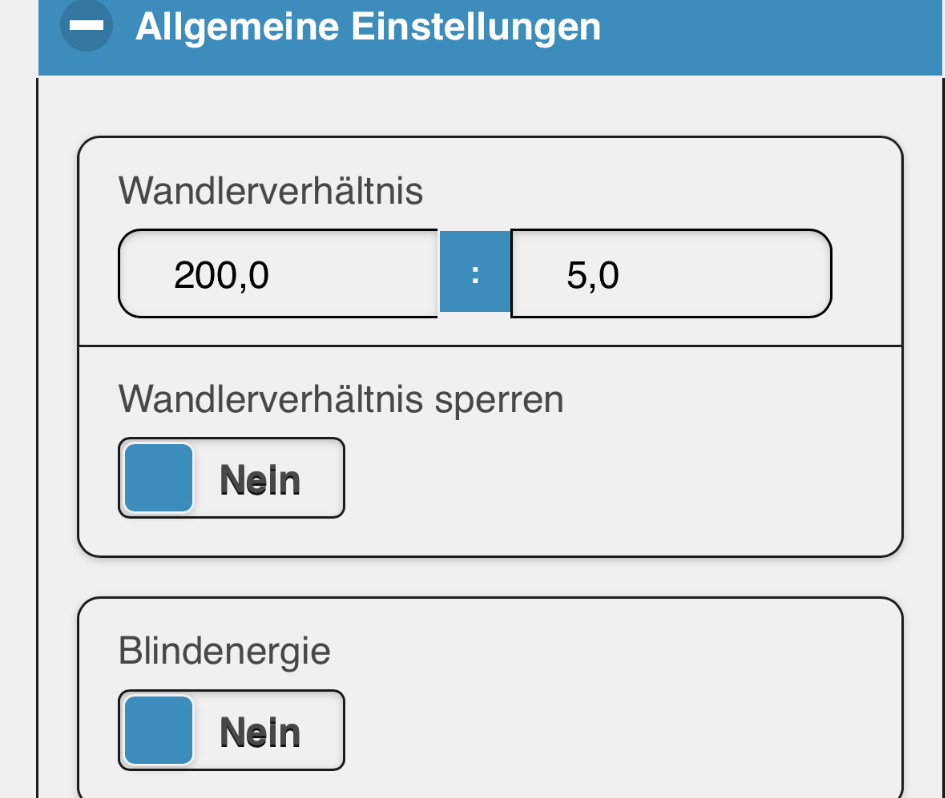
Setting the transformer ratio on the Telstar CT
-
Click the gear icon (Settings / Einstellungen) at the top right
-
Edit (Editieren)
-
General settings (Allgemeine Einstellungen)
-
Enter the transformer ratio (Wandlerverhältnis)
-
The transformer ratio can be locked. This protects against unwanted changes by unauthorized persons. To unlock the transformer ratio, the device must be installed again with the smart-me app. Deleting the device is not necessary for the reinstallation.
Note: Entering the transformer ratio does not change the historically stored data. For this reason, this step must be carried out immediately after commissioning.
Button functions
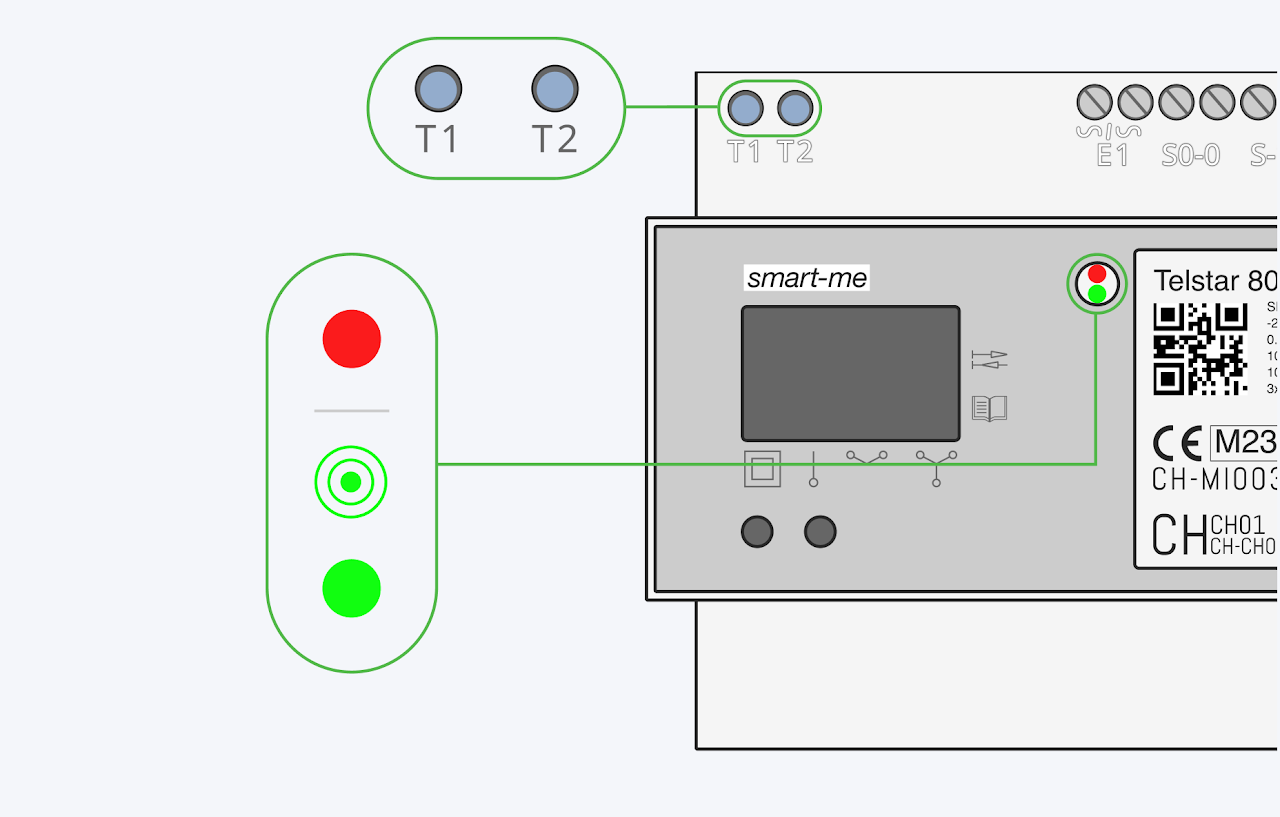
T1 Button for installation
Pressing the T1 button for 10 seconds creates a local WiFi for the installation
T1 + T2 Restart
Press the T1 and T2 buttons simultaneously for 10 seconds to force a restart.
T2 Special functions
Short: If T2 is pressed for >2s, the green LED toggles (from on to off or from off to on). When enabled, it shows the connection status
🟢 Green steady: connected to the smart-me Cloud
☀︎ Green flashing: establishing connection or no connection
Long: If T2 is pressed for >8s, the power display switches between active and reactive power. The calibration pulse LED also switches between active energy and reactive energy.
Very long: If T2 is pressed for >14s, the S0-0 pulse output switches between active power and reactive power.
Note: This setting only changes what is shown on the display, not in the smart-me Cloud (app and website). If reactive energy is to be displayed in the Cloud, this must be set in the general settings (allgemeine Einstellungen).
LED
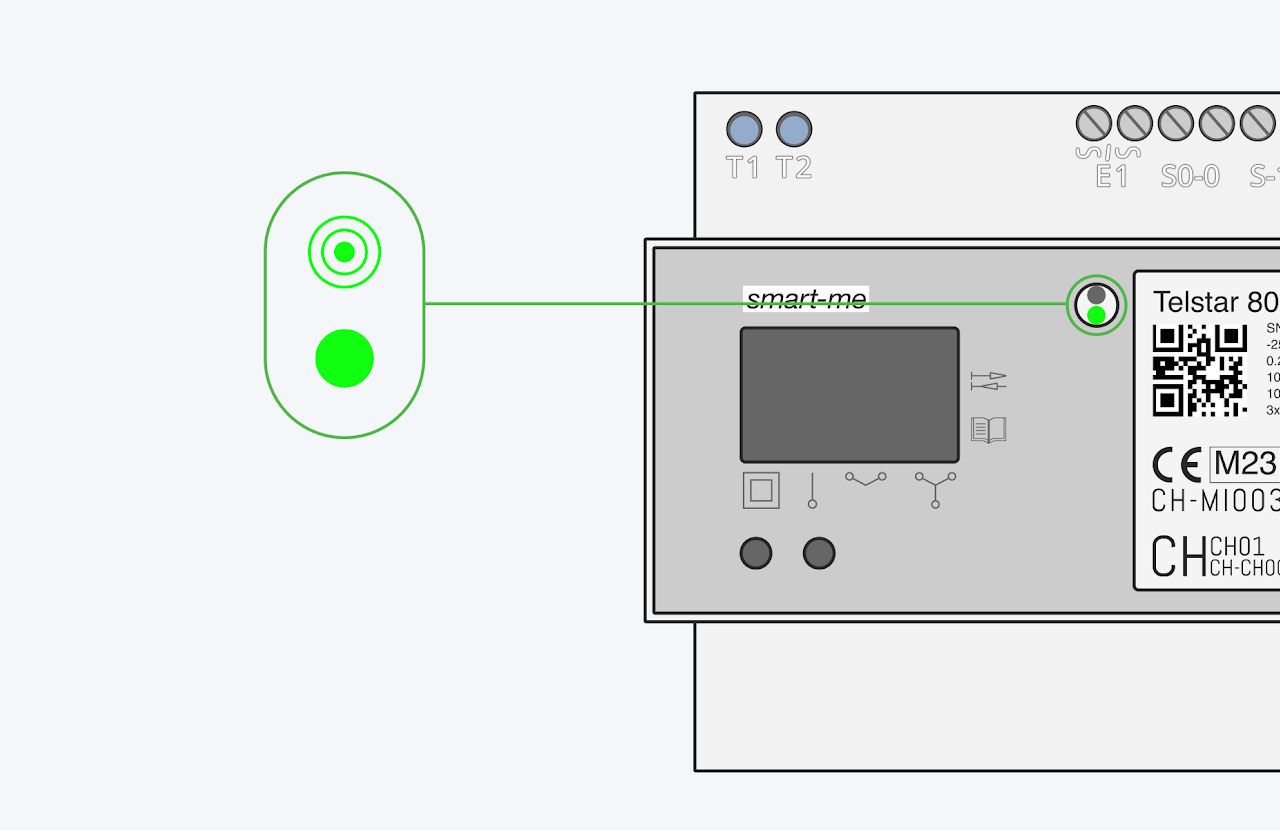
🟢 Green LED - connection status
- Shows the status of the connection to the smart-me Cloud. a) Flashing = connection error b) Always on = connection OK
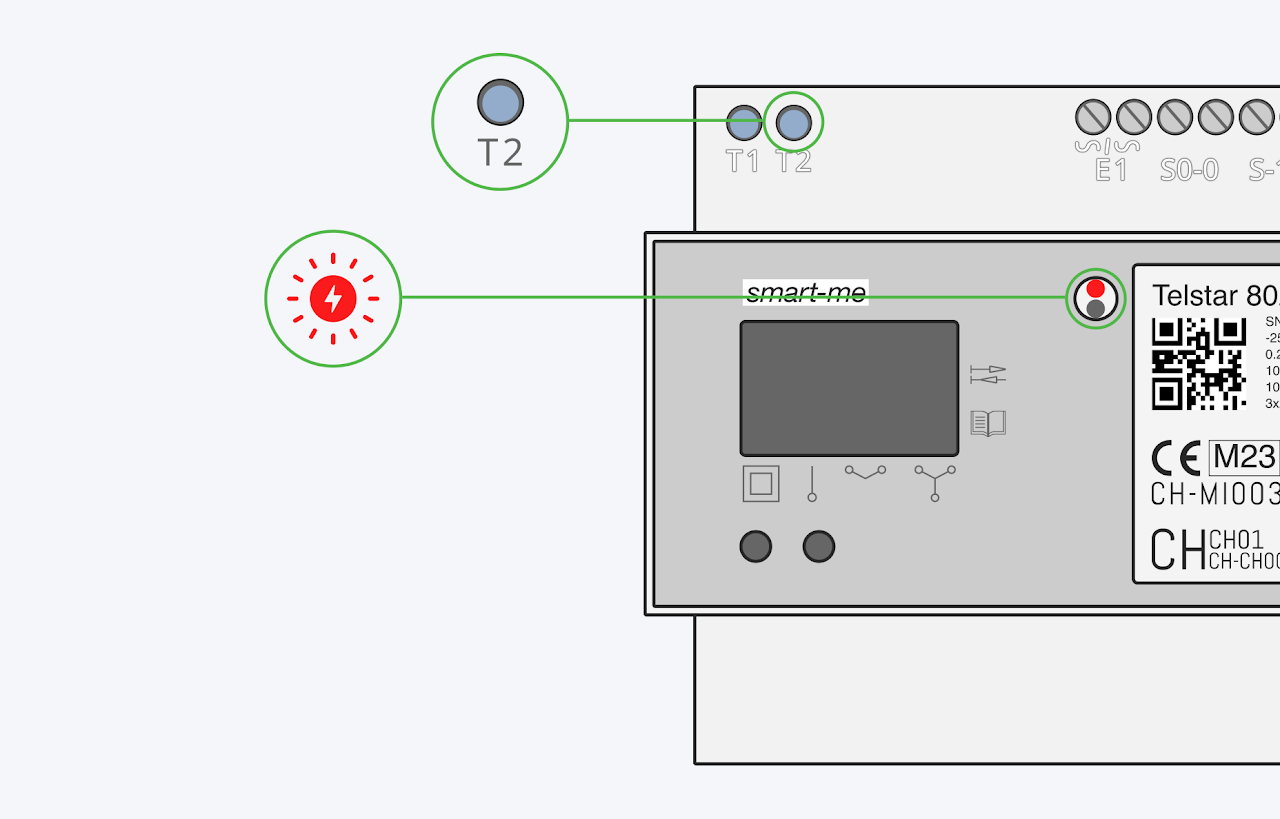
🔴 Red LED - pulse LED
-
Shows the currently drawn active or reactive power at 1000 pulses/kWh or 1000 pulses/kVArh respectively. Whether active or reactive power is shown can be set with the T2 button.
-
For example: An LED marked "1000 pulses/kWh" flashes 1000 times when 1 kilowatt hour (kWh) of energy has been consumed or delivered. If the 1000 pulses were counted within 1 hour, a constant power of 1 kW was measured.
Configuring inputs and outputs
The Telstar CT has two digital outputs and one digital input, which can be used as pulse inputs and outputs or as a switchable potential-free contact. You can find details on the wiki page Input and Output Configuration
On one digital output, the Telstar CT has a relay that can switch up to 8A.
Mesh technology
If WiFi reception is very weak or unavailable, the Telstar CT automatically connects via the mesh function to another neighboring meter within range. This meter then handles communication with the smart-me Cloud. Mesh technology ensures that the meters have higher availability towards the smart-me Cloud. It is not possible to deactivate the mesh function on the meter. Specific restrictions apply when Modbus TCP is enabled.
Current transformers and accessories
You can find recommendations for current transformers and accessories on the page: Current transformers and accessories
None of these products are sold by smart-me AG or offered as accessories at the time of purchase. Please buy these products directly from the manufacturer.
Shipping information
Article number: 212062
Article name: 3-Phasen Energiezähler Telstar CT MID Wifi
Customs tariff number: 9028.3019
Weight with packaging: 315g
Downloads and declaration of conformity
Wiring diagram ZIP files (*.DXF and *.DWG data can be found in the ZIP archive)
FAQ
At what interval do the meters send data?
-
Every 15 minutes, i.e. at xx:00:00, xx:15:00, xx:30:00 and xx:45:00. This sends the data required for the load profile. In the event of a connection interruption, this data is stored locally and sent later.
-
In addition, at least every 330 seconds.
-
Furthermore, when one of the following events occurs:
-
Meter reading change greater than 100Wh
-
Power change greater than 100W
-
Current change greater than 1A
-
Voltage change greater than 1V
-
Every second when the meter is selected in the GUI (smart-me Portal)
-
Can I reset the meter reading to zero?
No. Since our meters are used for billing, it is not possible to reset them.