smart-eye
The smart-eye brings energy meters according to the FNN specification for basic meters (modern metering devices) into the smart-me Cloud. For this purpose, the smart-eye is attached to the optical INFO data interface. The energy data is then transmitted to the smart-me Cloud via local WiFi. Via the app or online login, consumption visualizations and, where applicable, data relevant to grid operation such as frequency, voltage or current can be accessed in near real time.
Sales discontinued on 30.03.2021, support and cloud support are guaranteed until 30.03.2025.
The smart-me system is multi-utility capable: the readings of other meters, such as gas meters, can also be read and integrated into energy management. In addition, depending on the meter type, the smart-eye can automatically enter the PIN code for unlocking the extended data set.
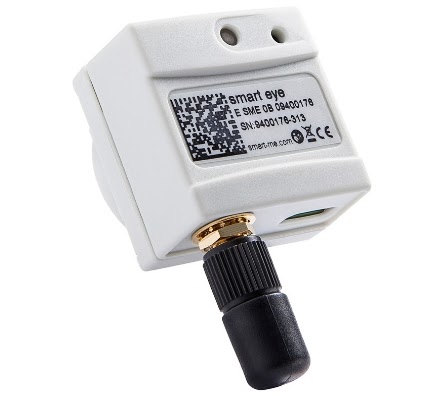
Functions
-
Real-time visualization of the meter data
-
Automatic storage of the meter readings in the cloud
-
Data logger: storage of the measured values in the event of a connection failure and automatic synchronization with the cloud once the connection is restored
-
Encrypted WiFi connection to the smart-me Cloud
-
Comprehensive energy management, automatic billing, control and alarms via the smart-me Cloud
-
Simple installation with the free smart-me app for Android and iOS
Installation and commissioning of the smart-eye module
Technical data
| Feature | Value |
|---|---|
| Supported meters | all meters according to the FNN specification for basic meters |
| Operating voltage | USB Type C interface (5V) |
| Interfaces | WiFi, INFO interface (communication with the meter) |
| Data storage | 2 months |
| Firmware update | Possible online |
| Product certification | CE |
| WiFi standard | 802.11 b/g/n |
| WiFi security standard | WEP, WPA, WPA2 (Personal) |
| Dimensions | 34x34x25.5 mm |
| Weight | 40 g |
| Temperature range | −40°C to 70°C |
| Mounting | Magnetic |
Tested meters
Tested meters
LED blink codes
smart-eye LED blink codes
Changing the upload interval
-
Log in to the smart-me portal
-
Select the meter
-
Select the gear icon at the top right
-
General settings (Allgemeine Einstellungen)

Downloads
Data sheet
Technical documents