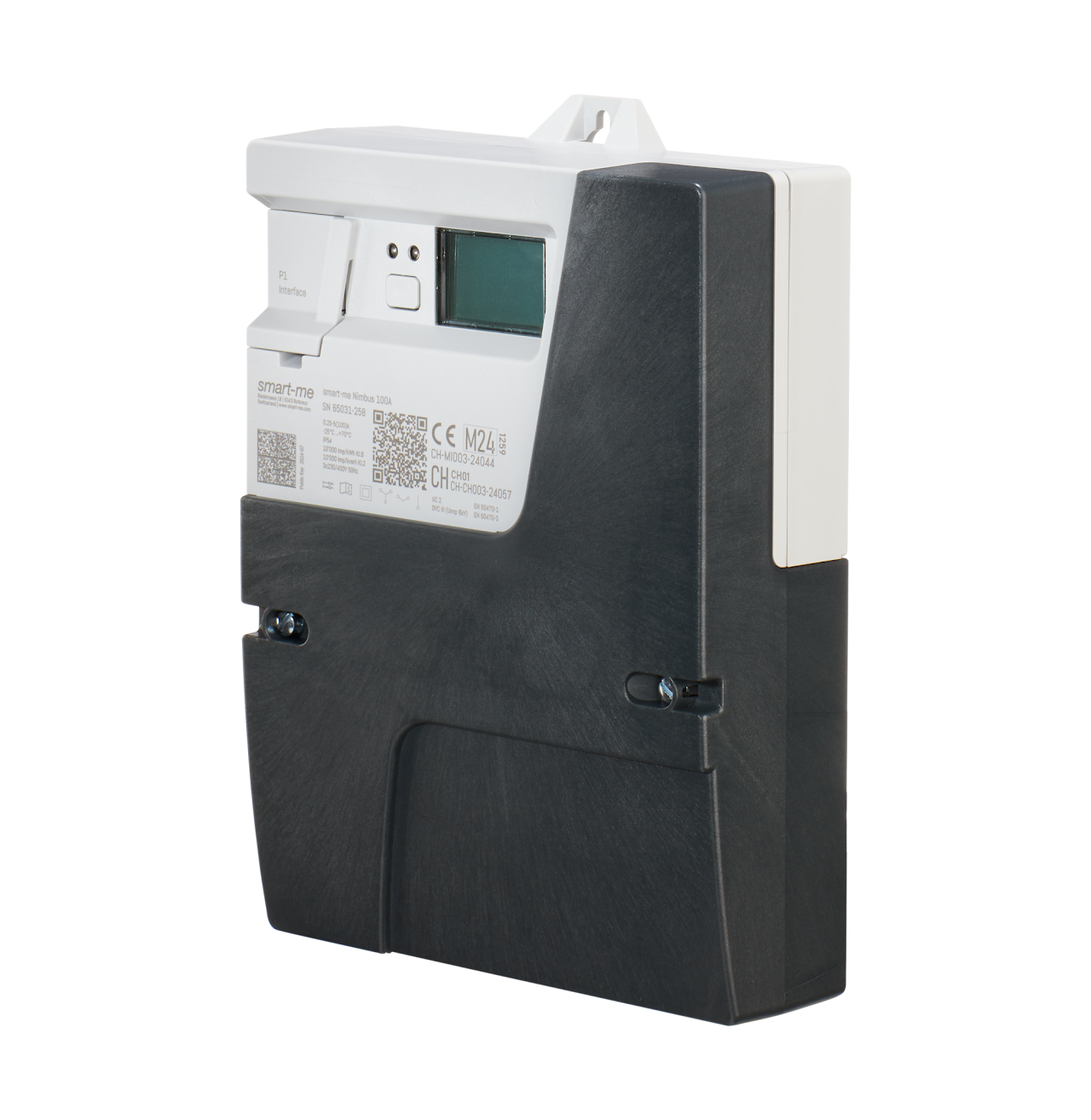
3-Phase Meter Nimbus 100A
Optional accessories
Meter plug-in terminals for Nimbus 100A
Features
-
Mounting on meter mounting plate according to DIN43857-1
-
Communication with the smart-me Cloud: WLAN 2.4 GHz
-
Compatible with meter plug-in terminals (e.g. Hager and Seidl)
-
Customer interface DSMR P1 V5.0.2
-
Installation with the free smart-me App.
-
Billing with the smart-me Billing Tool
-
Control with if/then actions or event actions
-
Interfaces from the system via API, CSV, MSCONS and IS-E
-
Encrypted real-time data connection to the smart-me Cloud
-
Signed meter reading profile (15min values) according to OCMF
A secure anchor for your blockchain solution
The Nimbus meter was designed as a trustworthy "hardware oracle" to solve the critical oracle problem when connecting IoT devices to decentralised systems.
The ECDSA signature process:
-
Hardware key: A private key is generated on a crypto coprocessor and never leaves it at any time.
-
Signature on the edge: Every 15 minutes, the meter readings (OCMF format) are signed with the private key using ECDSA over a SHA-256 hash function.
-
Verifiable origin: The result is a data packet with a digital signature. Using the meter's public key, any application can verify beyond doubt that the data is authentic and unaltered.
The Nimbus thus offers a hardware-based security guarantee that is superior to pure software solutions and provides the perfect foundation for robust P2P trading platforms, local electricity communities (LEC) and other decentralised energy services.
Technical data
| Feature | Value |
|---|---|
| Product certification | CE, MID 2014/32/EU, CH load profile / reactive energy, RED 2014/53/EU |
| Accuracy class for active energy/reactive energy | B (MID) / 2 (IEC) |
| Applied standards | EN50470-1:2006, EN 50470-3:2006 |
| Direction | +A (consumption), -A (delivery), +R, -R |
| Quadrants | Q1, Q2, Q3, Q4 |
| Mains voltage | 3x230/400VAC 50Hz |
| Current measuring range Imin-Iref(Imax) | 0.25-5(100)A |
| Terminal cable cross-sections | 2.5-35 mm2 |
| Measuring instrument category | CAT III |
| Customer interface | DSMR P1 V5.0.2 , RJ12 socket |
| Temperature range (operation, storage and transport) | -25°C to +70°C |
| Rel. humidity | Annual average 75%, non-condensing short-term 95%, non-condensing |
| Altitude | up to 2000m |
| Measured values | Active energy (kWh), active power (kW) Reactive energy (kvarh), reactive power (kvar) Current (A), voltage (V), power factor (cosφ) |
| Self-consumption per phase | < 0.8W |
| Tariffs | unlimited virtual tariffs in the smart-me Cloud |
| Optical test output | 10'000 Imp/kWh |
| Communication | WLAN IEEE 802.11 b/g/n (2.4 GHz) LTE CAT-M1 (plug-in module, optional) |
| WLAN security standard | WEP, WPA-PSK/WPA2-PSK |
| Data storage (logbook & meter reading profile) | 9 months |
| Data security | AES-128 CBC, signed 15min meter reading profile, OCMF format |
| Housing | Protection rating: IP51 (installed on mounting plate) Housing material: glass-fibre reinforced polycarbonate Dimensions: W:171mm H:236mm D:59mm |
| Ambient conditions | M1, E2, indoor |
| Mounting | Meter plate according to DIN 43857-1 |
| Server location | Switzerland |
| Protection class | II |
| Rated impulse voltage (Uimp, Safety) | 6 kV |
| Utilization category | UC 2 |
| Last change | 24.09.2025 |
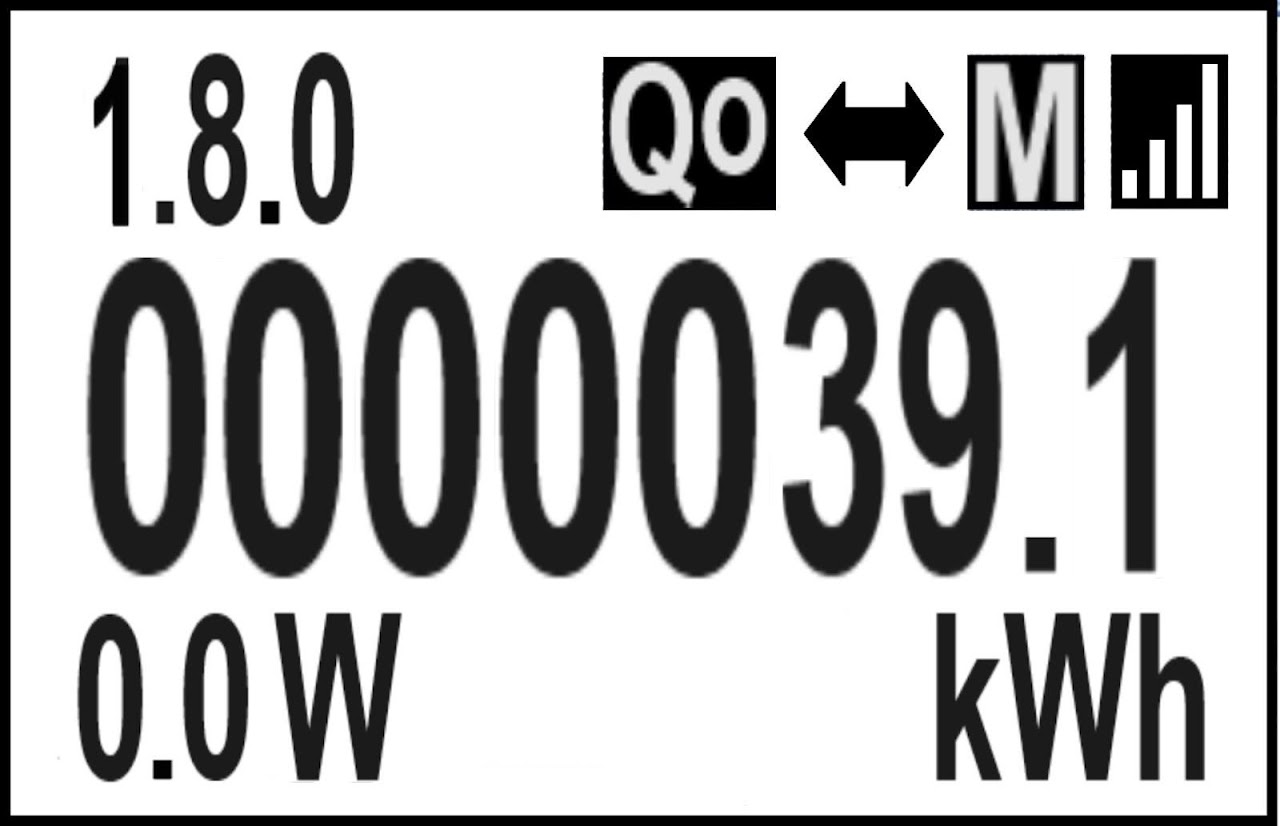
Display
Value / symbol description
-
1.8.0 OBIS code for the displayed meter reading
-
Q1 Current quadrant (Q1-Q4)
-
Arrow Energy direction (right consumption / left delivery)
-
Reception (bars) WLAN signal quality
-
0000053.2 Meter reading
-
5520W Currently measured power with unit (w or var)
-
kWh Unit of the displayed meter reading (kWh or varh)
Rolling display
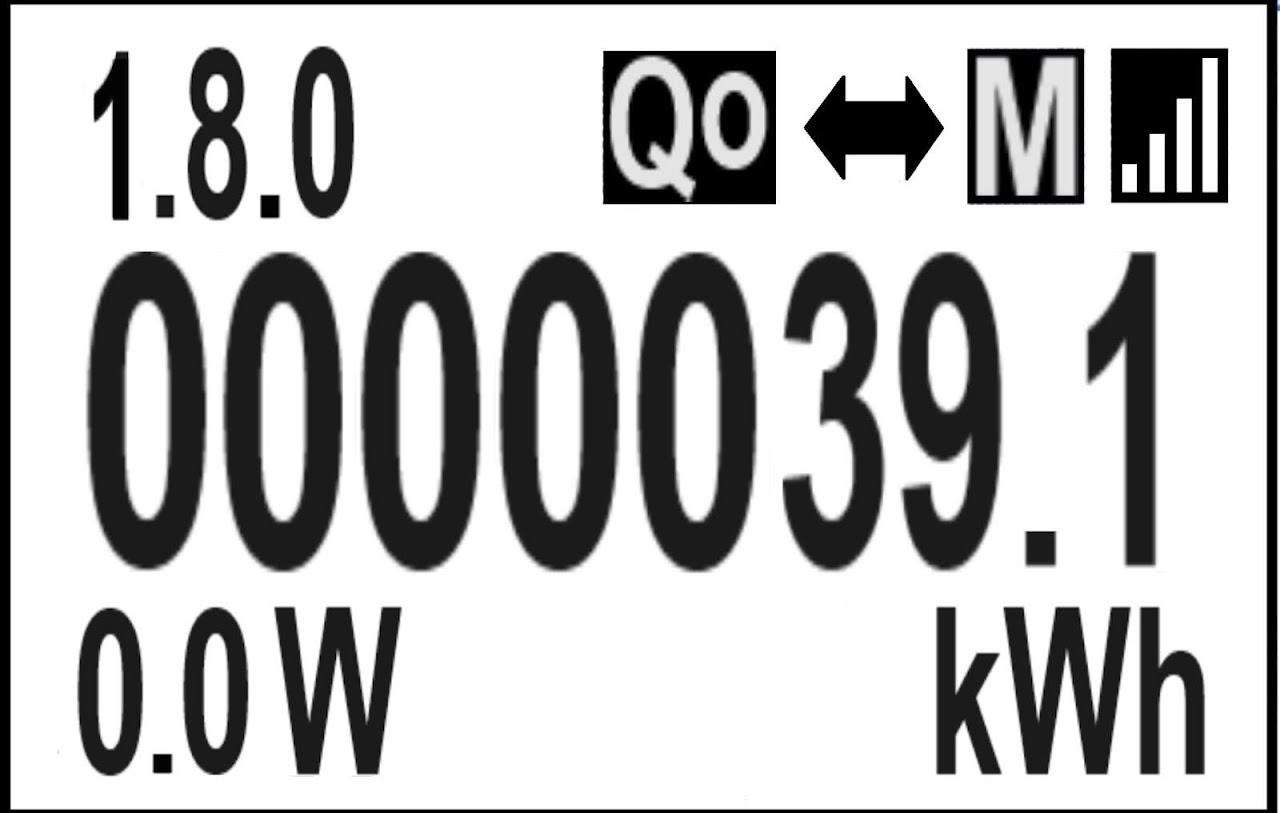
Meter reading (OBIS code followed by meter reading)
- 1.8.0 (A+) Active energy consumption total
- 2.8.0 (A+) Active energy delivery total
- 5.8.0 (Q1) Inductive reactive energy consumption total
- 6.8.0 (Q2) Capacitive reactive energy consumption total
- 7.8.0 (Q3) Inductive reactive energy delivery total
- 8.8.0 (Q4) Capacitive reactive energy delivery total
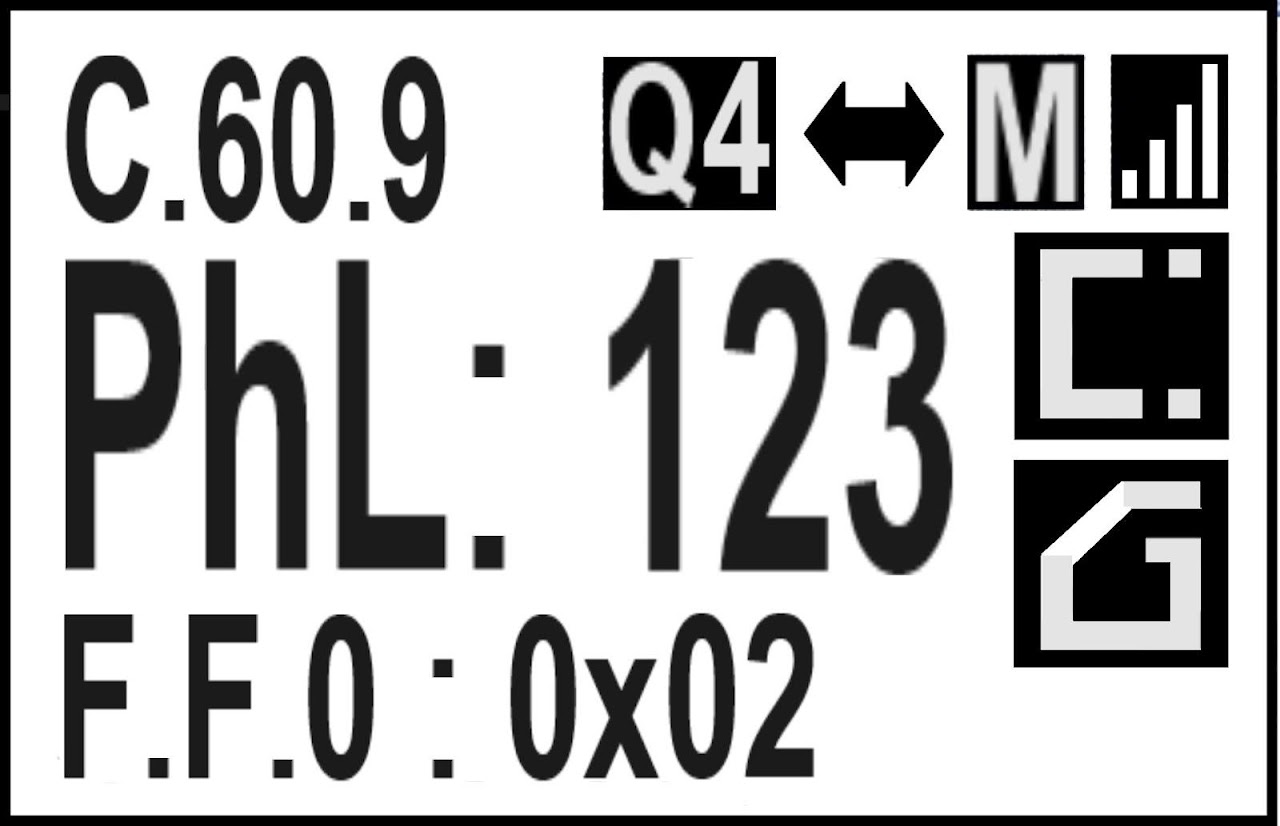
Error display (OBIS code followed by error messages)
C.60.9 Error messages (page is only displayed if errors are present)
-
PhL Wiring error (wrong phase sequence or unwired phases)
123: Wrong phase sequence. 1, 2 and 3 flash.
1 : Only phase L1 connected. 2 and 3 flash.
2 : Only phase L2 connected. 1 and 3 flash.
3 : Only phase L3 connected. 1 and 2 flash.
12 : Only phases L1 and L2 connected. 3 flashes.
1 3 : Only phases L1 and L3 connected. 2 flashes.
23 : Only phases L2 and L3 connected. 1 flashes.
-
F:F:0 ( Only displayed if one of the errors below is present)
0x00: No error
0xX2: Nimbus meter is not calibrated
0xX4: Microprocessor error, meter must be replaced
0xX8: Software error, meter must be replaced
0xX6 Not calibrated and microprocessor error, meter must be replaced
0xXA: Not calibrated and software error, meter must be replaced
0xXC: Microprocessor and software error, meter must be replaced
0xXE: Not calibrated, microprocessor error and software error, meter must be replaced
0x1X: Logbook full
-
Symbol meter manipulation (magnet): OBIS code C.51.6 Meter has been negatively influenced.
-
Symbol terminal cover opened ( "G"): OBIS code C.51.2 Terminal cover is open.
Firmware (OBIS code followed by information)
- C.1.6 762A MID firmware part checksum
- 0.2.1 V 1.1 Firmware version MID part.
Special display functions
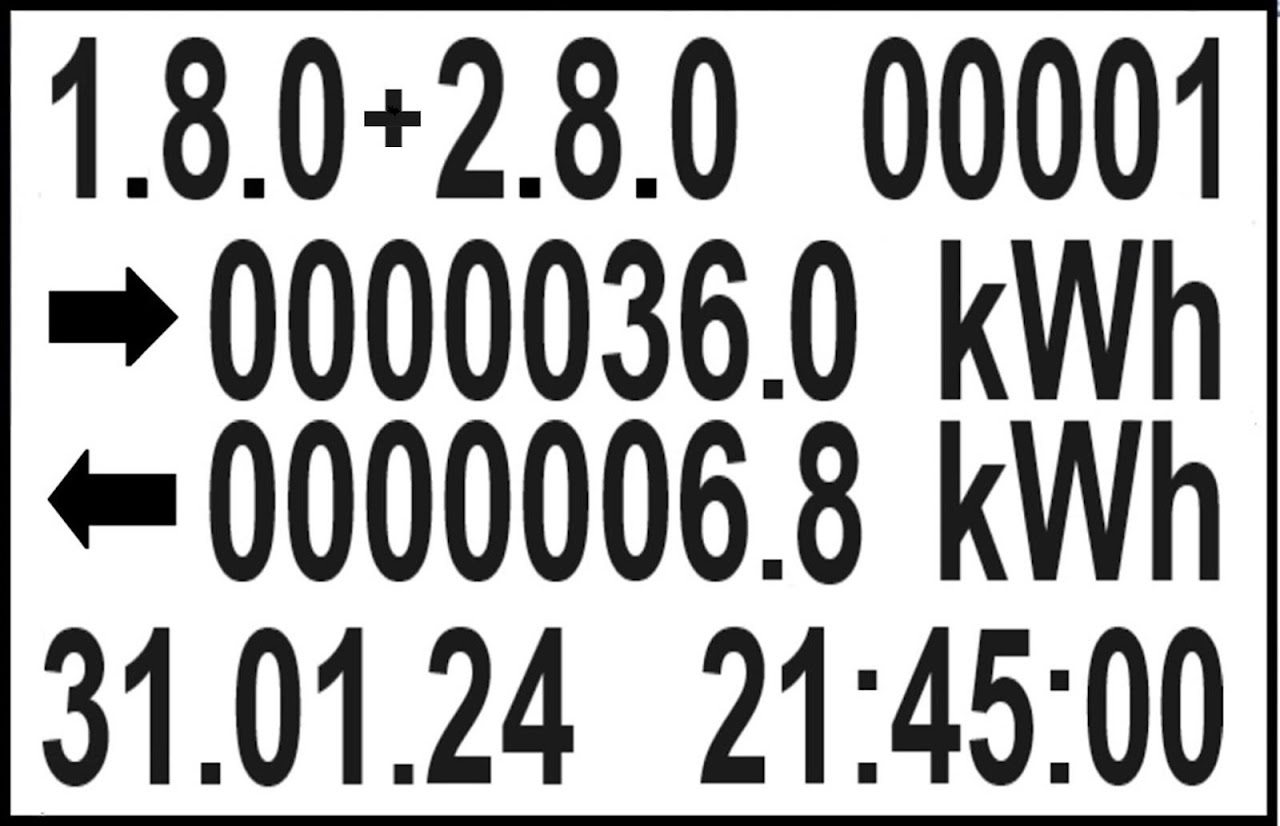
Meter reading profile (15min values)
Opening and leaving the memory:
-
To enter the memory, press display button T1 for 3-4 seconds.
-
To leave the memory, press display button T1 again for 3-4 seconds or wait 60 seconds.
-
To move from one value to the next, briefly press the display button each time.
Meter reading profile:
-
1.8.0 and 2.8.0: OBIS codes shown in memory
-
0001: Entry number in memory
-
First line: 1.8.0 Active positive energy (consumption)
-
Second line: 2.8.0 Active negative energy (delivery)
-
Date and time of the entry
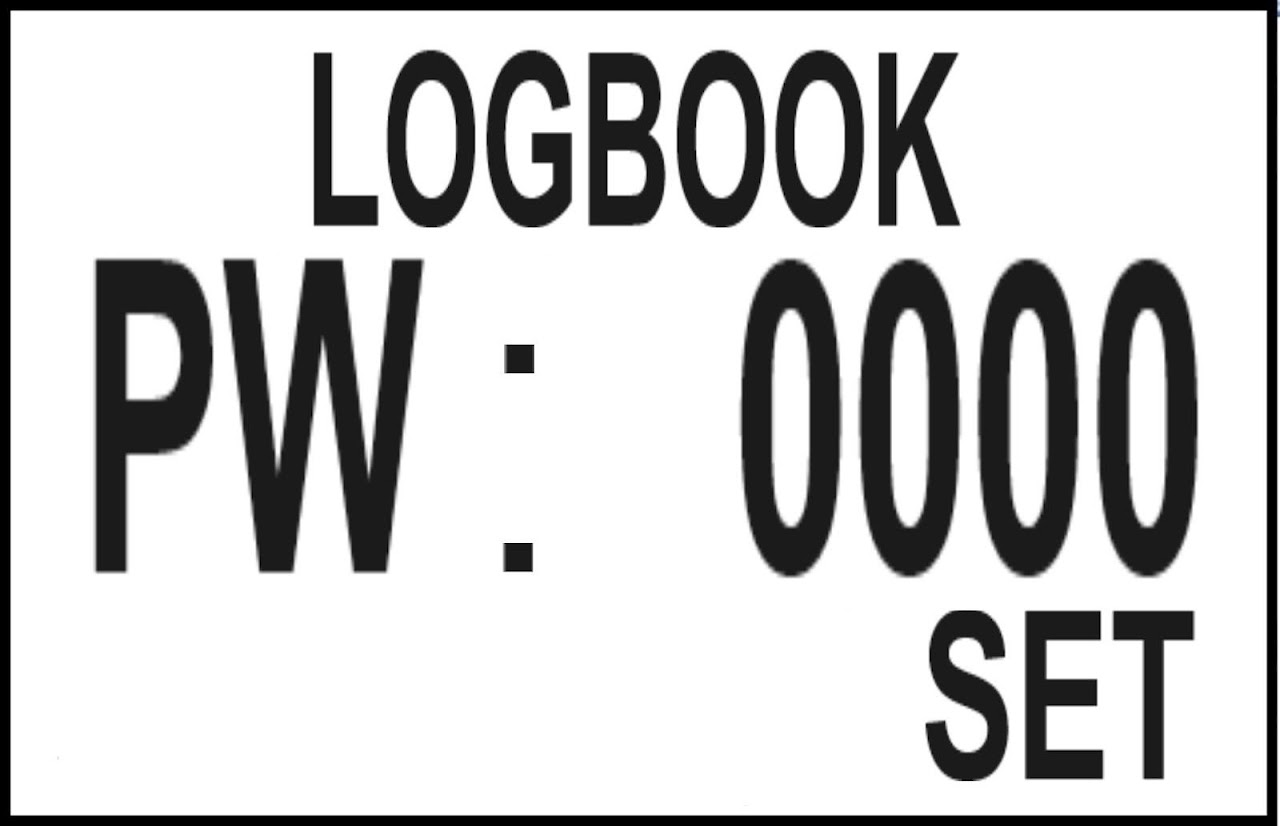
Logbook
Opening the logbook:
- Press the display button in normal mode for 7-8 seconds.
Entering the password to display the logbook:
The user of the NIMBUS meter receives the password from the provider.
-
Briefly pressing the button increases the first digit by 1.
If the digit is at 9, it changes back to 0 at the next press.
-
If the button is not pressed for 2 - 3 seconds, the display automatically switches to the next digit. This digit flashes and any number can be set again.
-
Once the 4th digit has been set, password entry ends after 2 - 3 seconds and the password is checked.
-
If the password is correct, the SMART-ME LOGBOOK screen is displayed.
-
If the password is incorrect, the password “FALSE” is displayed for a few seconds and the display switches back to normal mode on
-
If there is no message in the logbook yet (Total : NO ENTRY), the display switches back to normal mode on display screen 2 or 3.
Ending the logbook display:
-
To leave the logbook, the display button must be held down continuously for approx. 3 - 4 seconds.
-
If the display button is not pressed within 60 seconds, the display also switches back to normal mode on display screen 2 or 3.
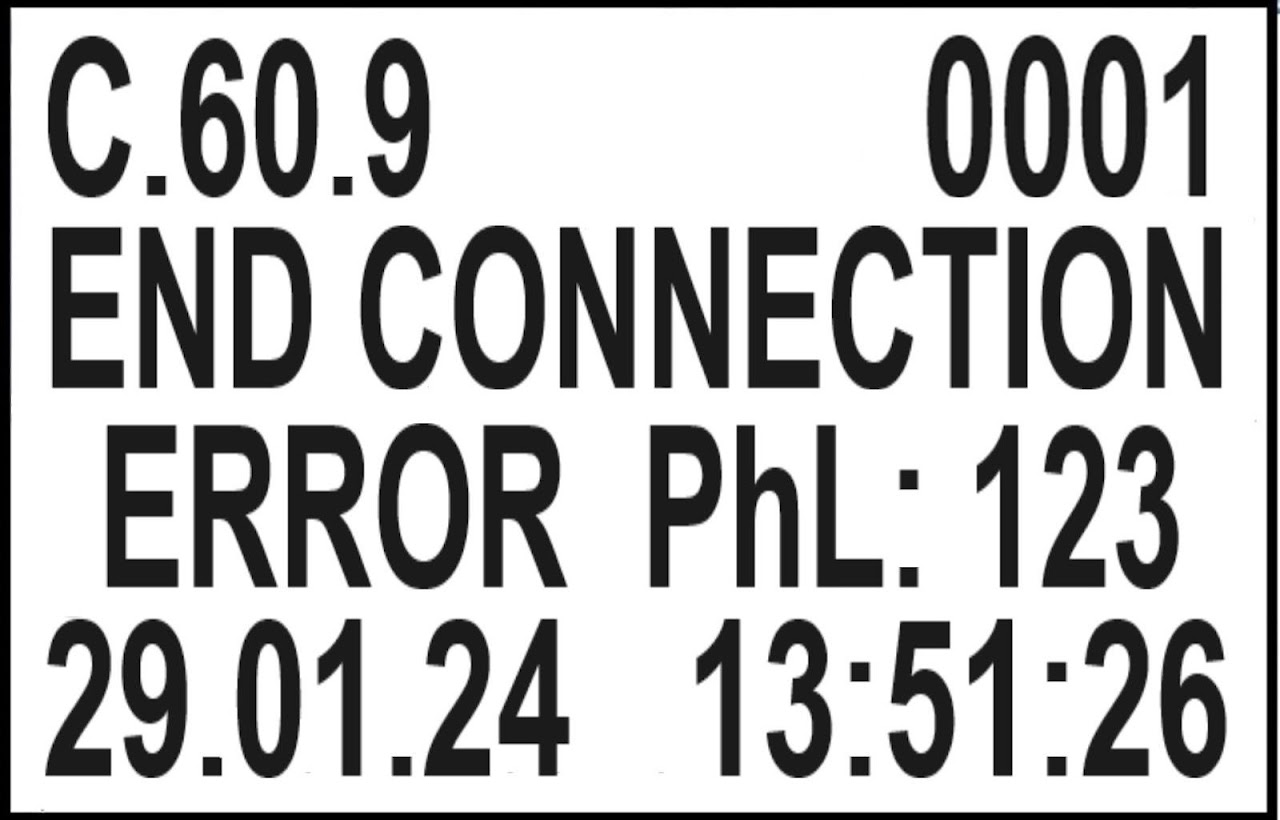
C.60.9 : OBIS code of the currently displayed message
-
0001 : Number of the stored message; 0001 is the newest message.
-
8192 : Maximum possible messages in the logbook.
When the maximum possible number of messages is stored in the logbook, no further messages are stored ⇨ LOGBOOK FULL.
When LOGBOOK FULL, further changes to the metrologically relevant parameters are no longer possible without breaking the metrological seal.
-
Second and third line:
Identifier and type of the displayed message.
-
Fourth line: Date and time of the message
Log information:
-
Firmware upgrade (New Firmware)
-
Terminal cover opened or closed (Open, close terminal cover)
-
Manipulation detected and cleared (Start, End Meter Manipulation)
-
Wiring error detected (Set, End Connection)
-
New MID firmware version (New MID part)
-
Time reset (Time: OLD --> NEW)
-
Meter restart (Meter OFF--> ON)
-
Meter has received new calibration (New Meter Calibartion)
-
Event logbook full (Last Stored Data, Logbook full)
Dimensions and connections
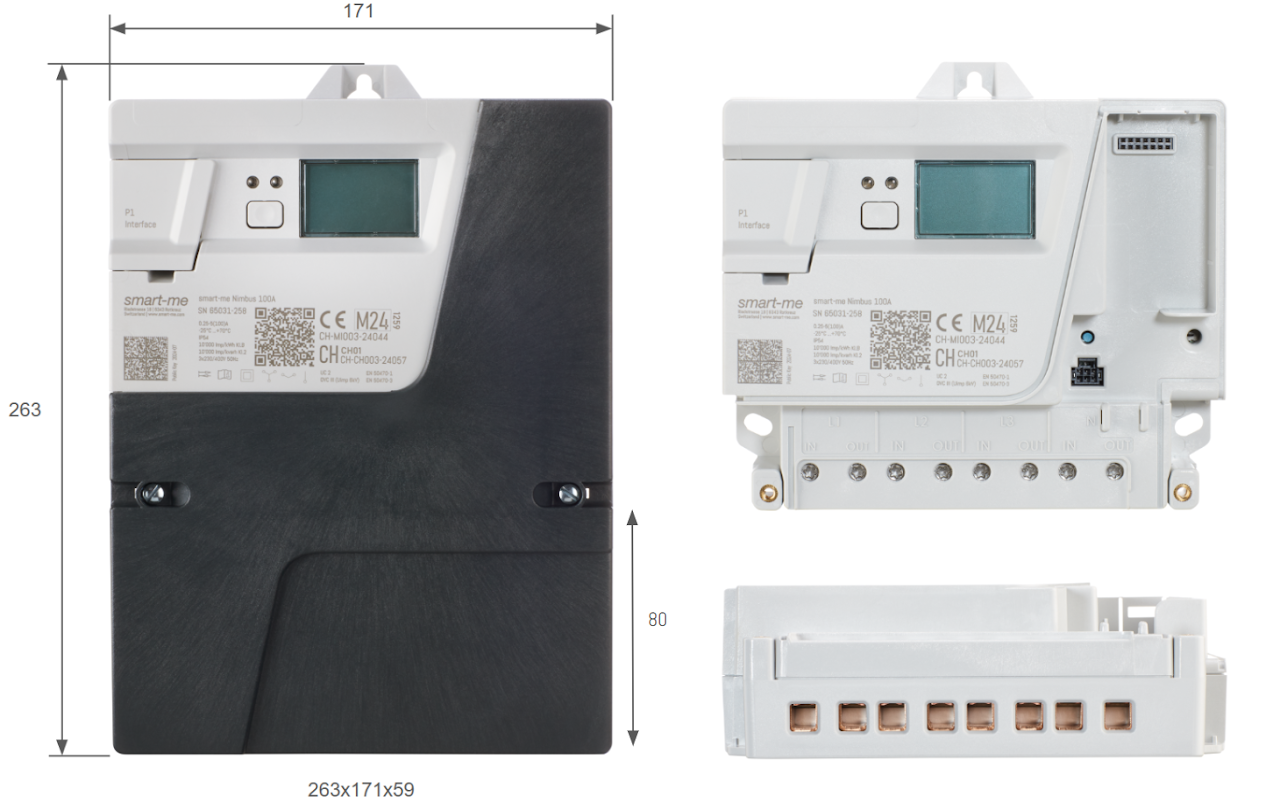
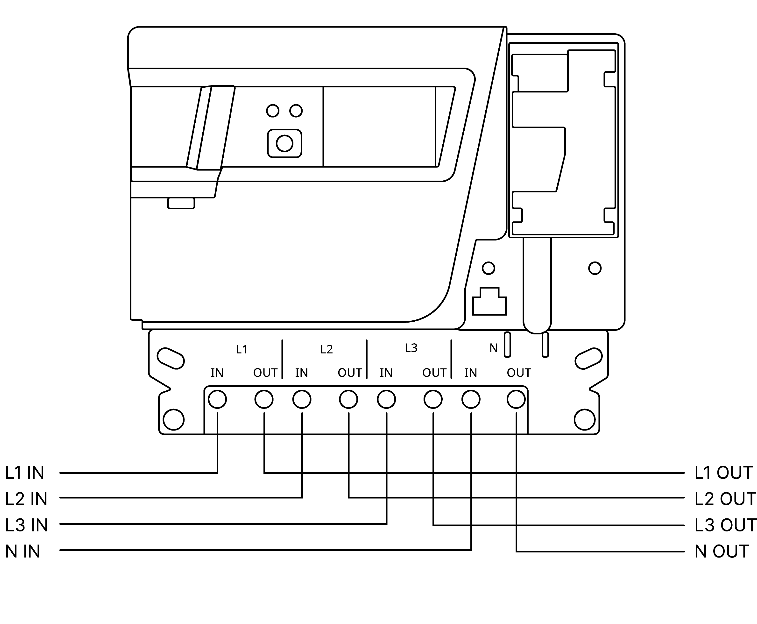
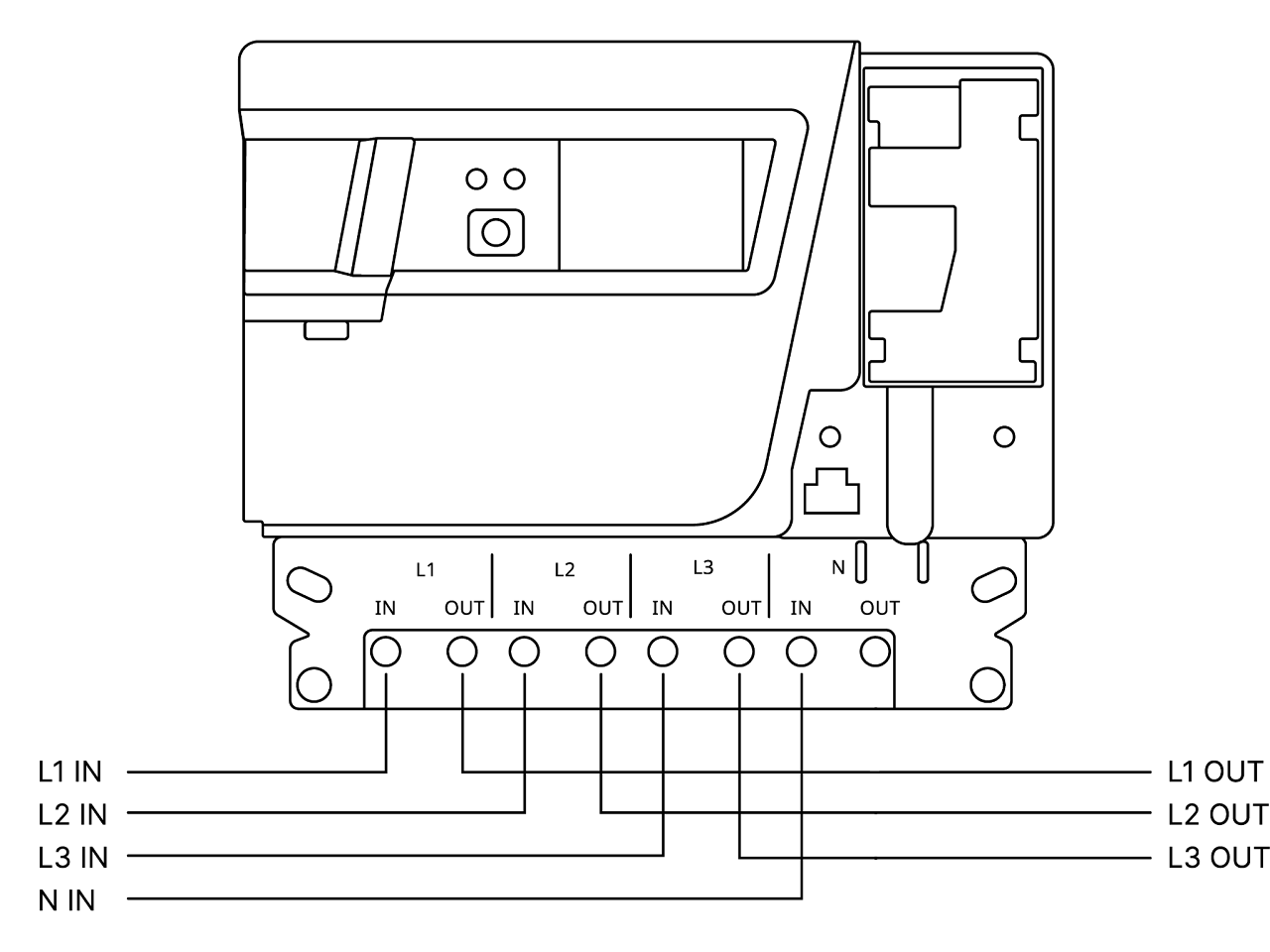
Connection diagram
Wiring
Stranded conductors, solid conductors and flexible wires between 4-35 mm2 are permitted as supply lines. Flexible wires may only be installed with suitable ferrules. Further information on the connection cables can be found in the Quickstarter Guide.
Screw drive: Torx 25
Before installation, the supply lines must be de-energised and secured against manipulation.
Connection with looped-through neutral conductor
Connection diagram with excitation neutral conductor (neutral conductor may be significantly smaller than L1, L2 or L3)
Button functions
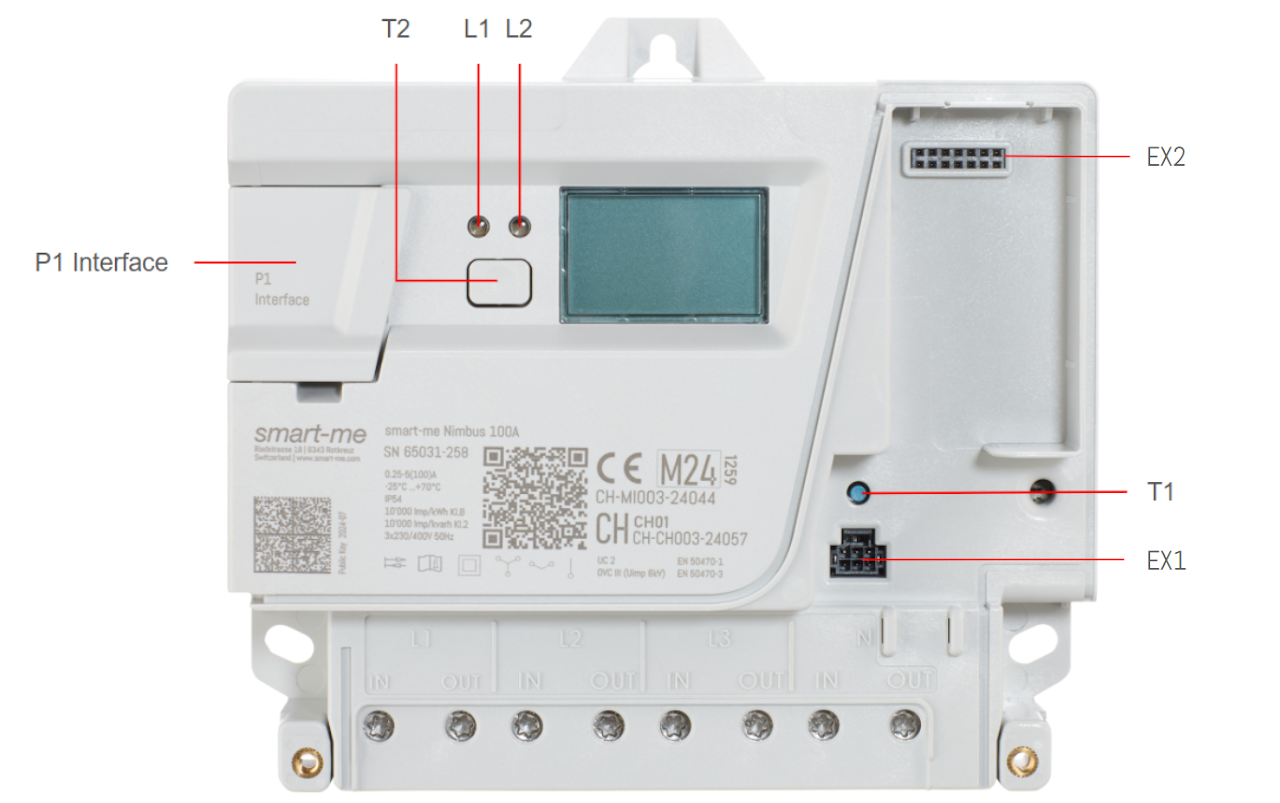
Button 1 (T1)
To connect the meter to a smart-me account, button 1 is pressed for 10 seconds during commissioning with the smart-me App. A device-specific Wifi is then created, to which the mobile phone can connect in order to store the Wifi access data on the meter.
Button 2 (T2)
Button 2 can be used to open the logbook and the meter reading profile. To display the meter reading profile, button 2 must be pressed for 4 seconds. The password can then be entered. The currently selected digit is indicated by flashing. To change this digit, briefly press button 2. After 10 seconds, the display moves one position to the right.
Access passwords have 4 numeric digits.
If the password is correct, the last entry of the meter reading profile is displayed. To display the next entry, briefly press button 2. If button 2 is not pressed for 60 seconds, the display switches back to showing the meter reading.
-
P1 Interface
-
RJ-12 socket for P1 modules
-
EX1 - Interface for external contactor control (not yet supported)
-
EX2 - Slot for alternative communication modules (not yet supported)
-
L1 - Status LED - lights up steadily when connected to the smart-me Cloud
-
L2 - Pulse LED - shows currently measured power in 10'000 Imp / kWh
The pulse LED can display active and reactive energy. To switch from active to reactive power or vice versa, button T2 must be pressed 10 times at intervals of 1 sec. Whether the LED is currently showing active or reactive power can be seen on the bottom line of the display.
P1 Interface (customer interface)
The P1 interface of the Nimbus allows third-party providers or end customers to reuse the measured data in their own control or analysis systems.
This requires a P1 interface reader module with an RJ-12 plug. It must support the “P1 Companion Standard” from Netbeheer Nederland, version 5.0.2 (26 February 2016).
Voltage: 5V DC, maximum load: 100mA DC, reinforced insulation against mains
Accessories
- Meter plug-in terminals - for easy replacement of meters without power interruption
Cleaning
Clean the device housing with a dry cloth. Do not use chemical cleaning agents!
Maintenance and warranty information
The device is maintenance-free. In the event of damage (e.g. due to transport, storage), you must not carry out any repairs yourself. Opening the device voids the warranty claim. The same applies if a defect is attributable to external influences (e.g. lightning, water, fire, extreme temperatures and weather conditions) as well as in the case of improper or careless use or handling. The seals may only be broken by authorised persons!
Shipping information
Article number: 242065
Article name: smart-me 3-Phasen Zähler Nimbus 100A
Customs tariff number: 9028.3019
Dimensions and weight without shipping packaging: 25.5x18x7 [cm] / 1.1kg
Manufacturer: smart-me AG, Riedstrasse 18, 6343 Rotkreuz
Commissioning
Downloads and declaration of conformity
Connection diagram and circuit diagram _ZIP_Files
FAQ
Can I reset the meter reading to zero?
No. Our meters are used for billing, so they cannot be reset.