3-Phase Meter
The smart-me 3-Phase Meter is a powerful and precise energy meter with an integrated WiFi interface. No additional hardware is required for integration into the smart-me Cloud. It uses the existing WiFi network and can be controlled and analysed from anywhere via the internet. With a Professional subscription, the meter values can also be queried via the Modbus TCP interface. With the 5(32)A version, each phase can be switched individually.
This 3-phase meter is no longer available. You can find the new generation of our 3-phase meter here: 3-Phase Meter Telstar
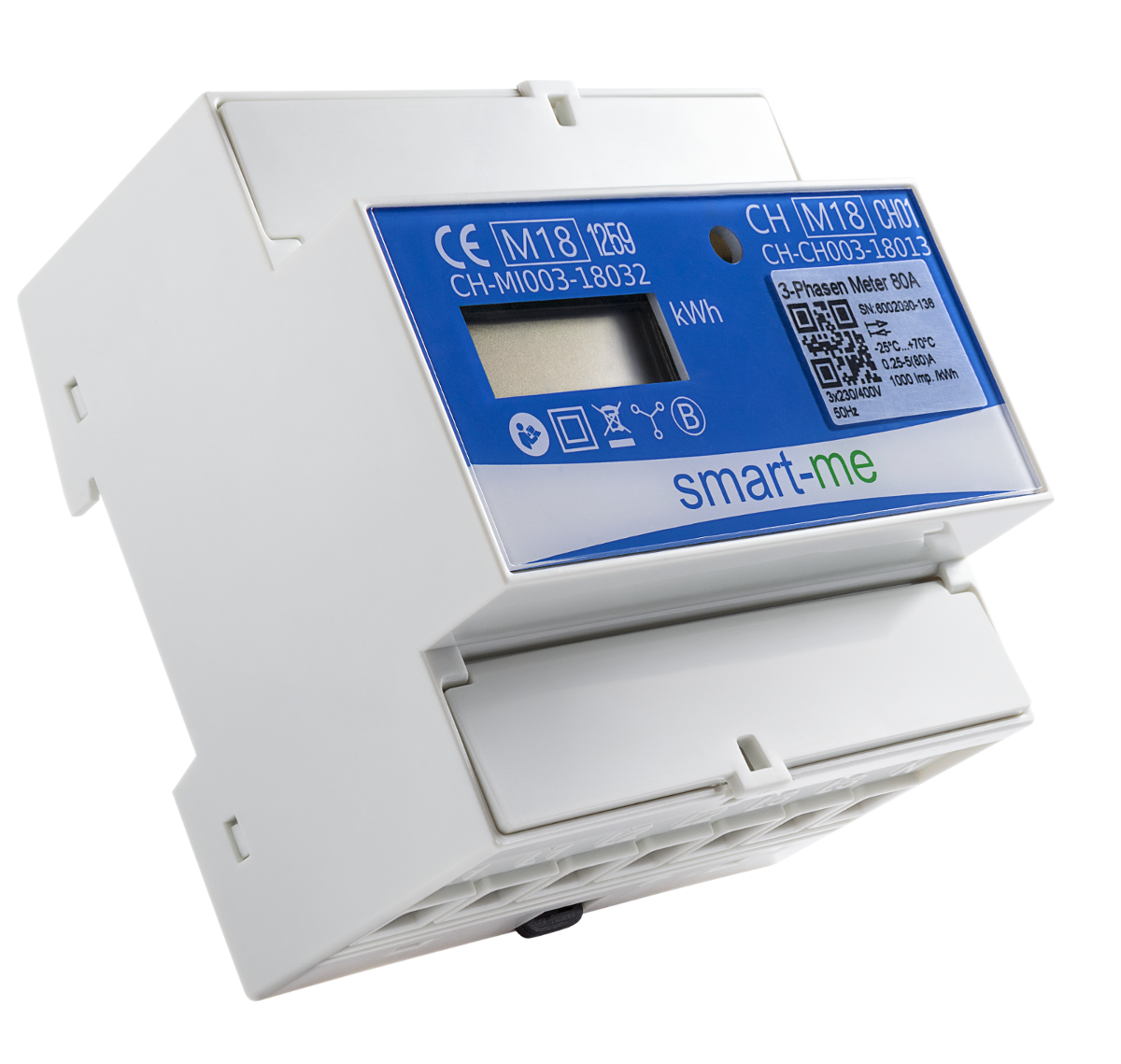
Variants
-
Direct connection 5(80)A
-
Direct connection 5(32)A, switchable
Features
-
3-phase energy meter with MID 2014/32/EU certification
-
Direct measurement up to 80 A (not switchable), direct measurement up to 32 A (switchable)
-
Real-time measured values with the highest accuracy, class B
-
Additional contact outputs for controlling external devices
-
The 3-phase meter also works as a gateway to the cloud for (almost) all IP-enabled smart energy devices
-
Easy installation with the free smart-me app for Android and iOS
-
Encrypted WiFi connection directly to the smart-me Cloud. The smart-me Cloud offers comprehensive energy management: visualizations, control (if/then actions), automatic billing (smart-me Billing) and interfaces to third-party systems (Auto Export, API)
Installation
Before you can use your smart-me device, you have to connect it to your WiFi network and the internet.
-
Connect your smartphone or tablet to the WiFi network.
-
Download and install the smart-me app from the Play Store or iOS App Store.
-
Start the app and create an account or log in with the corresponding account.
-
Click on "Add device" („Gerät hinzufügen“) (+) and follow the instructions.
Technical data
| Feature | Value |
|---|---|
| Operating voltage | 3 x 230 VAC |
| Reference current | 5 (80) A / 5 (32) A |
| Self-consumption | < 0.8 W per phase |
| Storage temperature | -40°C to 85°C |
| Temperature range | -25°C to 70°C |
| Humidity | Annual average 75%, briefly 95%, non-condensing |
| Accuracy | Class B |
| Meter type | Bidirectional meter (consumption and delivery) |
| Measured values | Active energy (kWh) Active power (kW) Current (A) Voltage (V) Power factor (cosphi) Status of inputs and outputs Additionally with Professional subscription: reactive energy (kvarh), reactive power (kvarh) |
| Tariffs | 2 (virtual tariffs can be created in the cloud) |
| Interfaces | WiFi S0 / potential-free contact outputs Tariff input (24 - 48VDC / 24 - 230 VAC) SG Ready with Professional subscription: Modbus TCP |
| Pulse outputs / digital outputs S0, S1 | Opto Power MOSFET, 5 - 48VDC / 5 - 230 VAC , max. 550mW |
| WiFi standard | 802.11 b/g/n |
| WiFi security standard | WEP, WPA, WPA2 (personal) |
| S0 pulse rate | 10’000 or 1’000 pulses per kWh |
| Data storage | 2 months |
| Product certification | CE, MID 2014/32/EU |
Configuring inputs and outputs
The smart-me meter has two outputs and one input, which can be used as pulse inputs and outputs or as a switchable potential-free contact. You can find details here.
Display
The meter has a scrolling display. The items described below are shown one after the other. After the last item, the display starts again at item 1:
-
Phase sequence (if incorrect, see below)
-
Meter reading (OBIS code followed by meter reading)
1-8-1: Active energy tariff 1 import (consumption) 1-8-2: Active energy tariff 2 import (consumption) 2-8-1: Active energy tariff 1 export (delivery) 2-8-2: Active energy tariff 2 export (delivery)
-
Software version
-
CRC value
Phase sequence
PhL 1 -> only phase L1 has been connected (PhL2 for L2, etc.) PhL 12 -> only phases L1 and L2 have been connected (PhL13 for L1 and L3, etc.) PhL 123 -> an incorrect phase sequence has been detected
Dimensions and connections
Dimensions [mm]
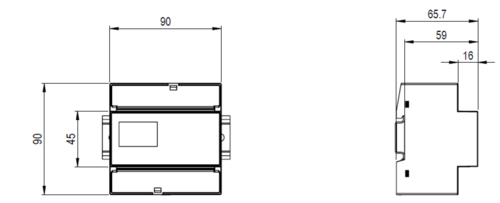
Note: .DXF and .DWG data can be found in the ZIP archive in the downloads.
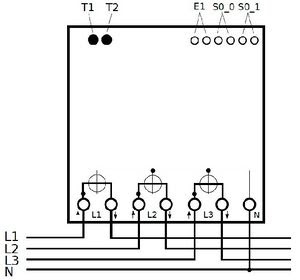
Connection diagram
E1: Tariff input (digital input)
0V: Tariff 1
>24V: Tariff 2
T1: Button for installation
T2: Special functions
Short: If T2 is pressed briefly, the green LED switches on / off. When it is activated, it shows the connection status:
Green steady: connected to the smart-me Cloud
Green flashing: no connection
Long: If T2 is pressed for a long time, the display of the reactive energy meter reading is activated (if available). The items reactive energy meter reading T1 and reactive energy meter reading T2 are added to the display sequence. The displayed value flashes and can thus be distinguished from the active energy.
CAUTION: This setting only changes what is shown on the display, not in the smart-me Cloud (app and website). If the reactive energy is to be shown in the cloud, this must be done in the general settings. (When T2 is pressed, the red LED lights up; T2 must be held down until the red LED goes out)
S0_0: S0 pulse output (optionally potential-free contact / caution Pmax = 550mW continuous)
S0_1: S0 pulse output (optionally potential-free contact / caution Pmax = 550mW continuous)
Measured values (OBIS codes)
The following measured values are recorded by the meter and can be retrieved in the cloud and via the API
Measured values (incl. OBIS codes) 3-Phase Meter V1
Downloads and declaration of conformity
Data sheet
Quick Starter Guide
Technical documents
FAQ
At what interval do the meters send data?
-
Every 15 minutes, i.e. at xx:00:00, xx:15:00, xx:30:00 and xx:45:00. This sends the data required for the load profile. In the event of a connection interruption, this data is stored locally and sent later.
-
In addition, an individual configuration can be set up:
-
With Basic or Limited licences: max. once per minute.
-
With Pro licensing: max. once per second
-