Examples of boiler control with if/then actions
This page describes example configurations in detail.
Requirements
To use if/then actions, you need a smart-me Limited or Professional license.
Basics
The technical data can be found on the pages of the respective products (e.g. maximum switching capacity).
The configuration of the outputs is described on the inputs and outputs page (e.g. activating output 1).
The basics are described under if/then actions (e.g. where to find if-then actions).
Note that if/then actions only work correctly if the connection to the smart-me Cloud is ensured. Event actions are more limited, but are stored and executed locally.
When configuring if/then actions, always check whether the unit displayed is watts or kilowatts.
The smart-me meters are equipped with bistable relays: if switching on is configured, switching off must always be configured as well.
Introduction
Determine the consumption and plan a reserve for consumption fluctuations
To configure good control, it is important to know the power drawn by the consumers. It is also necessary to plan a reserve for every case. For example, if the attic boiler requires 3 kW, the boiler is switched on when less than -3.5 kW is measured on the balance meter and is only switched off again when more than 0 kW is measured. The 0.5 kW difference then serves as a buffer if someone switches on, for example, a computer (60 watts), so that in this case there is not immediately too little energy available.
Delayed switching on or off
In addition, a time span must be factored in before switching on or off. For example, the boiler is only switched off when the value of 0 kW is exceeded for longer than 5 minutes. This ensures that a short-term consumer such as an oven or a kettle does not immediately result in the consumer having to be switched off and on repeatedly. This is all the more important the larger the building is.
Determine how many consumers can be switched on at the same time
You should always check how the fuses have been dimensioned. This must be taken into account when all consumers are running at the same time, e.g. at night. If the fuse is too small, you must configure the if/then actions so that the consumers are not switched on at the same time.
Determine the switch-on and switch-off times of consumers for staggered switching on
When switching on consumers step by step, e.g. several boilers, you must ensure that the delay between the first and the second consumer is long enough for the first consumer to draw full power. For example, if it only takes 20 seconds for the consumers to draw full power, the consumers can be switched on with a delay of one minute. Provided there is enough electricity available.
If there are fixed switch-on and switch-off times, make sure that they are offset by at least 1 minute. For example, switching on between 5:00 and 8:00 and switching off between 8:01 and 4:59
Switching off consumers
When switching off consumers, e.g. several boilers, it is possible to switch everything off at once. For example, with a delay of 5 minutes (delayed switching off). However, it is also possible to switch off the boilers step by step.
Example of step-by-step switching off with a delay:
-
The first boiler switches off with a delay of 5 minutes so that, for example, someone can switch on the kettle without this switching off the boiler.
-
The second boiler is switched off after 7 minutes of increased grid consumption (i.e. 5 minutes after the first + 2 minutes waiting time)
-
The third boiler is then switched off after 9 minutes of increased grid consumption
Grid-optimized vs. self-consumption-optimized
When configuring the switch-on and switch-off thresholds, you must decide whether the system is grid-optimized, i.e. the consumers switch on and off as far as possible whenever electricity is drawn from the grid. Or whether the system should be optimized for self-consumption. This means that as much electricity from the roof as possible should be used.
-
Example for a consumer of 2.5 kW with a reserve for consumption fluctuations of 0.5 kW.
-
Grid-optimized: switch the boiler on at -3 kW and off at 0 kW.
-
Self-consumption-optimized: switch the boiler on at -1.5 kW and off at +1.5 kW.
-
Partly-partly: switch the boiler on at -2.5 kW and off at + 0.5 kW.
-
When configuring, note that the variant with optimized self-consumption is more profitable in winter, but in summer in good weather the consumers are switched on very early and are already full in the afternoon when the sun is shining.
We have had good experience when the consumers switch on when they can be supplied 100% with solar power and the reserve for small fluctuations in the grid share is taken into account. In other words, the "Partly-partly" example above.
Booster button
Setting up a booster button for a consumer is possible, but makes the setup more elaborate and complicated. Also note that only the owner of the smart-me account has the option of activating a booster button.
For this function, we must use a digital output that is not physically connected to a consumer. We then use the button only as a state for the if/then actions.
Reheating with peak and off-peak tariff vs. reheating with a single tariff.
For boilers that are reheated using the if-then actions, the local tariff structure can be taken into account.
If electricity is cheaper at night, it is common to reheat during the night. However, this means that the boiler usually has its maximum temperature at sunrise.
If a single tariff is applied, it is best to stagger the reheating from 12:00 noon. This way, in summer the boiler can be optimally charged in the morning and, if necessary, heated up in the afternoon. In this way, the solar yield for the boiler is better. In the following examples, reheating takes place at night. If this is to take place during the day, simply change the switch-on times in the examples. Make sure that switching off must also be taken into account.
3-stage boiler control
The example below for controlling 3 boilers can also be used for controlling 1 boiler with 3 phases. The configuration is exactly the same.
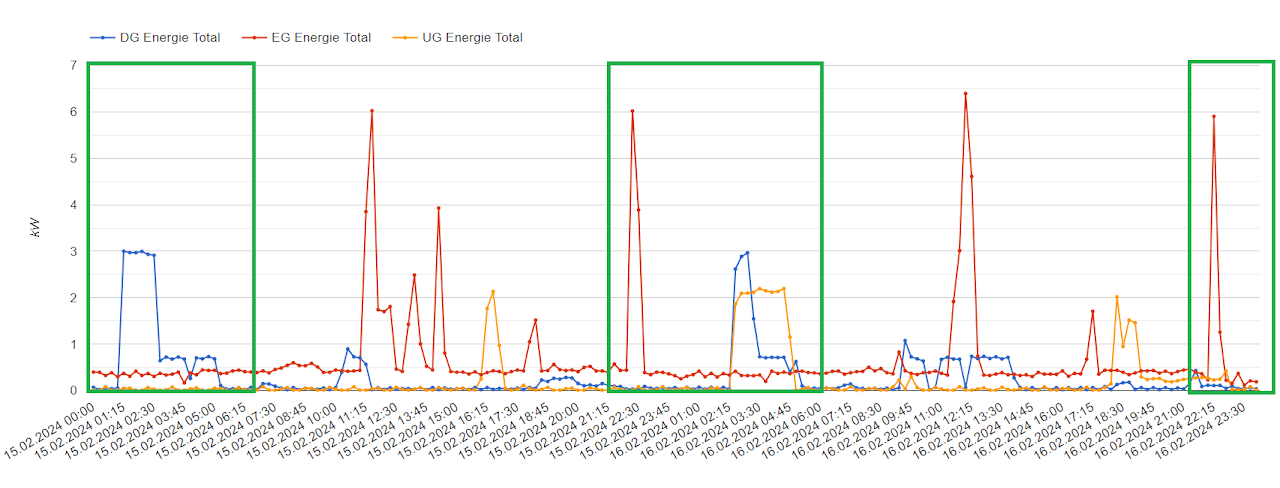
Image: ZEV (association for own consumption) with 3 boilers incl. reheating at night (green rectangles)
Example solar-optimized with reheating with 1 boiler (detailed explanation with images and tabular explanation)
When configuring if/then actions, always check whether the unit displayed is watts or kilowatts.
Relays are connected to boilers and have been given the name "Boiler".
Time until full power is drawn: 20 seconds
Boiler switches on automatically when a minimum temperature is reached: No
Power of boiler EG: 6 kW
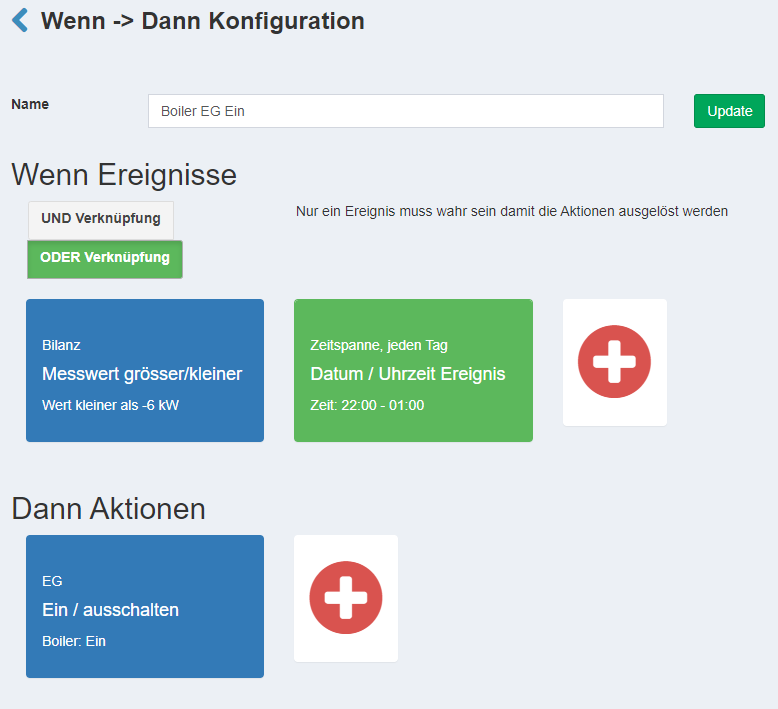
Configuration: Boiler 1 On (EG)
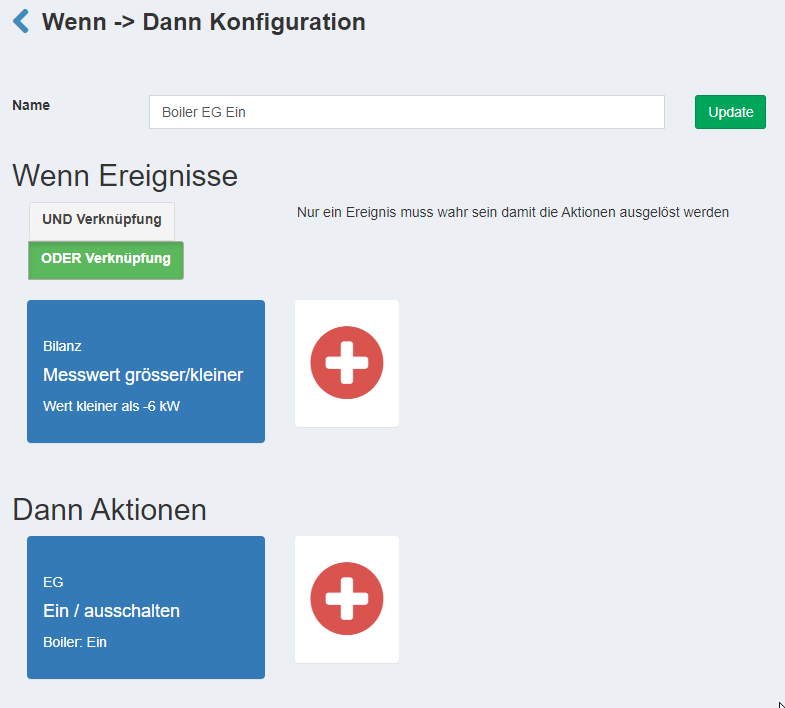
If/then action: Boiler EG On
This if/then action performs the function:
- to switch the boiler on when the balance meter supplies sufficient electricity for more than one minute.
Or
- It is a defined time and the boiler is heated for three hours in any case.

If measured value greater/less (Wenn Messwert grösser/kleiner):
-
Meter: Balance
-
Threshold: below (unter)
-
Power: -6000 watts
-
Minimum time: 1 minute
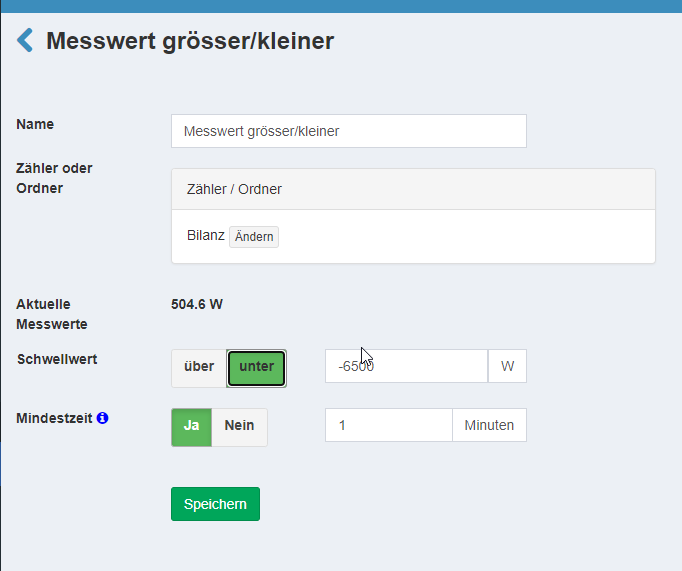
If date & time (Wenn Datum & Uhrzeit):
-
Type: Time span / Every day (Zeitspanne / Jeden Tag)
-
From: 22:00
-
Weekdays: Select all (Alle Wählen)
-
To: 01:00
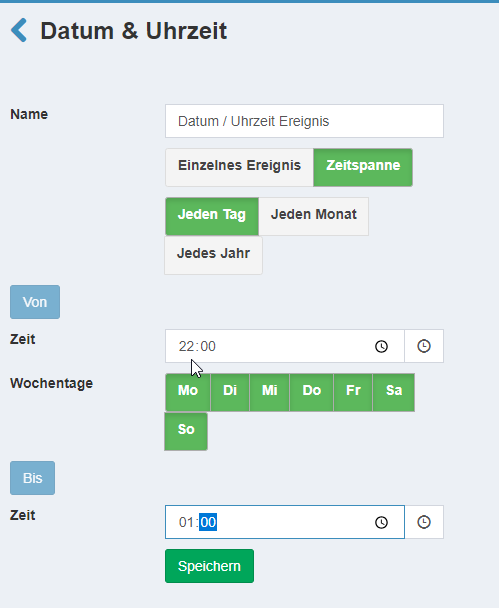
If event (Wenn Ereignis)
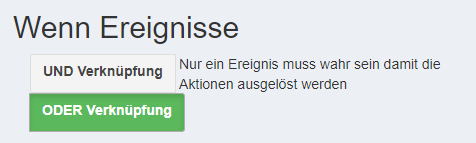
- Type: OR link (Oder Verknüpfung)
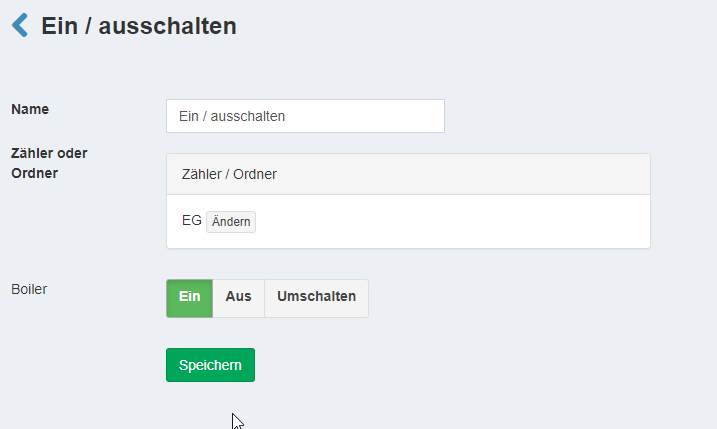
Then switch on / off (Dann Ein / ausschalten)
-
Meter: EG
-
Boiler: On (Ein)
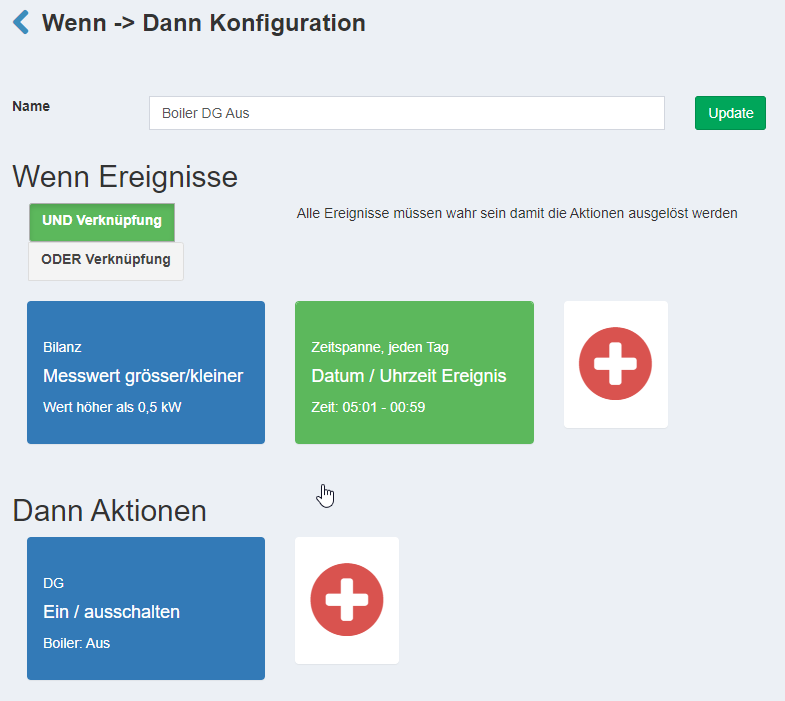
Configuration: Boiler Off tabular view (short)
If/then action: Boiler EG Off
This if/then action performs the function:
-
To switch the boiler off when the balance meter does not supply sufficient electricity for more than three minutes.
-
And
-
When the boiler is not within the defined time period in which it is reheated for three hours in any case.
The configuration is explained below in the tabular view. It is important to note that it is an AND action, the threshold is now above and no longer below, and the times are the opposite of switching on (reheating), offset by 1 minute.
Configuration: Boiler 1 Off (EG)
If/then action: Boiler EG Off
If measured value greater/less (Wenn Messwert grösser/kleiner):
-
Meter: Balance
-
Threshold: above (über)
-
Power: 500 watts
-
Minimum time: 4 minutes
If date & time (Wenn Datum & Uhrzeit):
-
Type: Time span / Every day (Zeitspanne / Jeden Tag)
-
From: 01:01
-
Weekdays: Select all (Alle Wählen)
-
To: 21:59
If event (Wenn Ereignis)
- Type: AND link (Und Verknüpfung)
Then switch on / off (Dann ein- / ausschalten)
-
Meter: EG
-
Boiler: Off (Aus)
Example solar-optimized with reheating with 3 boilers (tabular explanation)
When configuring if/then actions, always check whether the unit displayed is watts or kilowatts
Relays are connected to boilers and have been given the name "Boiler".
Time until full power is drawn: 20 seconds
Boiler switches on automatically when a minimum temperature is reached: No
Power:
-
Boiler EG: 6 kW
-
Boiler DG: 3 kW
-
Boiler UG: 2 kW
To ensure that the boilers are not switched on at the same time, we will build in a delay before each boiler is switched on. The boiler with the shortest delay time has the greatest advantage in using solar energy, as it is switched on first. In this example, we will switch on the boiler with the highest consumption first, so that it has the opportunity to be switched on first after a long period of high consumption, e.g. at midday.
Configuration: Boiler On tabular view (short)
Here we now go into the configuration. A simpler example is explained in detail above.
The tabular presentation makes it quicker to spot the differences on desktop screens and thus also the logic behind them.
Configuration: Boiler 1 On (EG)
If/then action: Boiler EG On
If measured value greater/less (Wenn Messwert grösser/kleiner):
-
Meter: Balance
-
Threshold: below (unter)
-
Power: -6000 watts
-
Minimum time: 1 minute
If date & time (Wenn Datum & Uhrzeit):
-
Type: Time span / Every day (Zeitspanne / Jeden Tag)
-
From: 22:00
-
Weekdays: Select all (Alle wählen)
-
To: 01:00
If event (Wenn Ereignis)
- Type: OR link (Oder Verknüpfung)
Then switch on / off (Dann ein- / ausschalten)
-
Meter: EG
-
Boiler: On (Ein)
Configuration: Boiler 2 On (DG)
If/then action: Boiler DG On
If measured value greater/less (Wenn Messwert grösser/kleiner):
-
Meter: Balance
-
Threshold: below (unter)
-
Power: -3000 watts
-
Minimum time: 2 minutes
If date & time (Wenn Datum & Uhrzeit):
-
Type: Time span / Every day (Zeitspanne / Jeden Tag)
-
From: 01:00
-
Weekdays: Select all (Alle wählen)
-
To: 05:00
If event (Wenn Ereignis)
- Type: OR link (Oder Verknüpfung)
Then switch on / off (Dann ein- / ausschalten)
-
Meter: DG
-
Boiler: On (Ein)
Configuration: Boiler 3 On (UG)
If/then action: Boiler UG On
If measured value greater/less (Wenn Messwert grösser/kleiner):
-
Meter: Balance
-
Threshold: below (unter)
-
Power: -2000 watts
-
Minimum time: 3 minutes
If date & time (Wenn Datum & Uhrzeit):
-
Type: Time span / Every day (Zeitspanne / Jeden Tag)
-
From: 02:00
-
Weekdays: Select all (Alle wählen)
-
To: 06:00
If event (Wenn Ereignis)
- Type: OR link (Oder Verknüpfung)
Then switch on / off (Dann ein- / ausschalten)
-
Meter: UG
-
Boiler: On (Ein)
Configuration: Boiler Off tabular view (short)
Configuration: Boiler 1 Off (EG)
If/then action: Boiler EG Off
If measured value greater/less (Wenn Messwert grösser/kleiner):
-
Meter: Balance
-
Threshold: above (über)
-
Power: 500 watts
-
Minimum time: 4 minutes
If date & time (Wenn Datum & Uhrzeit):
-
Type: Time span / Every day (Zeitspanne / Jeden Tag)
-
From: 01:01
-
Weekdays: Select all (Alle Wählen)
-
To: 21:59
If event (Wenn Ereignis)
- Type: AND link (Und Verknüpfung)
Then switch on / off (Dann ein- / ausschalten)
-
Meter: EG
-
Boiler: Off (Aus)
Configuration: Boiler 2 Off (DG)
If/then action: Boiler DG Off
If measured value greater/less (Wenn Messwert grösser/kleiner):
-
Meter: Balance
-
Threshold: above (über)
-
Power: 500 watts
-
Minimum time: 5 minutes
If date & time (Wenn Datum & Uhrzeit):
-
Type: Time span / Every day (Zeitspanne / Jeden Tag)
-
From: 05:01
-
Weekdays: Select all (Alle Wählen)
-
To: 00:59
If event (Wenn Ereignis)
- Type: AND link (Und Verknüpfung)
Then switch on / off (Dann ein- / ausschalten)
-
Meter: DG
-
Boiler: Off (Aus)
Configuration: Boiler 3 Off (UG)
If/then action: Boiler UG Off
If measured value greater/less (Wenn Messwert grösser/kleiner):
-
Meter: Balance
-
Threshold: above (über)
-
Power: 500 watts
-
Minimum time: 6 minutes
If date & time (Wenn Datum & Uhrzeit):
-
Type: Time span / Every day (Zeitspanne / Jeden Tag)
-
From: 06:01
-
Weekdays: Select all (Alle Wählen)
-
To: 01:59
If event (Wenn Ereignis)
- Type: AND link (Und Verknüpfung)
Then switch on / off (Dann ein- / ausschalten)
-
Meter: UG
-
Boiler: Off (Aus)
Example solar-optimized without reheating with 1 boiler
Same as the "Example solar-optimized without reheating with 3 boilers (tabular explanation)" below. You only need to make the configuration for one boiler.
Example solar-optimized without reheating with 3 boilers (tabular explanation)
When configuring if/then actions, always check whether the unit displayed is watts or kilowatts.
Relays are connected to boilers and have been given the name "Boiler".
Time until full power is drawn: 20 seconds
Boiler switches on automatically when a minimum temperature is reached: Yes
Power:
-
Boiler EG: 6 kW
-
Boiler DG: 3 kW
-
Boiler UG: 2 kW
To ensure that the boilers are not switched on at the same time, we will build in a delay before each boiler is switched on. The boiler with the shortest delay time has the greatest advantage in using solar energy, as it is switched on first. In this example, we will switch on the boiler with the highest consumption first, so that it has the opportunity to be switched on first after a long period of high consumption, e.g. at midday.
Configuration: Boiler On tabular view (short)
Here we now go into the configuration. A simpler example is explained in detail above.
The tabular presentation makes it quicker to spot the differences on desktop screens and thus also the logic behind them.
Configuration: Boiler 1 On (EG)
If/then action: Boiler EG On
If measured value greater/less (Wenn Messwert grösser/kleiner):
-
Meter: Balance
-
Threshold: below (unter)
-
Power: -6000 watts
-
Minimum time: 1 minute
Then switch on / off (Dann ein- / ausschalten)
-
Meter: EG
-
Boiler: On (Ein)
Configuration: Boiler 2 On (DG)
If/then action: Boiler DG On
If measured value greater/less (Wenn Messwert grösser/kleiner):
-
Meter: Balance
-
Threshold: below (unter)
-
Power: -3000 watts
-
Minimum time: 2 minutes
Then switch on / off (Dann ein- / ausschalten)
-
Meter: DG
-
Boiler: On (Ein)
Configuration: Boiler 3 On (UG)
If/then action: Boiler UG On
If measured value greater/less (Wenn Messwert grösser/kleiner):
-
Meter: Balance
-
Threshold: below (unter)
-
Power: -2000 watts
-
Minimum time: 3 minutes
Then switch on / off (Dann ein- / ausschalten)
-
Meter: UG
-
Boiler: On (Ein)
Configuration: Boiler Off tabular view (short)
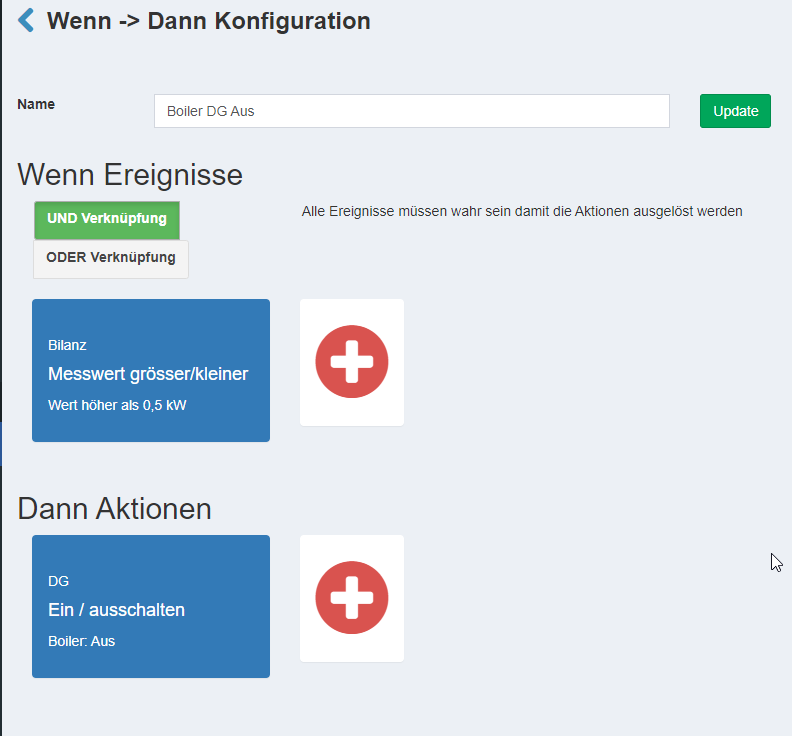
Configuration: Boiler 1 Off (EG)
If/then action: Boiler EG Off
If measured value greater/less (Wenn Messwert grösser/kleiner):
-
Meter: Balance
-
Threshold: above (über)
-
Power: 500 watts
-
Minimum time: 4 minutes
Then switch on / off (Dann ein- / ausschalten)
-
Meter: EG
-
Boiler: Off (Aus)
Configuration: Boiler 2 Off (DG)
If/then action: Boiler DG Off
If measured value greater/less (Wenn Messwert grösser/kleiner):
-
Meter: Balance
-
Threshold: above (über)
-
Power: 500 watts
-
Minimum time: 5 minutes
Then switch on / off (Dann ein- / ausschalten)
-
Meter: DG
-
Boiler: Off (Aus)
Configuration: Boiler 3 Off (UG)
If/then action: Boiler UG Off
If measured value greater/less (Wenn Messwert grösser/kleiner):
-
Meter: Balance
-
Threshold: above (über)
-
Power: 500 watts
-
Minimum time: 6 minutes
Then switch on / off (Dann ein- / ausschalten)
-
Meter: UG
-
Boiler: Off (Aus)
Example solar-optimized without reheating with 1 boiler and booster / legionella
When configuring if/then actions, always check whether the unit displayed is watts or kilowatts.
Relays are connected to boilers and have been given the name "Boiler".
The MOSFET is configured according to the inputs and outputs and is named "Booster und Legionelle".
Time until full power is drawn: 20 seconds
Boiler switches on automatically when a minimum temperature is reached: Yes
Power:
- Boiler: 7 kW
Configuration: Legionella On
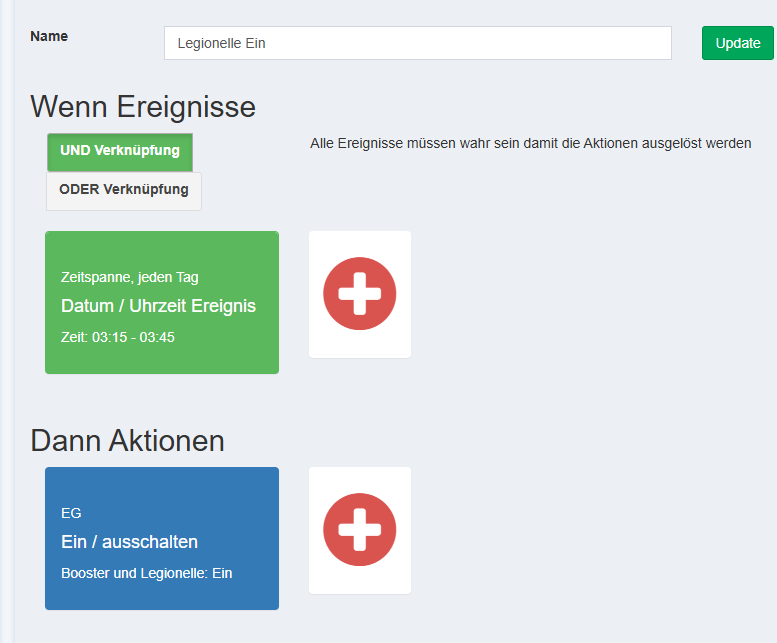
This only needs to be configured if legionella protection is to be activated, e.g. once a week on Friday from 3:15. A duration is specified here, which is 30 minutes (default), so that we can ensure that the state is set to "On" even if a data packet is lost.
If/then action: Legionelle On
If date & time (Wenn Datum & Uhrzeit):
-
Type: Time span / Every day (Zeitspanne / Jeden Tag)
-
From: 03:15
-
Weekdays: Select all (Alle Wählen)
-
To: 03:45
Then switch on / off (Dann ein- / ausschalten)
-
Meter: EG
-
Output Booster und Legionelle: On (Ein)
-
Minimum time: No
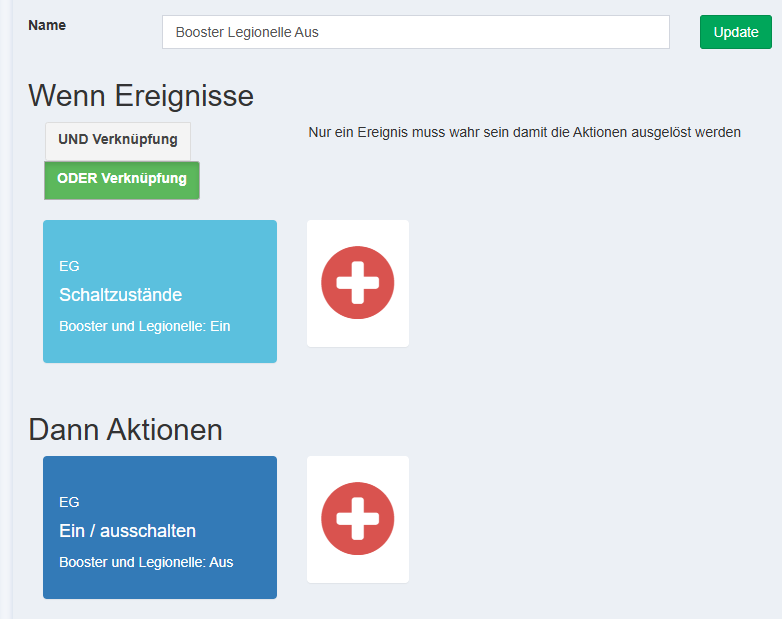
Configuration: Booster and legionella Off
This corresponds to the time after which the booster (activated manually by the user in the smart-me GUI) or the legionella switching (configured as above) should be switched off automatically because the boiler has then warmed up, e.g. 90 minutes.
If/then action: Booster Legionelle Off
If switching states (Wenn Schaltzustände):
-
Meter: EG
-
Output Booster und Legionelle: On (Ein)
-
Minimum time: Yes, 90 minutes
Then switch on / off (Dann ein- / ausschalten)
-
Meter: EG
-
Output Booster und Legionelle: Off (Aus)
Configuration: Boiler On tabular view (short)
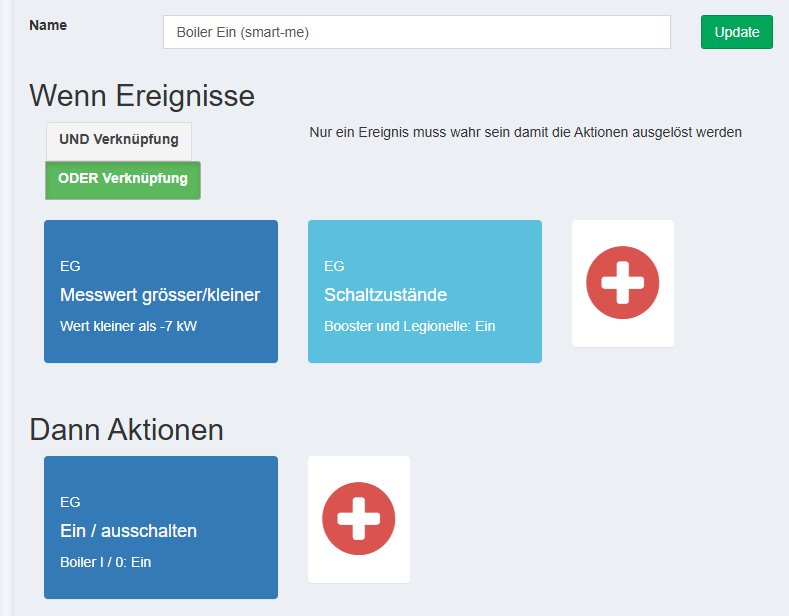
Configuration: Boiler On
If/then action: Boiler On
If measured value greater/less (Wenn Messwert grösser/kleiner):
-
Meter: Balance
-
Threshold: below (unter)
-
Power: -7000 watts
-
Minimum time: 1 minute
If switching states (Wenn Schaltzustände):
-
Meter: EG
-
Output Booster und Legionelle: On (Ein)
-
Minimum time: No
If event (Wenn Ereignis)
- Type: OR link (ODER Verknüpfung)
Then switch on / off (Dann ein- / ausschalten)
-
Meter: EG
-
Boiler: On (Ein)
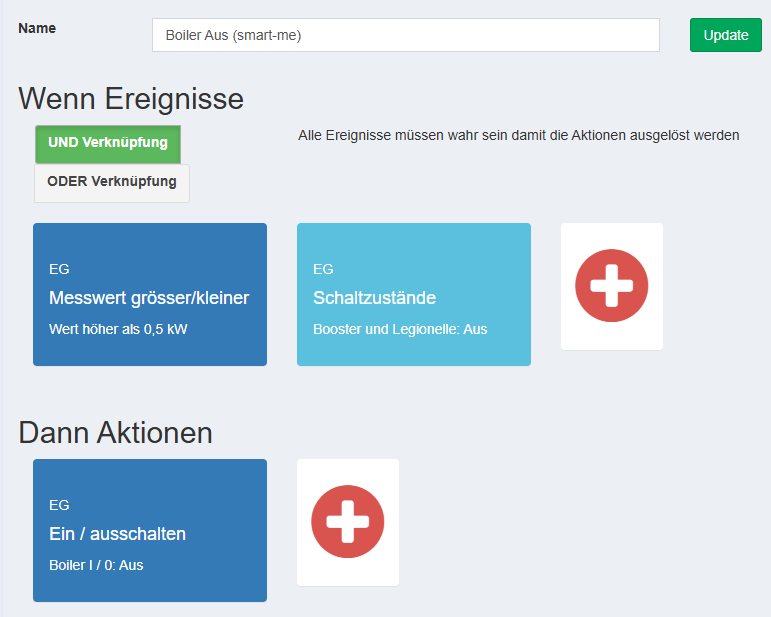
Configuration: Boiler Off tabular view (short)
Configuration: Boiler 1 Off (EG)
If/then action: Boiler EG Off
If measured value greater/less (Wenn Messwert grösser/kleiner):
-
Meter: Balance
-
Threshold: above (über)
-
Power: 500 watts
-
Minimum time: 1 minute
If switching states (Wenn Schaltzustände):
-
Meter: EG
-
Output Booster und Legionelle: Off (Aus)
-
Minimum time: No
If event (Wenn Ereignis)
- Type: AND link (UND Verknüpfung)
Then switch on / off (Dann ein- / ausschalten)
-
Meter: EG
-
Boiler: Off (Aus)
Example solar-optimized with reheating and booster button with 1 boiler
Same as the "Example solar-optimized with reheating and booster button with 3 boilers (tabular explanation)" below. You only need to make the configuration for one boiler.
Example solar-optimized with reheating and booster button with 3 boilers (tabular explanation)
When configuring if/then actions, always check whether the unit displayed is watts or kilowatts.
Relays are connected to boilers and have been given the name "Boiler".
The MOSFET is configured according to the inputs and outputs and is named "Boiler Booster".
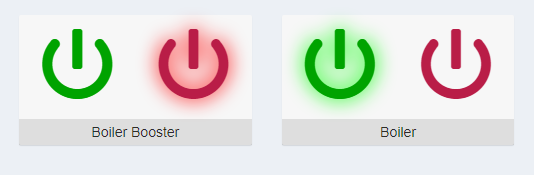
Time until full power is drawn: 20 seconds
Boiler switches on automatically when a minimum temperature is reached: Yes
Power:
-
Boiler EG: 6 kW
-
Boiler DG: 3 kW
-
Boiler UG: 2 kW
To ensure that the boilers are not switched on at the same time, we will build in a delay before each boiler is switched on. The boiler with the shortest delay time has the greatest advantage in using solar energy, as it is switched on first. In this example, we will switch on the boiler with the highest consumption first, so that it has the opportunity to be switched on first after a long period of high consumption, e.g. at midday.
Configuration: Boiler On tabular view (short)
Here we now go into the configuration. A simpler example is explained in detail above.
The tabular presentation makes it quicker to spot the differences on desktop screens and thus also the logic behind them.
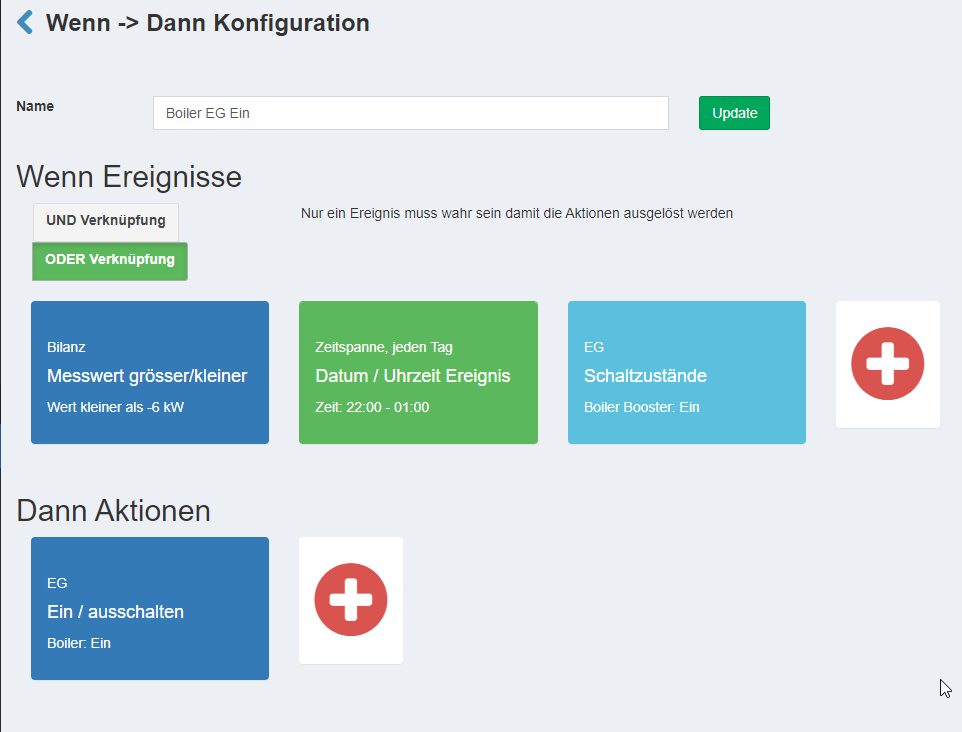
Configuration: Boiler 1 On (EG)
If/then action: Boiler EG On
If measured value greater/less (Wenn Messwert grösser/kleiner):
-
Meter: Balance
-
Threshold: below (unter)
-
Power: -6000 watts
-
Minimum time: 1 minute
If date & time (Wenn Datum & Uhrzeit):
-
Type: Time span / Every day (Zeitspanne / Jeden Tag)
-
From: 22:00
-
Weekdays: Select all (Alle Wählen)
-
To: 01:00
If switching states (Wenn Schaltzustände):
-
Meter: EG
-
Output Boiler Booster: On (Ein)
-
Minimum time: No
If event (Wenn Ereignis)
- Type: OR link (Oder Verknüpfung)
Then switch on / off (Dann ein- / ausschalten)
-
Meter: EG
-
Boiler Booster: Select nothing (Nichts wählen)
-
Boiler: On (Ein)
Configuration: Boiler 2 On (DG)
If/then action: Boiler DG On
If measured value greater/less (Wenn Messwert grösser/kleiner):
-
Meter: Balance
-
Threshold: below (unter)
-
Power: -3000 watts
-
Minimum time: 2 minutes
If date & time (Wenn Datum & Uhrzeit):
-
Type: Time span / Every day (Zeitspanne / Jeden Tag)
-
From: 01:00
-
Weekdays: Select all (Alle Wählen)
-
To: 05:00
If switching states (Wenn Schaltzustände):
-
Meter: DG
-
Output Boiler Booster: On (Ein)
-
Minimum time: No
If event (Wenn Ereignis)
- Type: OR link (Oder Verknüpfung)
Then switch on / off (Dann ein- / ausschalten)
-
Meter: DG
-
Boiler Booster: Select nothing (Nichts wählen)
-
Boiler: On (Ein)
Configuration: Boiler 3 On (UG)
If/then action: Boiler UG On
If measured value greater/less (Wenn Messwert grösser/kleiner):
-
Meter: Balance
-
Threshold: below (unter)
-
Power: -2000 watts
-
Minimum time: 3 minutes
If date & time (Wenn Datum & Uhrzeit):
-
Type: Time span / Every day (Zeitspanne / Jeden Tag)
-
From: 02:00
-
Weekdays: Select all (Alle Wählen)
-
To: 06:00
If switching states (Wenn Schaltzustände):
-
Meter: UG
-
Output Boiler Booster: On (Ein)
-
Minimum time: No
If event (Wenn Ereignis)
- Type: OR link (Oder Verknüpfung)
Then switch on / off (Dann ein- / ausschalten)
-
Meter: UG
-
Boiler Booster: Select nothing (Nichts wählen)
-
Boiler: On (Ein)
Configuration: Boiler Off tabular view (short)
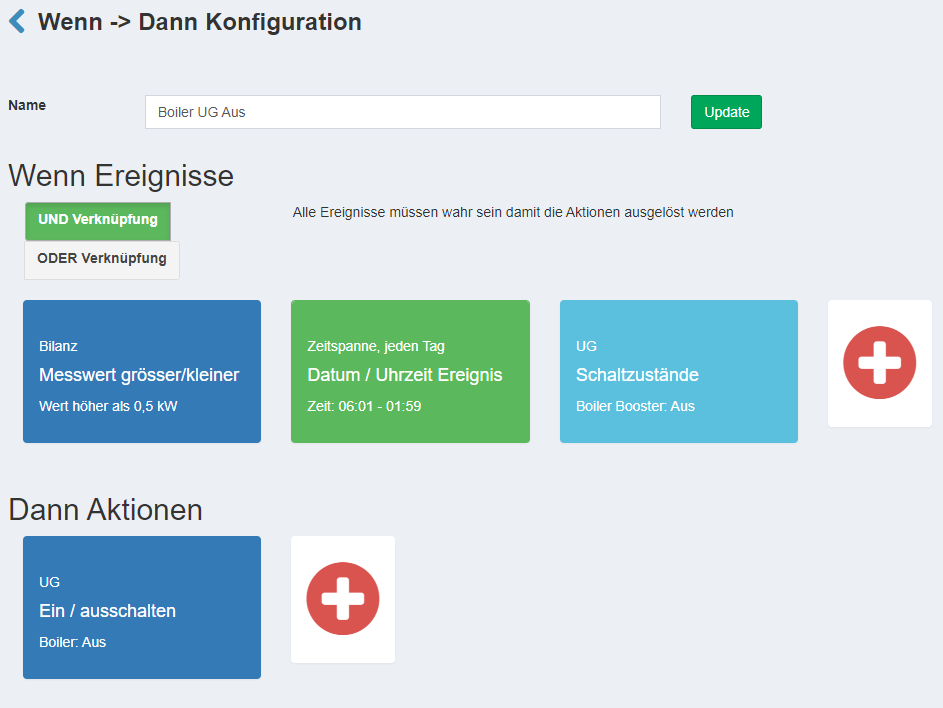
Configuration: Boiler 1 Off (EG)
If/then action: Boiler EG Off
If measured value greater/less (Wenn Messwert grösser/kleiner):
-
Meter: Balance
-
Threshold: above (über)
-
Power: 500 watts
-
Minimum time: 4 minutes
If date & time (Wenn Datum & Uhrzeit):
-
Type: Time span / Every day (Zeitspanne / Jeden Tag)
-
From: 01:01
-
Weekdays: Select all (Alle Wählen)
-
To: 21:59
If switching states (Wenn Schaltzustände):
-
Meter: EG
-
Output Boiler Booster: Off (Aus)
-
Minimum time: No
If event (Wenn Ereignis)
- Type: AND link (Und Verknüpfung)
Then switch on / off (Dann ein- / ausschalten)
-
Meter: EG
-
Boiler: Off (Aus)
Configuration: Boiler 2 Off (DG)
If/then action: Boiler DG Off
If measured value greater/less (Wenn Messwert grösser/kleiner):
-
Meter: Balance
-
Threshold: above (über)
-
Power: 500 watts
-
Minimum time: 5 minutes
If date & time (Wenn Datum & Uhrzeit):
-
Type: Time span / Every day (Zeitspanne / Jeden Tag)
-
From: 05:01
-
Weekdays: Select all (Alle Wählen)
-
To: 00:59
If switching states (Wenn Schaltzustände):
-
Meter: EG
-
Output Boiler Booster: Off (Aus)
-
Minimum time: No
If event (Wenn Ereignis)
- Type: AND link (Und Verknüpfung)
Then switch on / off (Dann ein- / ausschalten)
-
Meter: DG
-
Boiler: Off (Aus)
Configuration: Boiler 3 Off (UG)
If/then action: Boiler UG Off
If measured value greater/less (Wenn Messwert grösser/kleiner):
-
Meter: Balance
-
Threshold: above (über)
-
Power: 500 watts
-
Minimum time: 6 minutes
If date & time (Wenn Datum & Uhrzeit):
-
Type: Time span / Every day (Zeitspanne / Jeden Tag)
-
From: 06:01
-
Weekdays: Select all (Alle Wählen)
-
To: 01:59
If switching states (Wenn Schaltzustände):
-
Meter: EG
-
Output Boiler Booster: Off (Aus)
-
Minimum time: No
If event (Wenn Ereignis)
- Type: AND link (Und Verknüpfung)
Then switch on / off (Dann ein- / ausschalten)
-
Meter: UG
-
Boiler: Off (Aus)
Configuration: Boiler Booster Reset tabular view (short)
This section is optional. If it is not configured, this means that the booster button is never reset and is always valid.
In this example, the "Boiler Booster" button is set back to "off" after 300 minutes, i.e. 5 hours.
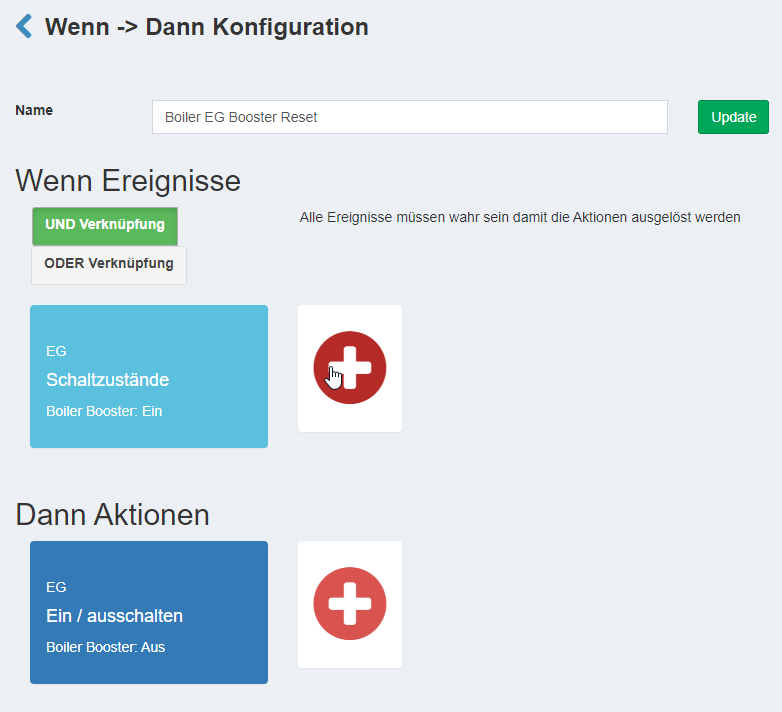
Configuration: Boiler 1 Booster Reset (EG)
If/then action: Boiler EG Booster Reset
If switching states (Wenn Schaltzustände):
-
Meter: EG
-
Output Boiler Booster: On (Ein)
-
Minimum time: 300 minutes
Then switch on / off (Dann ein- / ausschalten)
-
Meter: EG
-
Boiler: Off (Aus)
Configuration: Boiler 2 Booster Reset (DG)
If/then action: Boiler DG Booster Reset
If switching states (Wenn Schaltzustände):
-
Meter: DG
-
Output Boiler Booster: On (Ein)
-
Minimum time: 300 minutes
Then switch on / off (Dann ein- / ausschalten)
-
Meter: DG
-
Boiler: Off (Aus)
Configuration: Boiler 3 Booster Reset (UG)
If/then action: Boiler UG Booster Reset
If switching states (Wenn Schaltzustände):
-
Meter: UG
-
Output Boiler Booster: On (Ein)
-
Minimum time: 300 minutes
Then switch on / off (Dann ein- / ausschalten)
-
Meter: UG
-
Boiler: Off (Aus)