Alarms
Alarms can be set up to receive an email when a meter no longer has a connection to our cloud.
Prerequisite
You need a smart-me Limited or Professional subscription to use this function.
Configuring the alarms
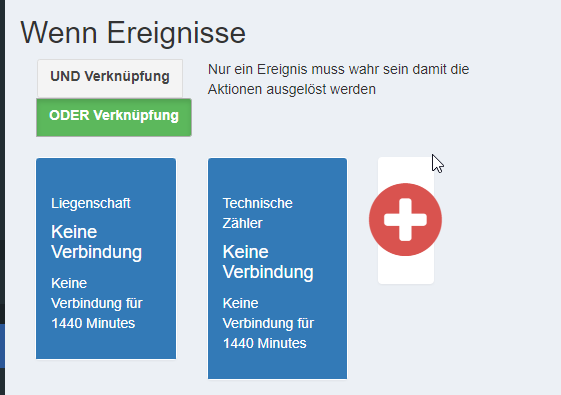
If event / No connection
We go into this in more detail under If / Then Actions.
You can set up an if event that triggers when a meter no longer has a connection to the cloud. The following settings must be made:
-
If a folder is selected, all associated meters are monitored. If you select several folders, please choose OR (ODER).
-
If a meter is selected, only this meter is monitored.
Definition of the downtime:
-
General: The 1440 minutes (1 day) prevent a false alarm in the event of a short internet interruption for smart-me meters.
-
Pico: When setting up alarms to check Picos that are connected to a backend, it can make sense to shorten this time, e.g. to 15 or 60 minutes. This prevents a station from being out of service for too long.
Then action / Alarm
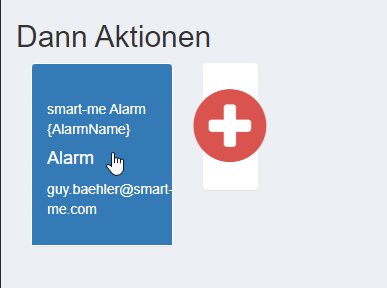
Once the if events have occurred, an email is sent. The following settings must be made:
-
Name of the alarm
-
Subject (Subjekt): subject line of the alarm emails
-
Message (Nachricht): text contained in the alarm email
Note: We recommend only adding the email to the then action and leaving the rest as it is. If you have several properties, we recommend entering the name of the account in the subject so that you always know which account the alarm comes from.
If the alarm is to be sent to several email addresses, a separate then action must be created for each individual email.
How often is an alert email sent?
The email is only sent once, when the status deteriorates. If further meters fail before the first one is back online, no further email is sent.
Once the problem has been resolved, we recommend checking in the If / Then Actions whether "Last triggered" ("Zuletzt ausgelöst") reads "never" ("nie"). If a point in time is shown there, there are still meters that are offline.
If you want to receive more than one email, you have to set up two alarms. The first, for example, with 1440 minutes and the second with 7200 minutes. This way, for example, an email that went unnoticed can be sent a second time.

The entire infrastructure is now ready for building the billing on top of it.