Virtual Meters
Virtual meters let you perform mathematical operations across several physical meters. They are mostly used together with smart-me Billing.
Prerequisite
You need Professional licences for the real meters from which you create the virtual meter, and for the virtual meter itself.
Purpose
Virtual meters are used in Billing to charge the solar tariff.
-
They are used to calculate the sum of all consumers (total consumption in the solar tariff).
-
If the solar systems in a property are metered separately, you can calculate their sum.
Visualizations
-
If no balance meter is installed in a property, some visualizations may need the total consumption to be calculated.
-
If a property has separately metered solar systems and you want a visualization that includes solar.
Limitation
In Billing, you cannot assign virtual meters to a billing unit.
- You can use virtual meters for the virtual tariff structures in Billing. However, billing with virtually calculated meters is not allowed. For this reason, Billing does not let you select a virtual meter.
Creating a virtual meter
To create a virtual meter, proceed as follows:
-
Log in to the smart-me website.
-
Click Configuration (Konfiguration)
-
Select Virtual Meters (Virtuelle Zähler)
-
Click Add (Hinzufügen)
-
Enter a name for the virtual meter.
-
Click in the formula text field to display all available meters.
-
Then insert an operator and confirm it with Enter (e.g. "+")
-
Add all the meters you need and connect them with the appropriate operators.
Note: If you create the virtual meter as a total consumption meter for Billing, we recommend naming it Total consumption (Gesamtverbrauch).
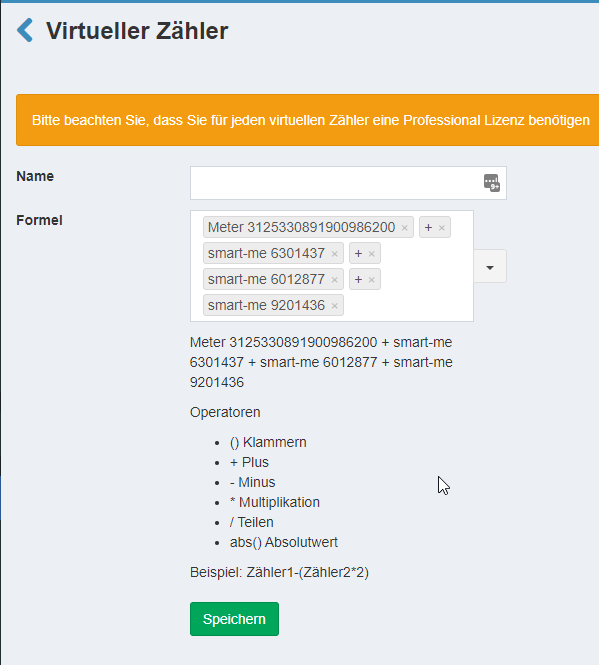
Supported operators
-
() Brackets
-
- Plus
-
− Minus
-
* Multiplication
-
/ Division
-
abs() Absolute value
Creating a total consumption meter for the solar tariff and battery tariff
The Sum all electricity meters (Summiere alle Stromzähler) function is useful when there are many meters. It adds up all the meters.
-
Enter a name for the virtual meter.
-
Next to Formula (Formel), select the down arrow on the right.
-
Select Sum all electricity meters (Summieren alle Stromzähler).
-
Remove any meters you do not need (e.g. solar or balance meters). Remove both the meters and their "+" operators.
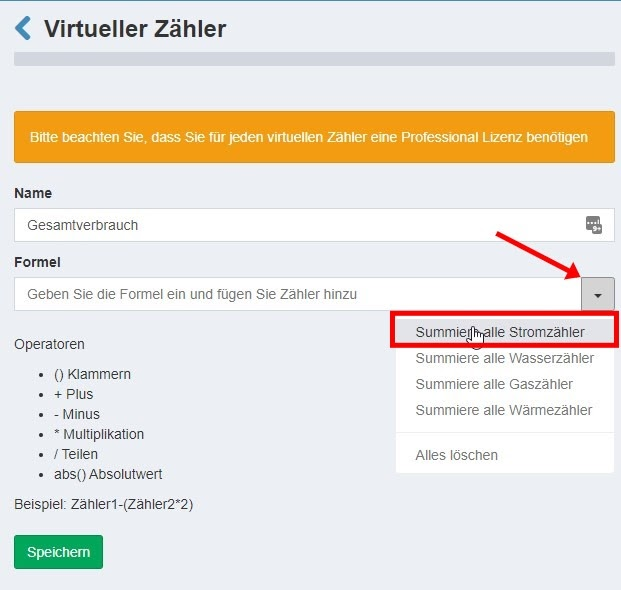
Adding the correct meters to the virtual total consumption
-
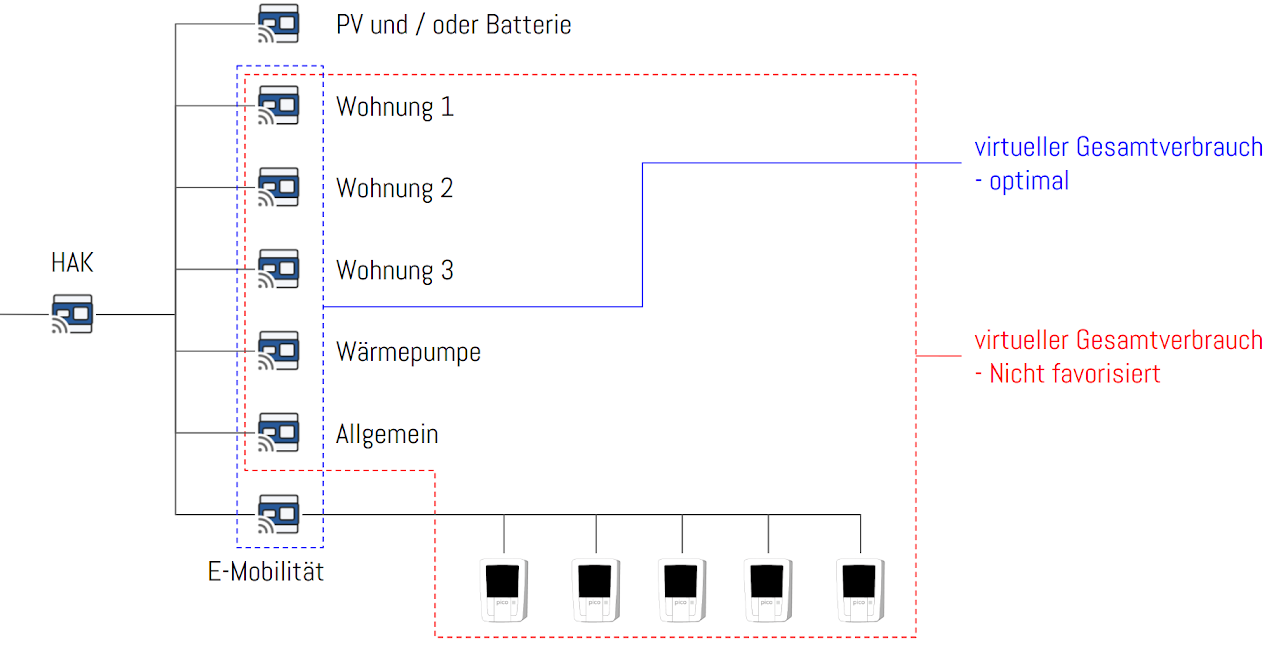
Make sure that the sum of the meters covers exactly 100% of the power consumed.
-
For devices connected in series, only the devices closer to the sub-distribution board or the building connection count. (Example: e-mobility) If you reference the outgoing circuit, remove the charging stations behind it from the sum.