Electricity and multiple heating systems
Configuration without automatic electricity billing
Advantage:
- No need to enter tenant contracts twice
Disadvantage:
-
No automatic billing for electricity
-
Electricity tariffs must be entered multiple times (per property)
Electricity with or without e-mobility and multi-energy with several buildings and individual heating systems. (Housing development)
Relevant for ZEVs (associations for own consumption) with electricity meters, multi-energy meters, several buildings and optionally charging stations.
For sites with several buildings and individual heating systems, one property must be created per heating system. So if three buildings have different heating systems, the configuration must be carried out according to 3c.
Note: If only one building has an individual heating system and the other two share a central heating system, two properties are sufficient, grouping the consumers accordingly.
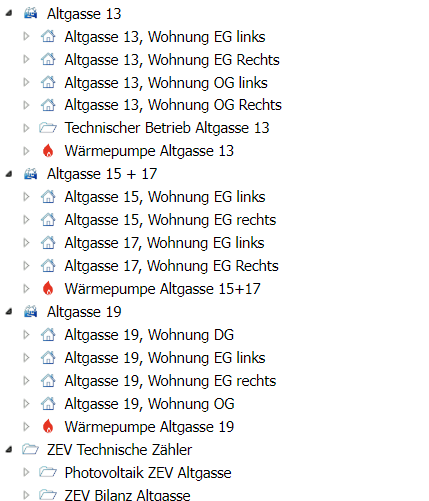
Example: Three buildings named Altgasse 13, Altgasse 15+17, Altgasse 19. Each has its own heat pump for heating and domestic hot water preparation.
3c. Basic structure
Assigning the meters
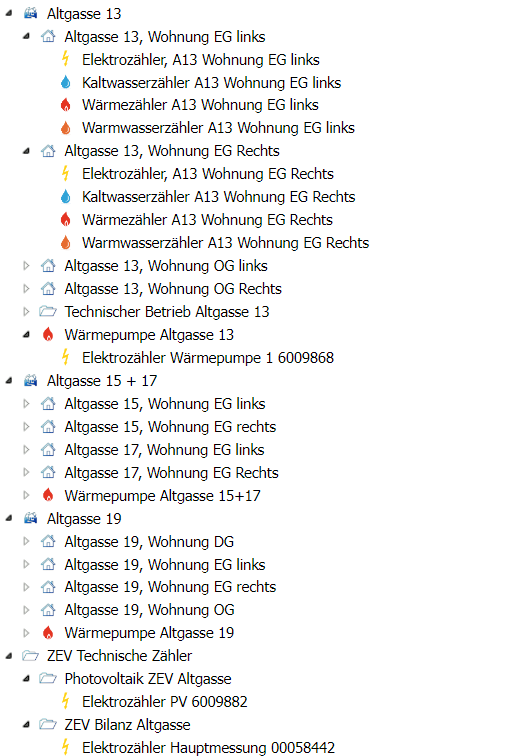
Use drag and drop to add the relevant meters to the nodes.
Important information on the assignment:
Electricity / heat / water
Only assign metering points directly to billing units if the invoice recipient will later have to pay 100% of the consumption.
If you only want to assign meters to part of an individual billing unit, move the meter into a node within the "Technical meters" ("Technischen Zähler") node.
Later, such a meter can be distributed by percentage in Billing.
Examples:
-
General meter
-
Heat meter of a floor that serves 4 billing units
Charging stations with smart-me Pico / Zaptec / Easee
Do not assign charging stations directly to apartments; instead, create a separate billing unit for the charging station. This makes tenant changes easier to handle.
Charging stations from other manufacturers
Charging stations from other manufacturers are not managed or billed directly in smart-me. In this case, create a node for the e-mobility outgoing circuit and assign the outgoing circuit meter to the node. This gives you the total consumption of all charging stations.
3c. Detailed structure with meters
Finally, create the alarms for a connection failure.
This way, you will notice early if a meter fails and minimise the resulting gap in the measurement data.
Configuration with automatic electricity billing
Advantage:
-
Automatic billing for electricity
-
No duplicate entry of electricity tariffs
Disadvantage:
- Tenant contracts must be entered multiple times
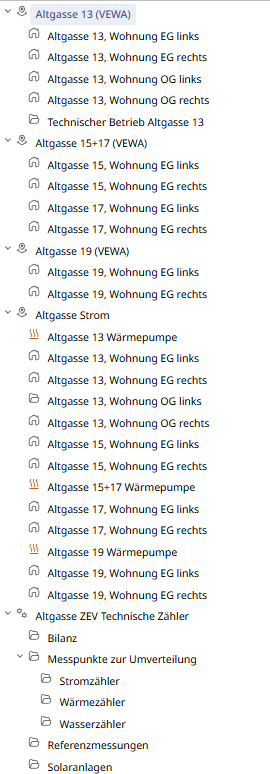
For this configuration, an additional property must be created for electricity only, containing all apartments of the three buildings.
Only the electricity meters are assigned in this property.
Finally, create the alarms for a connection failure.
This way, you will notice early if a meter fails and minimise the resulting gap in the measurement data.