Property with electricity only
Electricity only, with or without e-mobility, in single buildings or housing developments
Relevant for ZEVs (associations for own consumption) with electricity meters and optional charging stations.
Folder structure for smart-me Billing electricity
Folder structure: a two-level structure is mandatory.
This is where a billing is set up. It contains all apartments, rooms and parking spaces as subfolders, together with their relevant electricity meters.
-
1 folder for the property (e.g. Altgasse ZEV)
- 1 subfolder per billing unit, i.e. per apartment or invoice recipient. Our suggestion for the folder name
Naming billing units (tips):
-
-
ZEV with one building: apartment name (e.g. APT UF left, APT UF, right, etc....)
-
ZEV with several buildings: building name apartment name (e.g. Altgasse 13 APT UF left, Altgasse13 APT UF, right, etc....)
-
3a. Basic structure
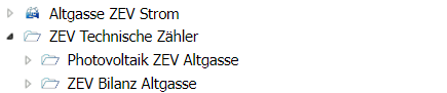
Assigning the meters
Use drag and drop to add the relevant meters to the nodes.
Important information on the assignment:
Electricity / heat / water
Only assign metering points directly to billing units if the invoice recipient will later have to pay 100% of the consumption.
If you only want to assign part of a meter to an individual billing unit, move the meter into a node within the "Technical meters" ("Technische Zähler") node.
Such a meter can later be distributed by percentage in Billing.
Examples:
-
General meter
-
Heat meter of a floor that serves 4 billing units
Charging stations with smart-me Pico / Zaptec / Easee
Do not assign charging stations directly to apartments; instead, create a separate billing unit for the charging station. This makes tenant changes easier to handle.
Charging stations from other manufacturers
Charging stations from other manufacturers are not managed or billed directly in smart-me. In this case, create a node for the e-mobility outgoing feeder as a billing unit and assign the feeder meter to the node. This gives you the total consumption for all charging stations.
3a. Detailed structure with meters
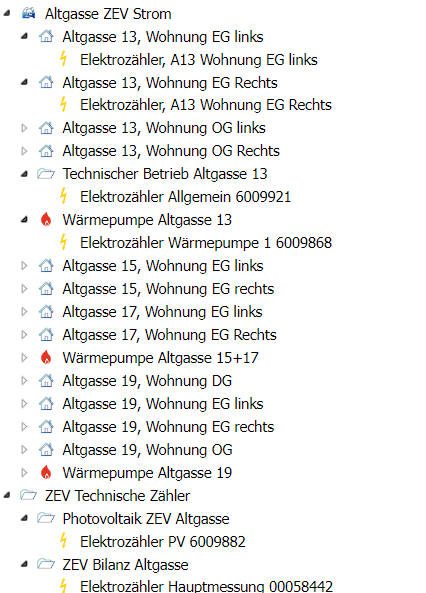
Finally, create the alarms for a connection failure.
This way you will notice early if a meter fails and minimize the resulting gap in the measurement data.