Define electrical tariffs
Set the electricity price
In the video on the right, Guy explains the basics of how electricity prices are generally composed.
You can now also use our online electricity tariff calculator, which helps you along and is based on this explanation.
smart-me electricity tariff calculator
smart-me Billing: setting ZEV prices, explained by Guy.
Attention: The video was recorded with an old version of the Excel file, which still contains an error in the formulas. The Excel file has since been corrected.
Example setting prices in the ZEV.xlsx
Configure electricity tariffs
In smart-me Billing, you can work either with the electricity tariffs or with virtual tariffs. The solution with electricity tariffs is suitable exclusively for implementing pure grid power systems. In all other cases, the virtual tariffs must be used.
1.Get the tariff sheet from your energy supplier
Your energy supplier's tariff sheet is available online on its website months before the start of the new tariff period.
Also find out exactly which tariff you purchase from the energy supplier:
-
Green, blue, grey or other versions
-
Single tariff, dual tariff or dynamic.
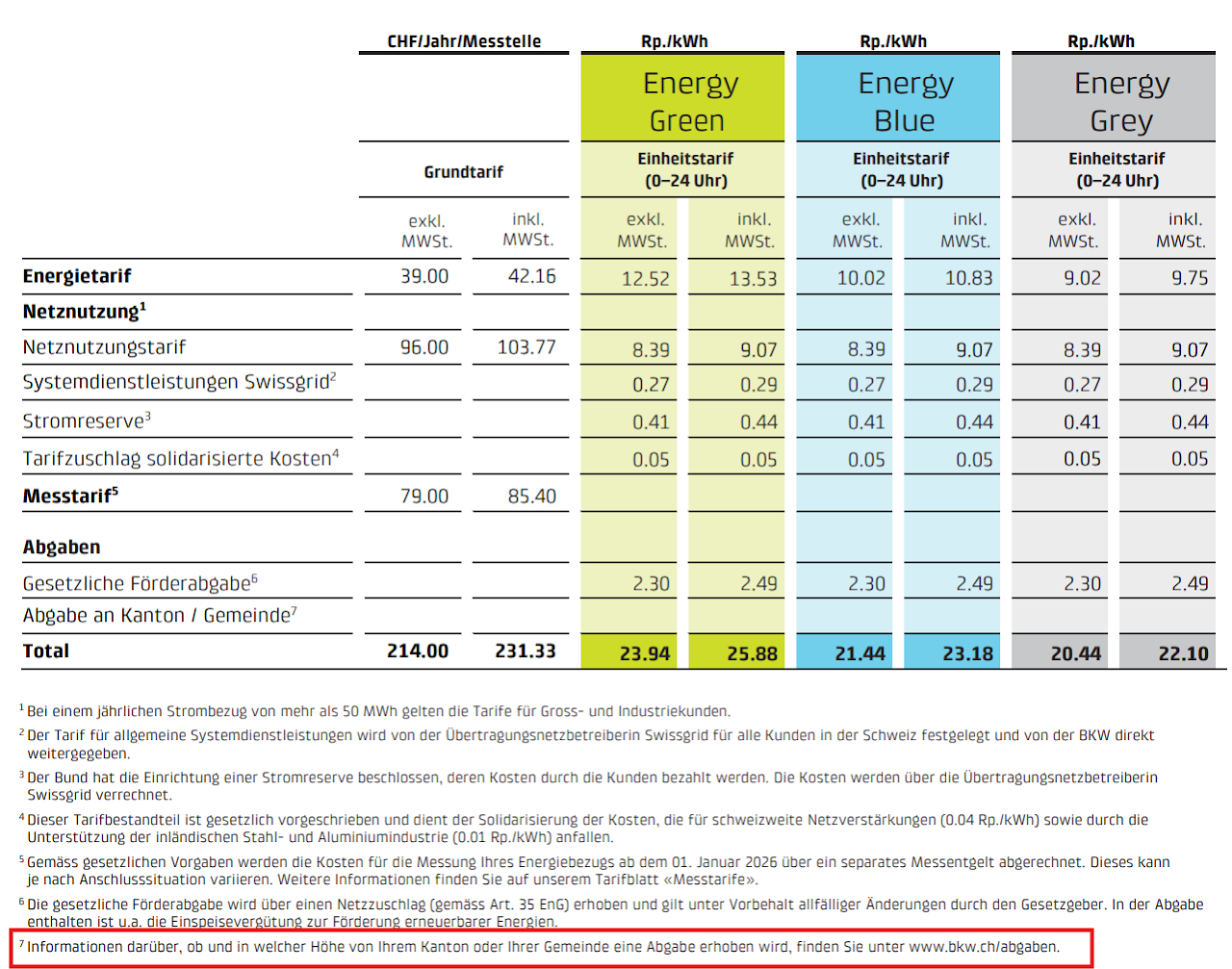
Reading the tariff sheet:
The relevant information is sometimes somewhat scattered. The tariff sheet itself usually consists of 4 sections:
-
Energy prices
-
Grid usage prices
-
Metering fees
-
Public levies
The public levies in particular are not fully listed on the tariff sheet. Municipal levies differ from municipality to municipality and are recorded in a separate tariff sheet. In 99% of cases, the link can be found in the footnote of the tariff sheet.
Obtain this value for your tariff setup via the link printed on the tariff sheet.
It is usually also a Rp. / kWh value, but can also be stated as a % of grid usage (components vary).
2. Choose the solar tariff calculation to use for your (v)ZEV
You can choose between two basic approaches:
-
Flat-rate method at 80% of the standard grid product It is important here that the flat-rate method automatically covers all other costs. No costs may be charged for metering, billing and management of the ZEV electricity sales.
No costs may be charged here for metering the ZEV, or for administration and billing of the ZEV. The energy supplier's meter fee for the main meter of the ZEV may not be charged separately on top here.
-
-
Variant 1: Grid power charged 1:1, solar power at 80% of the basic costs and 80% of the grid power purchase price This variant is suitable for optimising profit within the ZEV, as long as occupancy of the rental units is high. This method is not suitable if large industrial consumers are in the same building and a multi-tariff system is in place. Best solution for multi-tariff systems.
-
Variant 2: Grid power 1:1, solar power at 80% of the Elcom reference price (use if the energy supplier has dynamic tariffs) This variant is suitable for all ZEVs without large industrial consumers and is the simplest to implement. Better option with frequent vacancies. If this variant is used in connection with industry and multi-tariff (dual tariff), the industrial consumer may end up paying more via the higher solar tariff than outside the ZEV!
-
-
-
Effective costs (production cost calculation) With this method, costs for metering, billing and management can be charged in addition to the calculated value of the solar power. You can find details in the VEWA handbook.
-
-
This method is suitable if 80% of the grid power would possibly not cover the costs of your solar installation. This is very rarely the case.
-
This method must be proven year after year with the calculation and increases the administrative effort.
-
-
3. Calculate your tariffs for the tariff period
The easiest way to calculate them is with our tariff calculator. Depending on the method you choose, it tells you which entries you need to make in smart-me.
For a dynamic tariff: Choose the 80% Elcom method and look up the H4 tariff of your region and energy supplier in the calculator as a reference.
smart-me electricity tariff calculator
4. Configure your tariffs
Now navigate back to the property configuration.
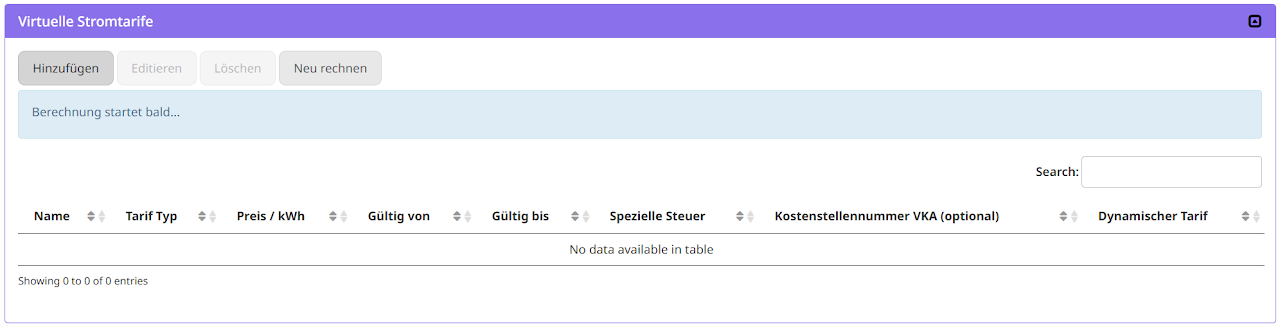
Now create the grid tariffs for your tariff period
Example: Single tariff
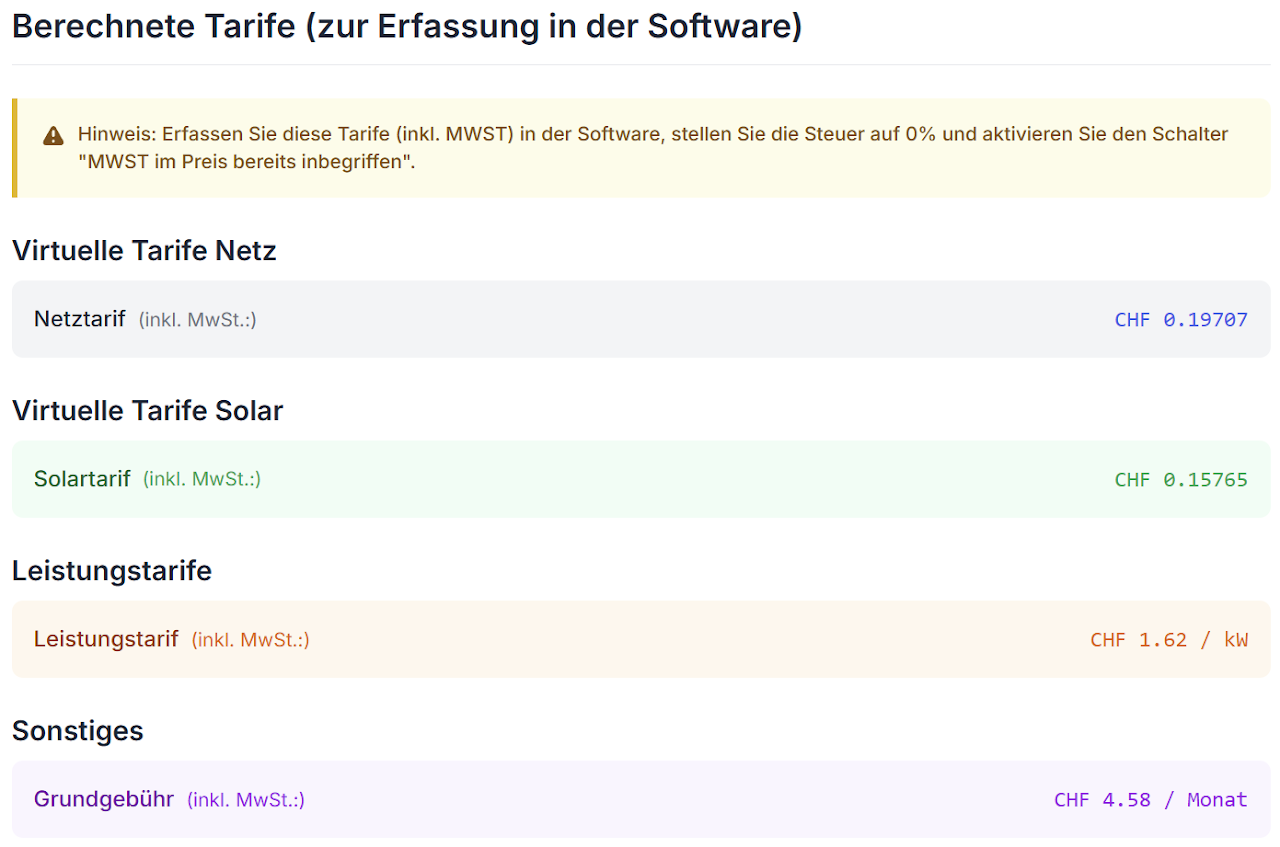
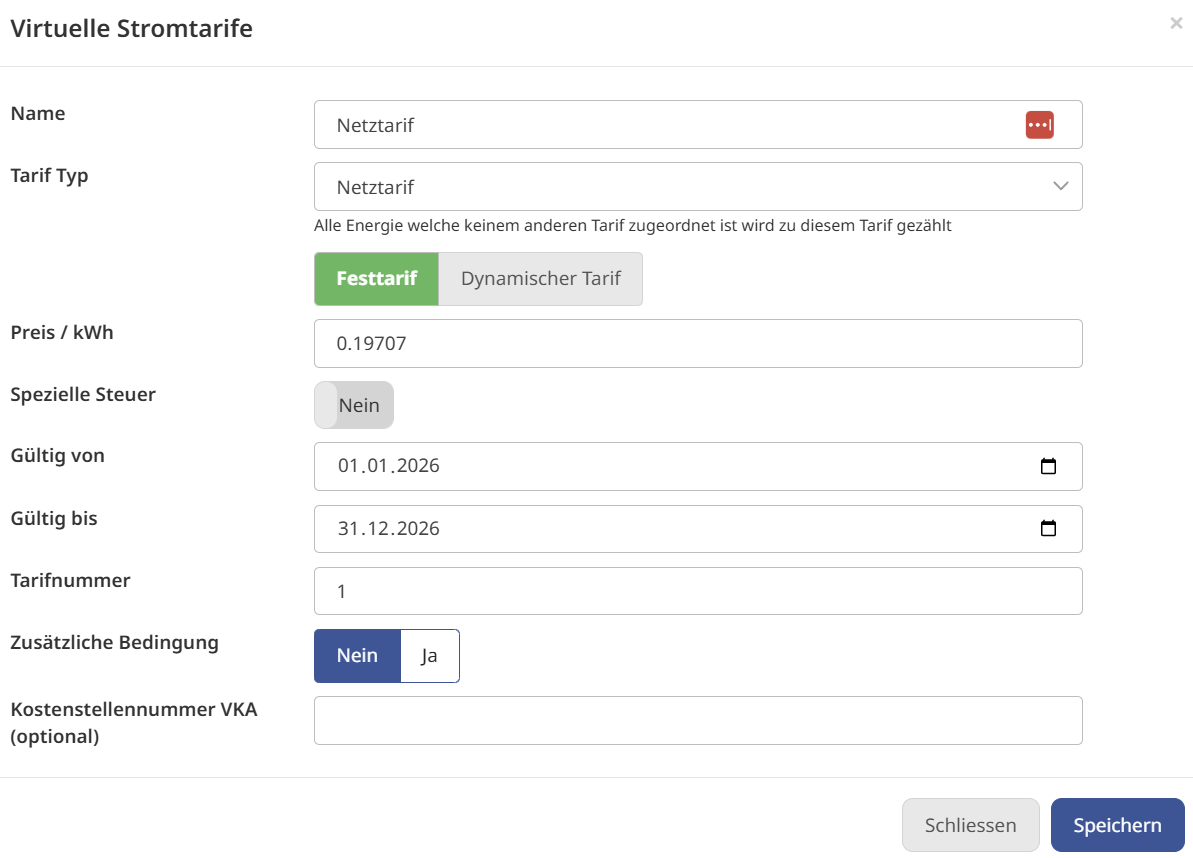
Example of a single tariff with the 80% flat-rate method:
Now create a grid tariff with the specified price:
- Grid tariff 2026 : 0.19707 CHF / kWh
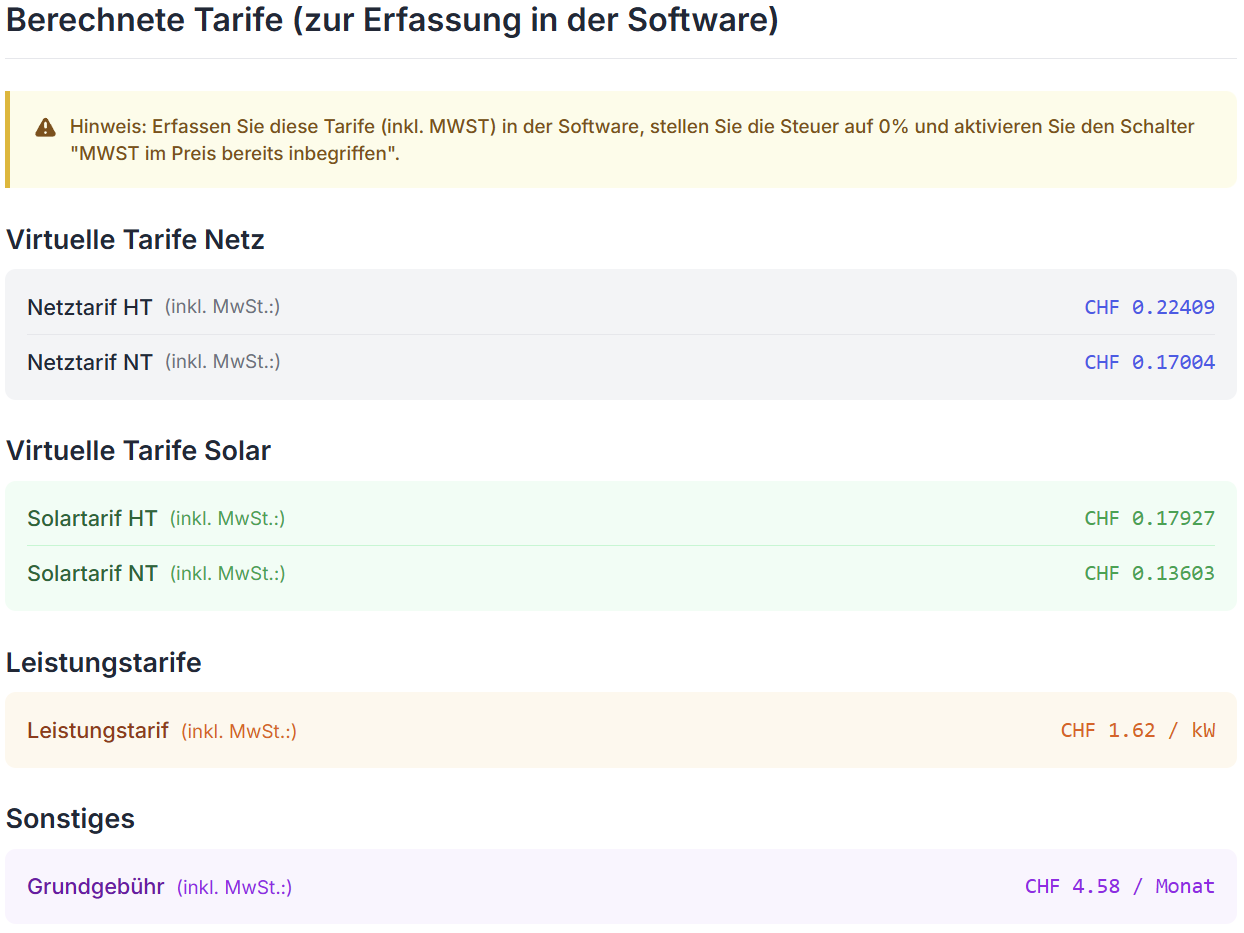
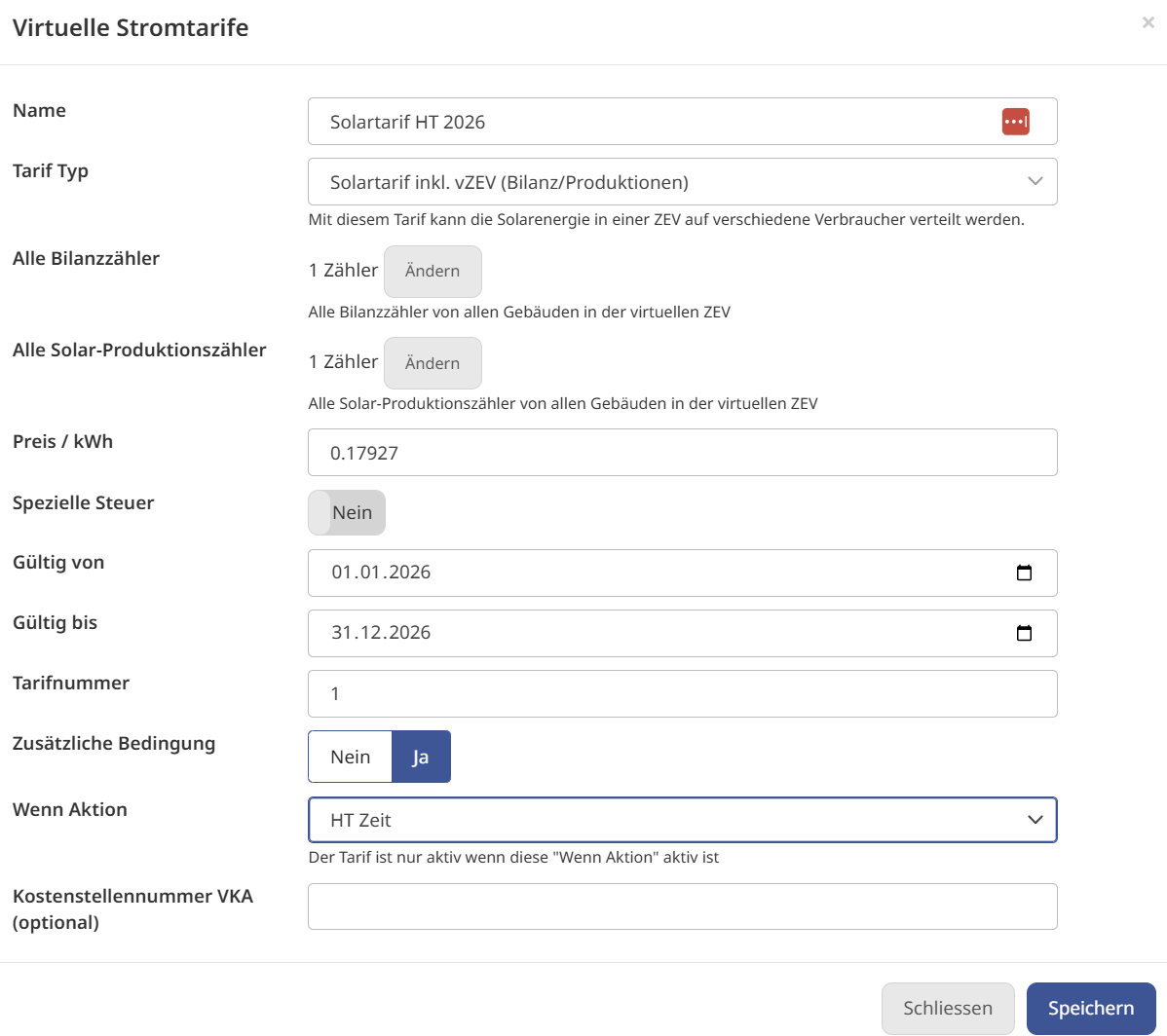
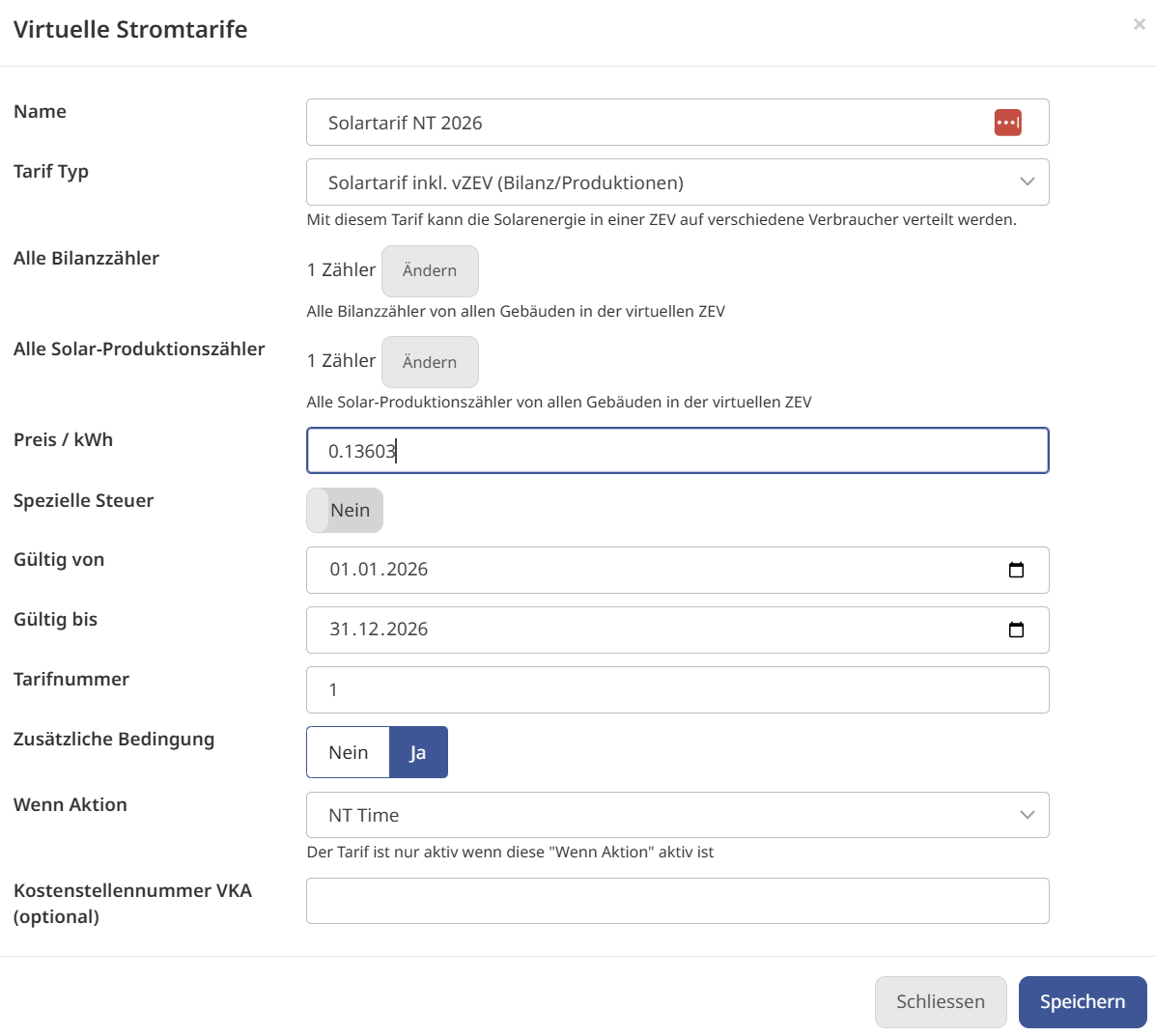
Example of a dual tariff with the 80% flat-rate method:
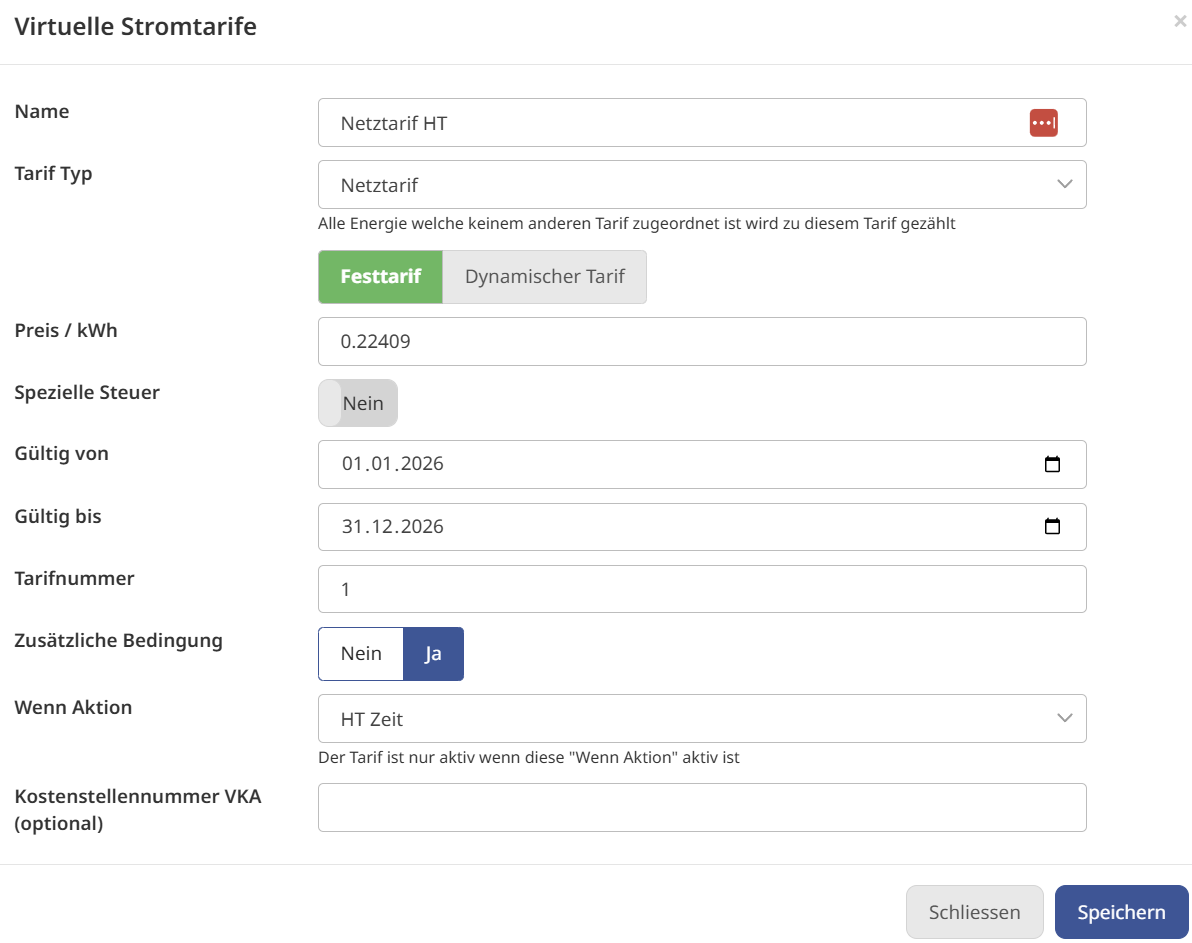
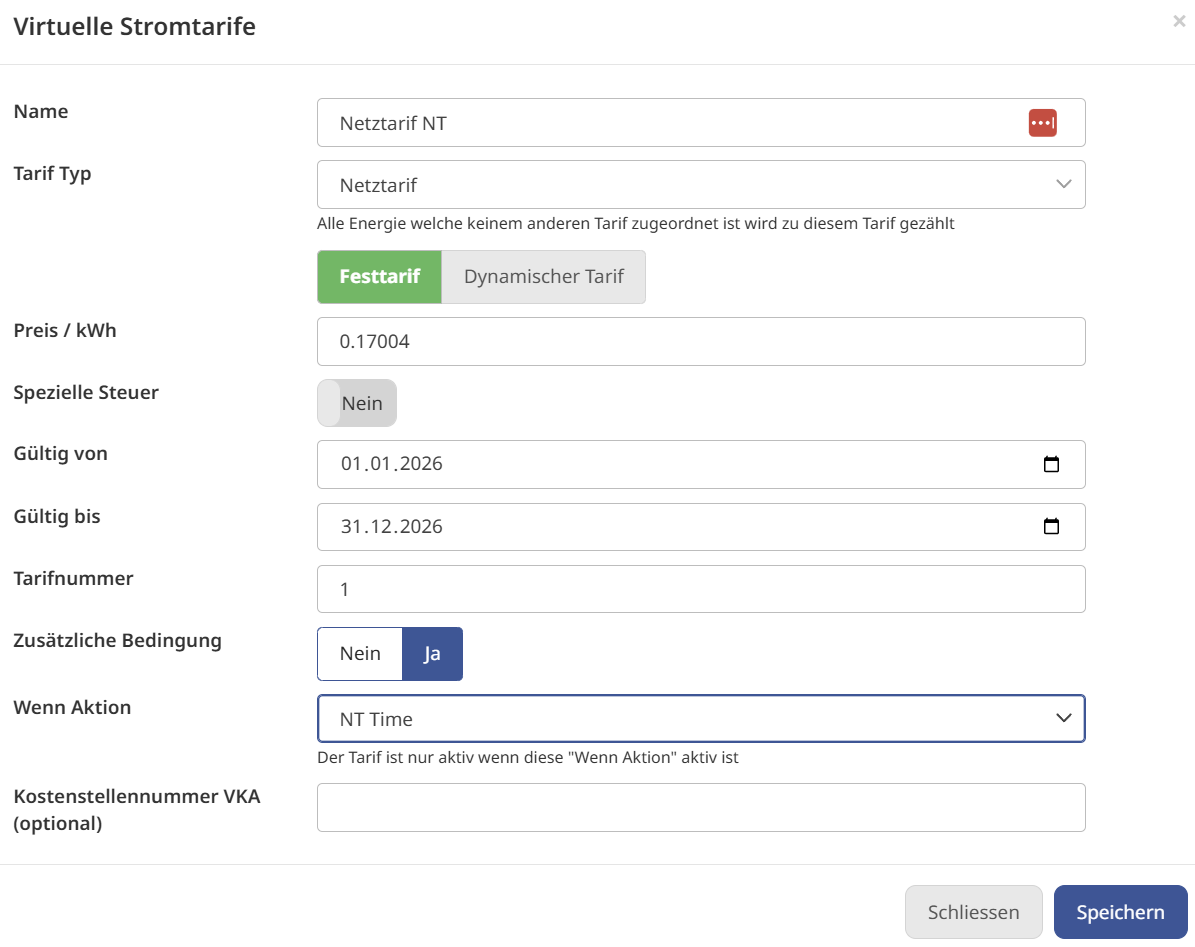
Now create two grid tariffs with the specified prices:
-
Grid tariff HT 2026: 0.22409 CHF / kWh
-
Grid tariff NT 2026: 0.17007 CHF / kWh
For dual tariffs, the timing must first be created using IF/THEN actions. These actions can then be linked via the "Additional condition (Zusätzliche Bedingung)" to control validity throughout the week.
Now create the matching solar tariff
Note: There are various solar tariffs and battery tariffs with different capabilities and requirements.
In general, the Solar tariff vZEV (Solartarif vZEV) is the best and most universal choice.
What it cannot do is define different tariffs for battery and solar energy. For that, the alternative tariff must be used.
You can find details below in the section "All details".
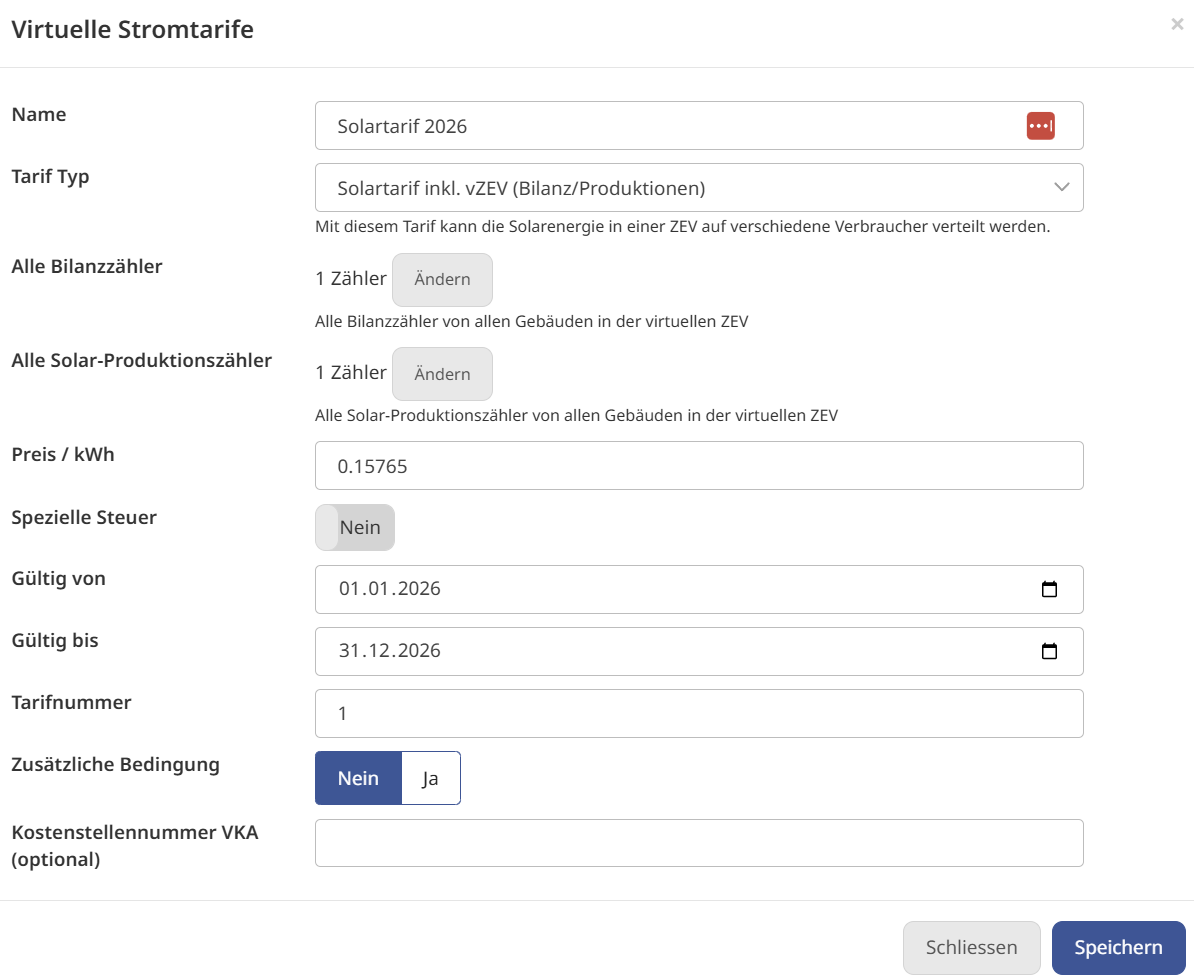
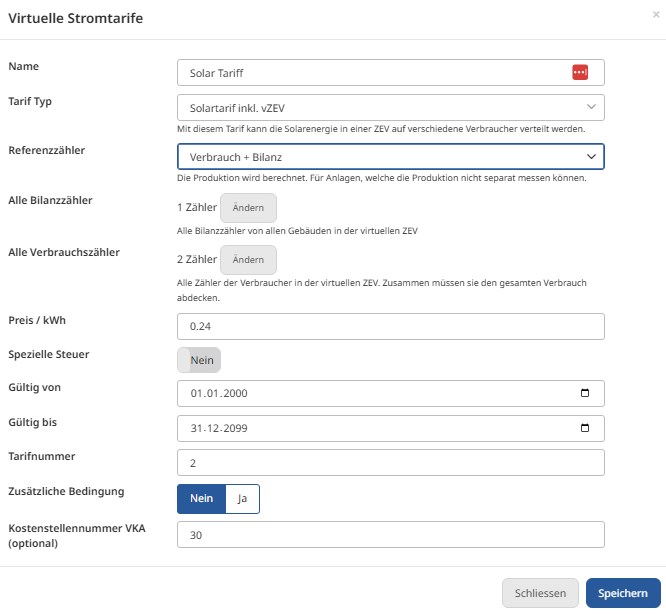
In this example, the Solar tariff vZEV is used.
Measurements:
All solar tariffs require relevant metering points, which must be linked.
Simplest option:
-
Field "Solar meter (Solarzähler)": Select all generation meters (solar and battery).
-
Field "Balance meter (Bilanzzähler)": Select the balancing meters (1 building: grid connection meter; site: site meter or several grid connection meters)
Alternative option:
-
Field "Solar meter (Solarzähler)": Select all generation meters (solar and battery).
-
Field "Balance meter (Bilanzzähler)": Select all consumption meters and production meters.
Solar single tariff
Solar dual tariff
Start recalculating the electricity tariffs
If the virtual tariffs are used, you must click Recalculate (Neu berechnen) at the end of the configuration (and after any later configuration changes) (ideally from 1.1.2018). This recalculates all previous values.
Before an invoice can be created, you must wait until the last calculated value shows "Today (Heute)" and no error message appears.
Error messages caused by a configuration problem are usually displayed within one minute. It is therefore worth clicking "Recalculate (Neu berechnen)" and waiting briefly to see whether an error message appears or not.
Tip: For price or tenant changes (addresses, move-in or move-out date), a recalculation is not required; in all other cases, a recalculation is always required.

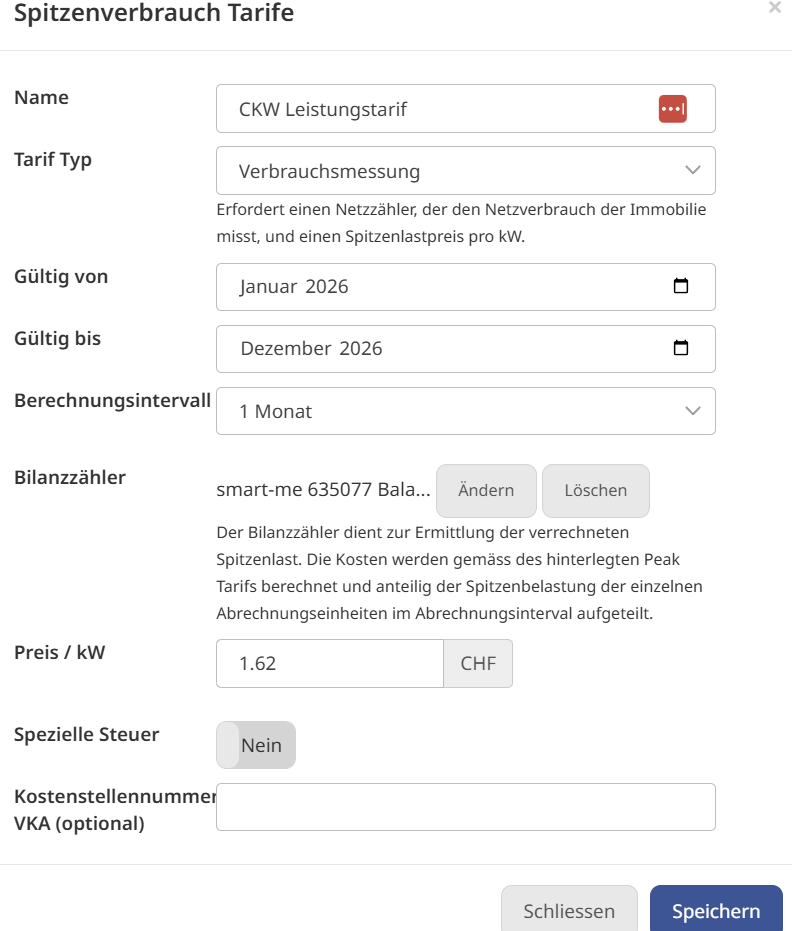
Entering the demand tariff
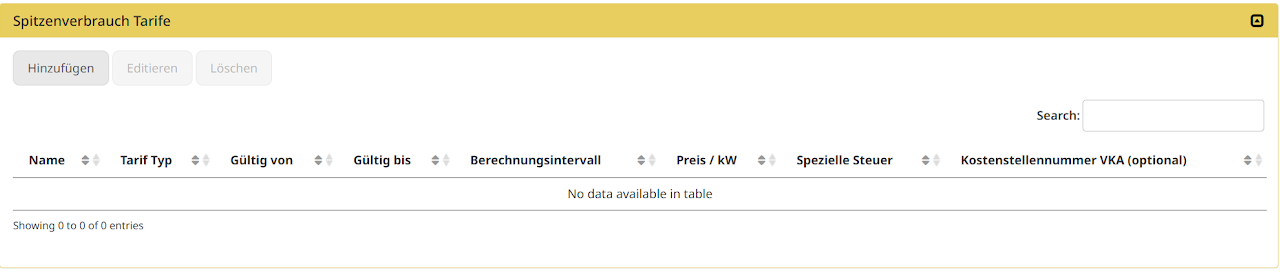
Peak power tariffs can be used to cover extended or new electricity models from energy suppliers.
On the tariff sheet, it can be recognised by its unit. Usually stated as e.g. 1.50.- / kW / month
In our example, we enter the calculated price.
The peak demand costs can be recorded using one of two methods:
-
Consumption measurement: Automatically via your own balance measurement
-
Cost entry: Later cost entry per month after receiving the invoice
Validity period: The validity period of a peak power tariff is limited to 1 year; it can be created multiple times for several years.
Peak tariffs are based either on the costs incurred monthly (energy supplier invoice) or depend on the stored tariff and the active measurement of the main metering point.
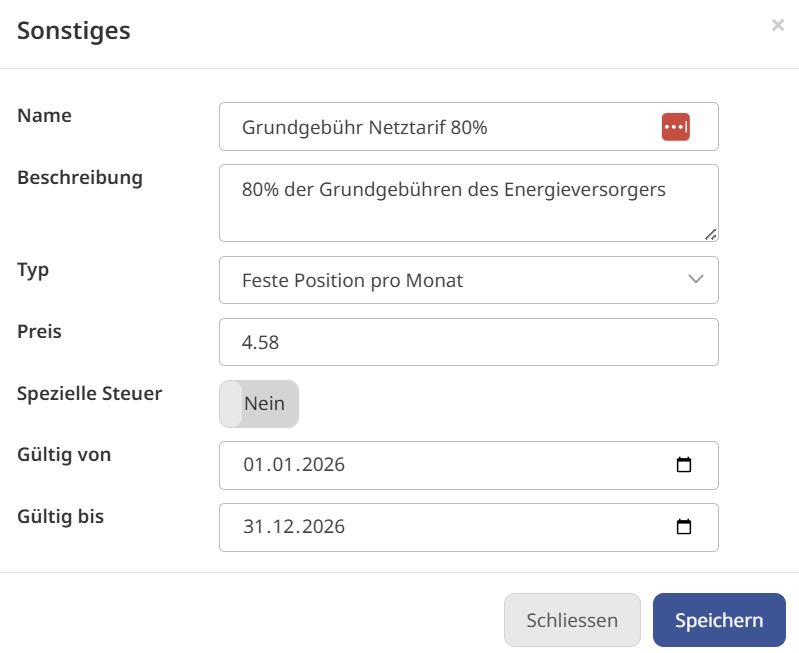
Entering the 80% basic fee (if the 80% method with basic fee was chosen)
In this example, we use the 80% method with basic fee. Accordingly, these costs still need to be entered under "Other (Sonstiges)"
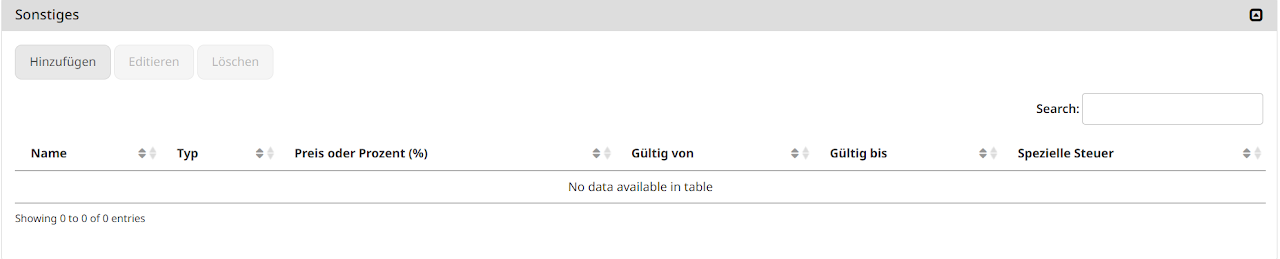
The costs of the basic fee apply to all billing units, so it can be stored globally with the tariffs for the year 2026.
All details on the tariffs and functions
From here on, the page is a reference: the sections are collapsible so that you only open what you currently need.
Virtual tariff configuration (grid, solar, battery tariffs)
Virtual tariffs allow you to define your own dynamic tariff model for charging energy. This can be used, for example, in a ZEV (association for own consumption) or tenant electricity setup to distinguish whether a tenant draws power from a solar installation or from the grid.
Please note that all normal electricity tariffs must be deleted.
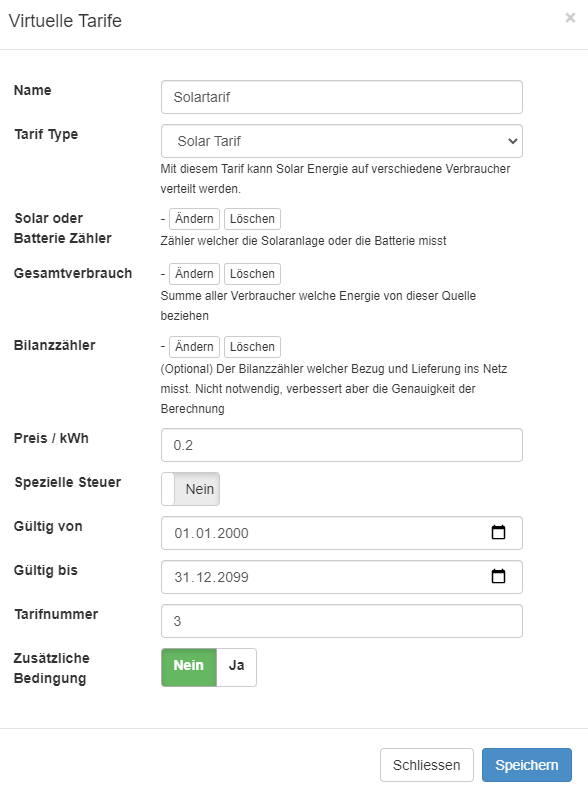
Under Virtual Tariffs (Virtuelle Tarife) you can see all virtual tariffs already entered. Click Add (Hinzufügen) and enter all virtual tariffs.
Name: The name of the tariff is also shown to the user (tenant).
Tariff type
-
Solar tariff vZEV (new) (Solartarif vZEV (neu)): This allows a global solar tariff to be created in a ZEV or a vZEV. The solar energy is distributed evenly across all consumers and is based on the sum of the building balances (ZEV) and the sum of the productions (solar meters and/or battery meters). With this tariff, it is not necessary to measure 100% of the loads if a grid connection meter is physically present. Virtual sum meters are not needed with this tariff.
-
Solar tariff (legacy) (Solartarif (legacy)): This allows the energy from a solar installation to be charged within a ZEV. ZEVs can be implemented with or without a balance meter (DSO). The tariff requires a virtual sum meter of all relevant loads (100% metering).
-
Battery tariff (legacy) (Batterietarif (legacy)): This allows the energy from an AC-coupled battery to be distributed within a ZEV. This tariff is only compatible with the Solar tariff (legacy). The tariff requires a virtual sum meter of all relevant loads (100% metering).
-
Grid tariff (normal tariff or dynamic tariff) (Netztarif): This is used to charge grid power. If required, it can additionally be split into peak and off-peak tariff times or dynamically.
-
Additional condition (Zusätzliche Bedingung) You can use an additional condition to specify when this tariff is valid. This can be a time period (e.g. for peak/off-peak tariff) or any other condition. The condition must have been defined beforehand as an if/then action.
General information about the tariffs
For each tariff, a price / consumption unit and a validity can be stored.
Price / kWh (Preis / kWh): The price for this tariff
Valid from (Gültig von): The date from which this tariff should be valid. See note.
Valid until (Gültig bis): The date until which this tariff should be valid. See note.
Notes:
-
We recommend setting the validity from 1.1.2000 to 31.12.2099. The prerequisite for this approach is that invoices are sent at the same frequency as by the local energy supplier. In this case, the price can be set before the invoice is created. If only the price is changed in smart-me Billing, it is not necessary to press the "Recalculate (neu rechnen)" button. For all other adjustments, however, recalculation is necessary.
-
Once you have defined all tariffs, you must click "Recalculate (Neu berechnen)". This calculates and activates all virtual tariffs. This process can take several hours.
-
If one or more conditions are saved, all tariffs must cover the 24 hours of the day. If a normal tariff without conditions is stored, it automatically catches all energy quantities that cannot be assigned and thus covers the 24 hours. Alternatively, you must make sure that the times of the conditions are configured correctly (see example above).
Grid tariff
The grid tariff can be entered as the following tariffs:
-
Single tariff (static or dynamic)
-
Dual tariff
-
Multi-tariff
Single tariff (static and dynamic)
The single tariff can be created either as static (fixed tariff) or dynamic.
Fixed tariff
The fixed tariff applies the defined price / kWh of grid power.
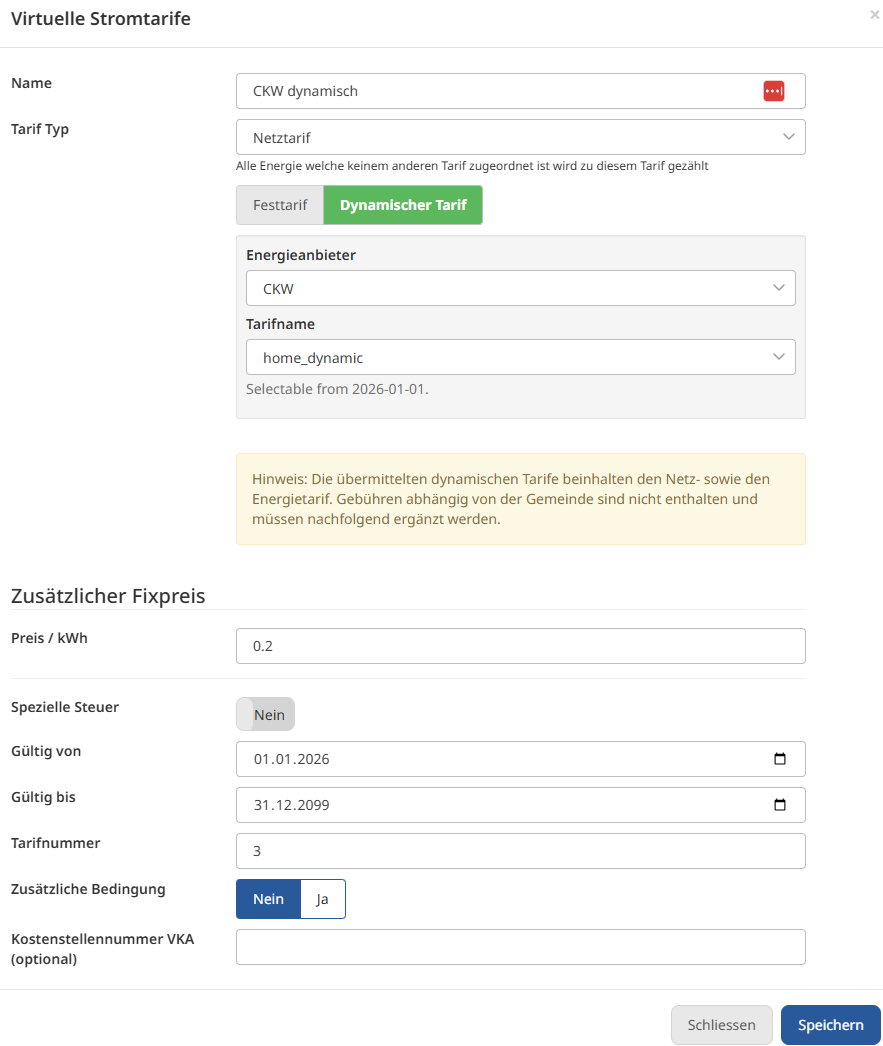
Dynamic tariff
The dynamic tariff, on the other hand, uses an external API and queries the available provider for the currently valid price for each hour.
The price is then applied per hour.
Please note that the dynamic prices do not transfer all relevant costs, and additional entries must be made.
-
Additional fees such as municipal concession fees (Enter as an additional fixed price)
-
Monthly connection fees (Other (Sonstiges) section)
Calculating invoices with a dynamic tariff takes noticeably longer than with the other methods (data transfer and application)
Dual tariff and multi-tariffs
A separate tariff (grid tariff) is created for each different tariff. These are then linked to a timing using the conditions.
The timing is defined via the IF/THEN actions.
Configure the Solar tariff vZEV
The Solar tariff vZEV enables the implementation of ZEV (association for own consumption) and vZEV (virtual ZEV) solutions.
The vZEV solar tariff configuration calculates the effective surplus of a virtual ZEV and the effective grid consumption based on several solar production meters and grid connection meters.
The calculation takes into account the individual surpluses of a building and, at the same time, the demand of other buildings for this surplus.
If there is demand, the surplus is made available to the neighbouring building. If there is none, the surplus is identified as grid feed-in.
The solution supports the following implementations:
-
Implementation of a - ZEV with balance meter and solar (balance + production) - ZEV with balance and total consumption (consumption + balance) - ZEV with solar and total consumption (production + consumption)
-
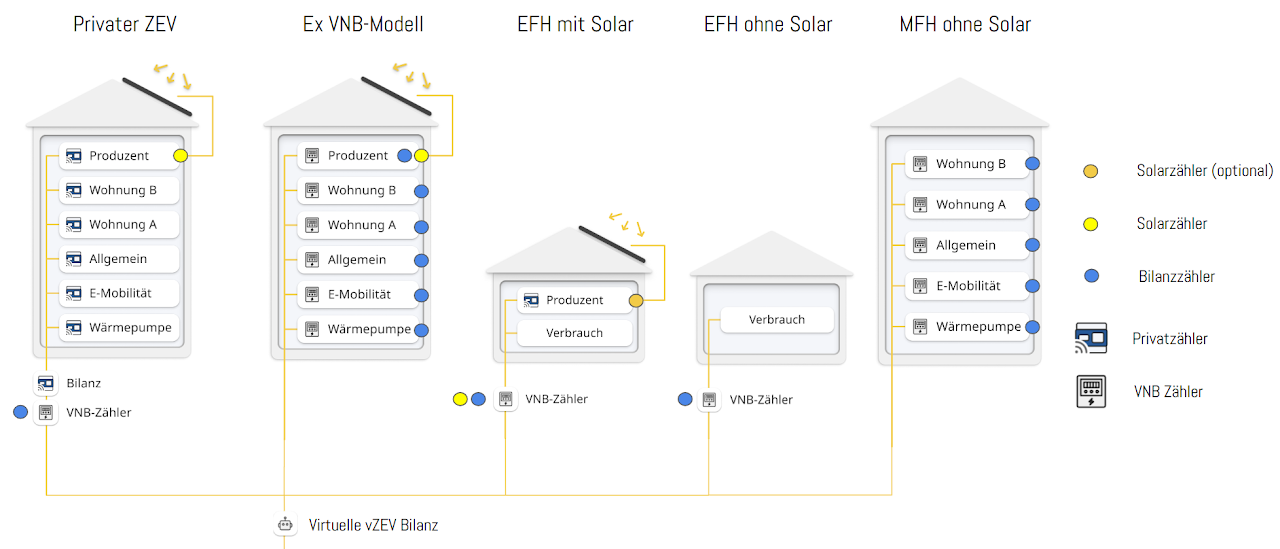
vZEV: Several smart-me ZEVs with grid connection meters
-
vZEV: Combination of smart-me ZEVs with buildings that only have consumers
-
vZEV: Combination of smart-me ZEVs with single-family homes with solar installations
-
vZEV: Several smart-me ZEVs in combination with former DSO practice models
Note: The battery cannot be tariffed separately with this tariff system.
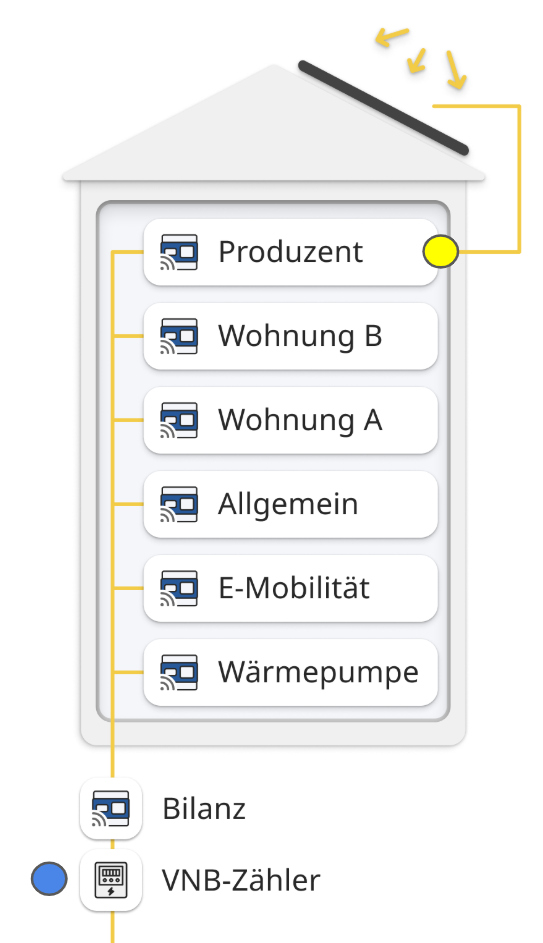
Tariffing a ZEV
-
Grid connection meter
-
Production measurement (PV + battery)
Tariffing a ZEV without a balance meter
-
Production measurement (as production and balance)
-
All consumers (100%)
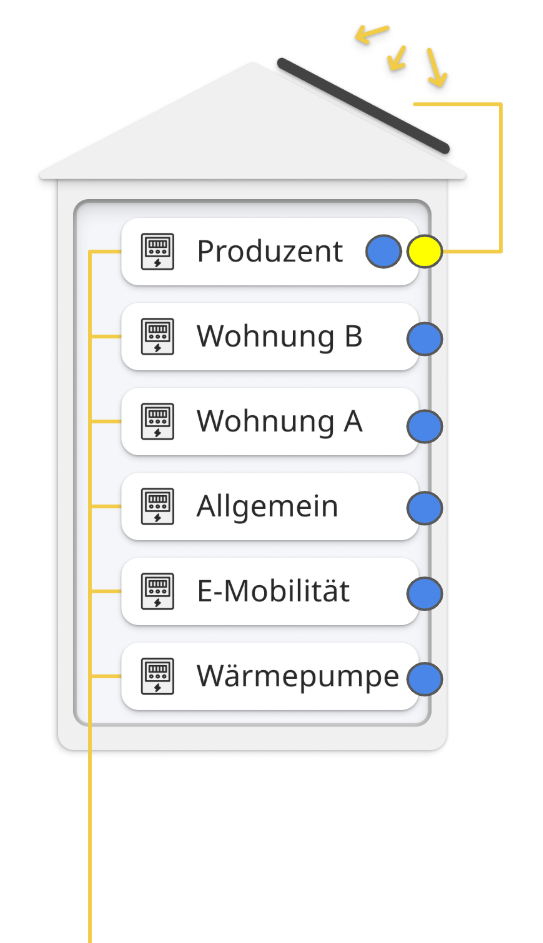
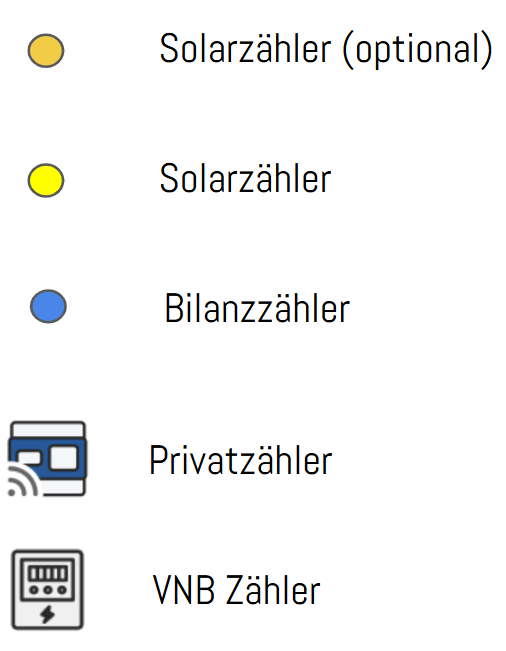
Legend
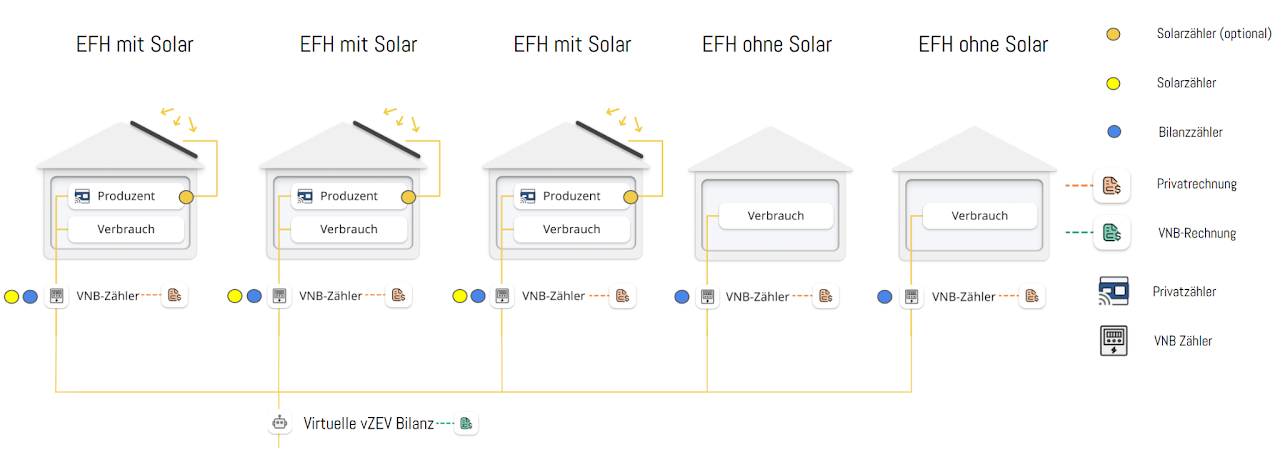
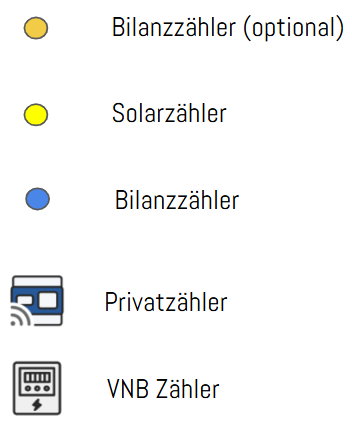
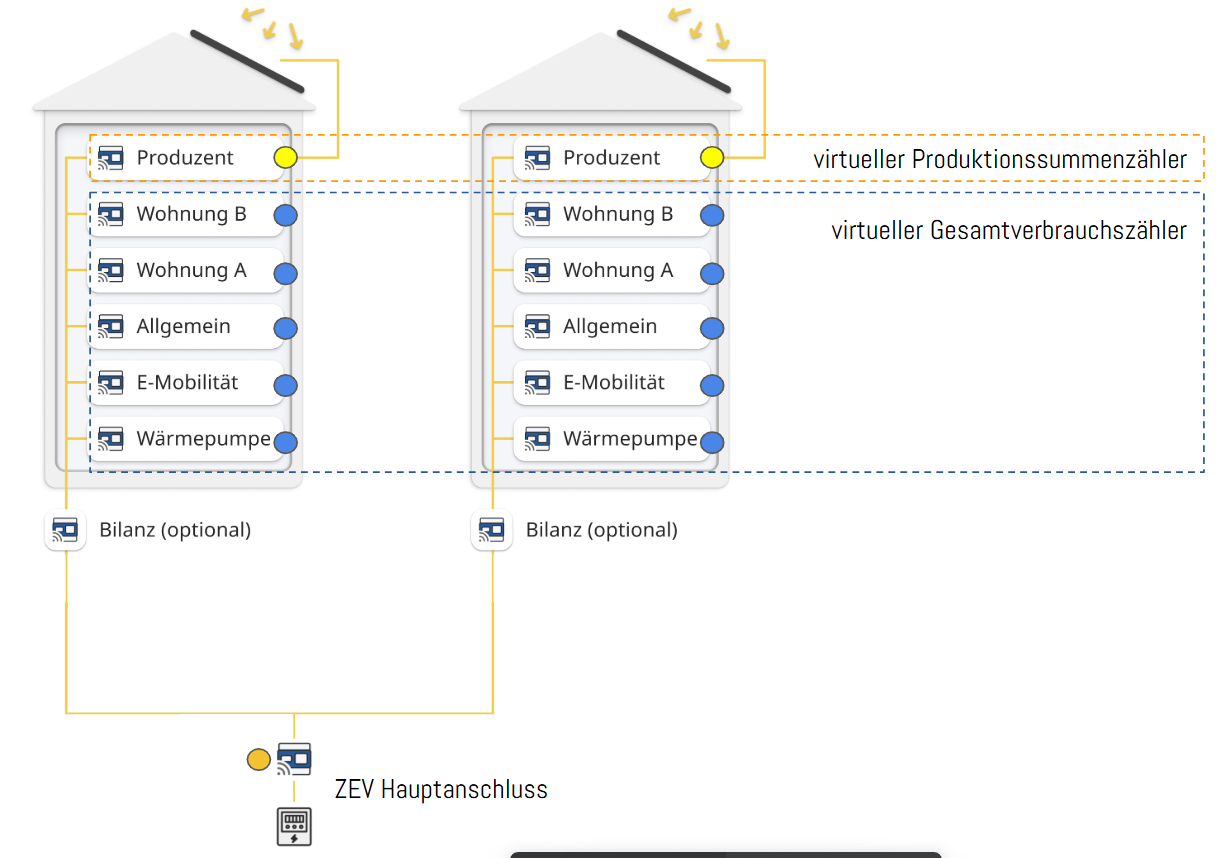
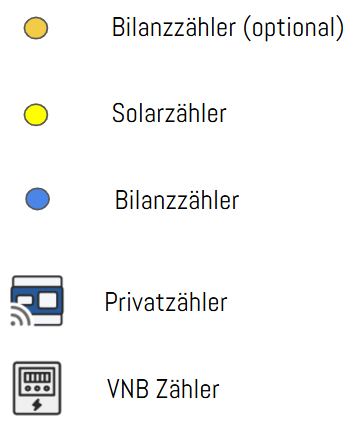
The coloured dot indicates how the respective meter must be stored in the tariff
Tariffing an extended vZEV with different combinations of metering concepts
Tariffing terraced single-family houses as a vZEV
Configure the solar and battery tariff
The solar tariffs and battery tariffs of the legacy series enable the implementation of a ZEV (association for own consumption) with or without a balance meter.
Using this tariff group enables the following:
-
ZEV with or without a balance meter
-
Different tariffs for battery and solar power
Prerequisites for use:
-
Use of a 100% metering concept: all measured consumers must correspond to 100% of the load.
-
Requires a virtual sum meter of all loads.
Solar or battery meter For the solar and battery tariff, you must specify the meter that measures the battery or the solar installation.
Total consumption For the solar and battery tariff, you must specify a meter that measures all consumers to which this energy is to be distributed. This is usually a virtual meter that sums up all consumers (attention: virtual meters then require an additional licence).
Balance meter For the solar tariff and battery tariff, a balance meter can optionally be specified. If the balance meter is specified, the energy fed into the grid is taken into account when calculating the solar tariff. This means that per 15 minutes, only the solar energy that was actually consumed in the building is distributed (energy available = PV production - grid feed-in).
Attention: If no physical balance meter is used, deviations of 10-15% in the allocation of tariffs are not unusual.
Virtual sum meters
-
The virtual sum meter (total consumption) is necessary to form the reference for the tariff allocation. It is formed from all load meters and is subject to a charge (1x Professional licence)
The sum of the meters must amount to exactly 100% of the load. If you have meters connected in series, only the meter closer to the sub-distribution / grid connection is relevant. Solar meters, battery meters and grid connection meters must be excluded.
-
If there are several solar installations in the system and they cannot be measured together, an additional licence for the total production is required.
More information: Virtual Meters
Tariffing a ZEV with legacy tariffs (1 building)
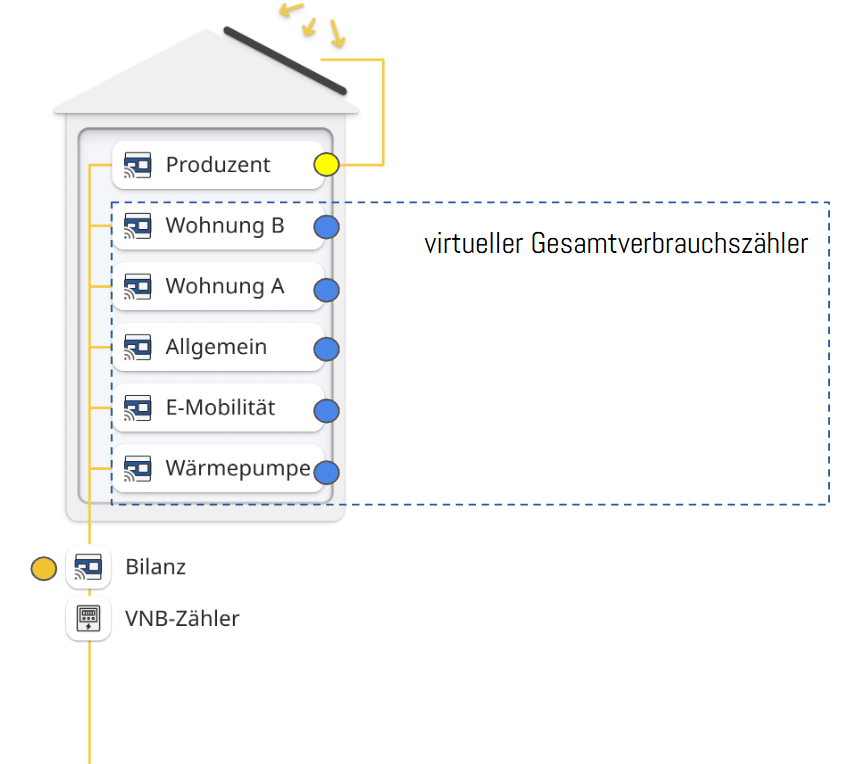
Tariffing a ZEV with legacy tariffs (several buildings )
Peak power tariffs
Peak power tariffs can be used to cover extended or new electricity models from energy suppliers.
-
Dual tariff for base consumption + peak demand (Virtual tariffs in combination with the peak tariff)
-
Single tariff for base consumption + peak demand (Virtual tariffs in combination with the peak tariff)
-
Peak tariff only, without base tariffs
Validity period: The validity period of a peak power tariff is limited to 1 year; it can be created multiple times for several years.
Peak tariffs are based either on the costs incurred monthly (energy supplier invoice) or depend on the stored tariff and the active measurement of the main metering point.
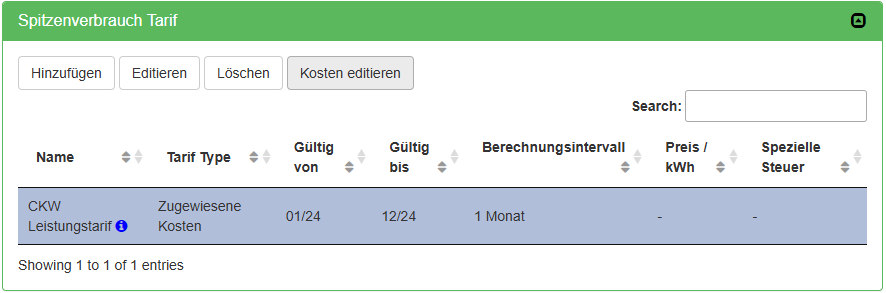
Example of an entered electricity tariff with a cost basis (cost entry)
General operating principle:
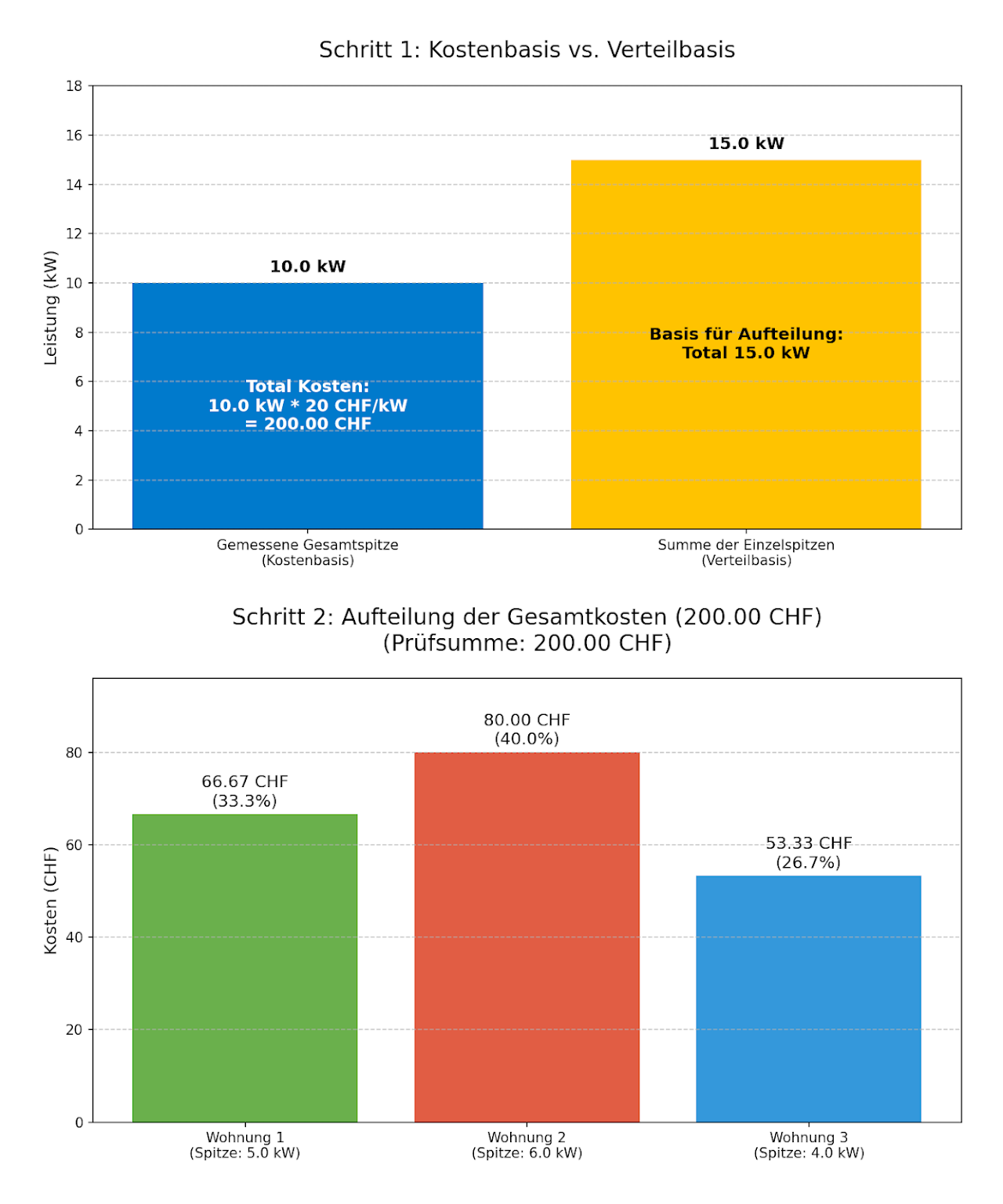
The entered peak tariff costs, or the costs calculated automatically based on the measurement and the stored tariff, are allocated to the consumers during invoice creation in the selected calculation interval.
The basis is the respective power peak caused (grid consumption only) by each individual consumer in the billing period and the selected calculation interval.
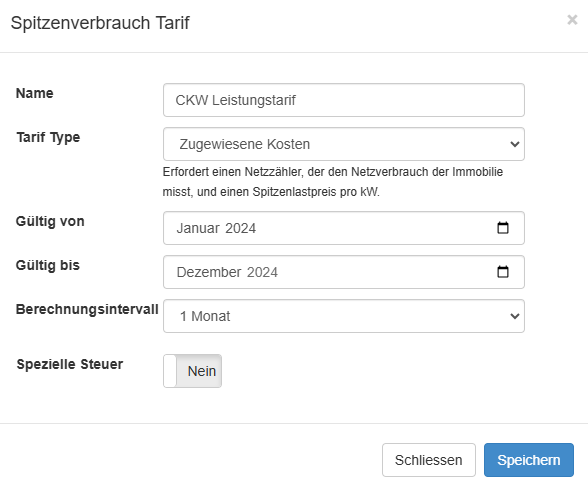
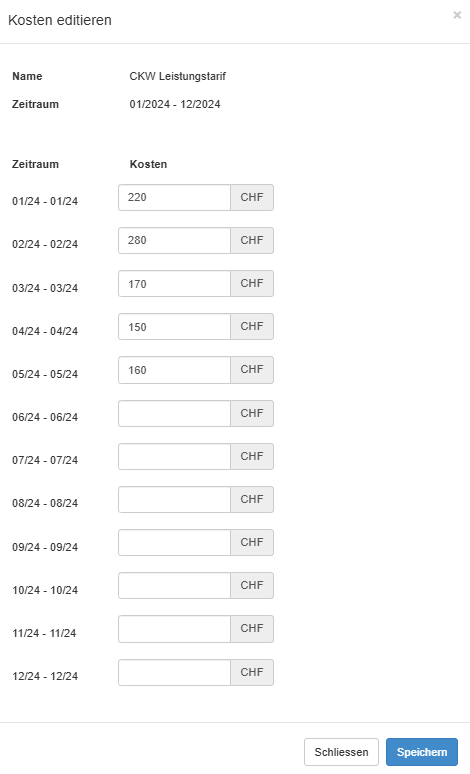
Peak tariffs without active main measurement (manual cost entry)
Suitable for all systems that do not have a reference measurement.
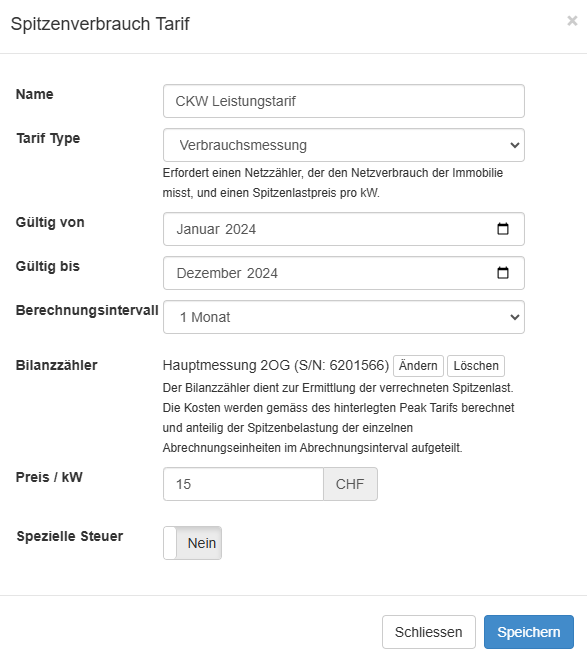
Peak tariffs with active main measurement (automatic cost calculation)
Suitable for all systems that have a direct balance measurement.
FAQ
Depending on your energy supplier's tariff model, the configuration looks different. Expand the setup that matches your case.
Single tariff without solar
- In this case, we recommend not using virtual tariffs. Electricity tariffs (all) are more efficient in this case. It is possible to switch from electricity tariffs to virtual tariffs at any time.
Logic: The meter readings are queried and used for billing. No calculation is necessary.
Single tariff with solar
-
Solar power single tariff: Define a solar tariff without an if action
-
Grid power single tariff: Define a normal tariff without an if action
Logic: First, the available solar power is distributed. If too little or none is available, the normal tariff is used.
Peak and off-peak tariff for grid power and single tariff for solar power
-
Solar power single tariff: Define a solar tariff without an if action
-
Grid power peak tariff: Define a normal tariff with an if action
- Example. Mon to Fri 7h00 to 22h00 or Sat 7h00 to 13h00
-
Grid power off-peak tariff: Define a normal tariff without an if action
Logic: First, the available solar power is distributed. If too little or none is available, the normal tariff that meets a condition is used. Finally, the tariff without a condition is applied to the remaining power.
Peak and off-peak tariff for grid and solar power
-
Solar power peak tariff: Define a solar tariff with an if action
- Example: Mon to Fri 7h00 to 22h00 or Sat 7h00 to 13h00
-
Solar power off-peak tariff: Define a solar tariff with an if action
- Example: Mon to Fri 22h00 to 7h00 or Sat 13h00 to 7h00 or Sun 0h00 to 0h00
-
Grid power peak tariff: Define a normal tariff with an if action
- Use the same if action as for the solar power peak tariff
-
Grid power off-peak tariff: Define a normal tariff with an if action
- Use the same if action as for the solar power off-peak tariff
Logic: First, the available solar power with the valid condition is used. If too little or none is available, the normal tariff with the valid condition is used. In this use case, it is important that 24h/day is covered by an if condition.
Summer and winter with peak and off-peak tariff for grid power and single tariff for solar power
-
Solar power peak tariff: Define a solar tariff without an if action
-
Grid power peak tariff summer: Define a normal tariff with an if action
- Example: Time span every day: Mon to Sun 7h00 to 22h00 and time span every year from 1 / 04 / 00:00 to 1 / 10 / 00:00.
-
Grid power off-peak tariff summer: Define a normal tariff with an if action
- Example: Time span every day: Mon to Sun 22h00 to 07h00 and time span every year from 1 / 04 / 00:00 to 1 / 10 / 00:00.
-
Grid power peak tariff winter: Define a normal tariff with an if action
- Example: Time span every day: Mon to Sun 7h00 to 22h00 and time span every year from 1 / 10 / 00:00 to 1 / 4 / 00:00.
-
Grid power off-peak tariff winter: Define a normal tariff with an if action
- Example: Time span every day: Mon to Sun 22h00 to 07h00 and time span every year from 1 / 10 / 00:00 to 1 / 4 / 00:00.
Logic: First, the available solar power is used. If too little or none is available, the normal tariff with the valid condition is used. In this use case, it is important that 24h/day is covered by an if condition.
Pure grid tariff systems (external signal solution)
Electricity tariffs (only supported if the VEWA function is not used)
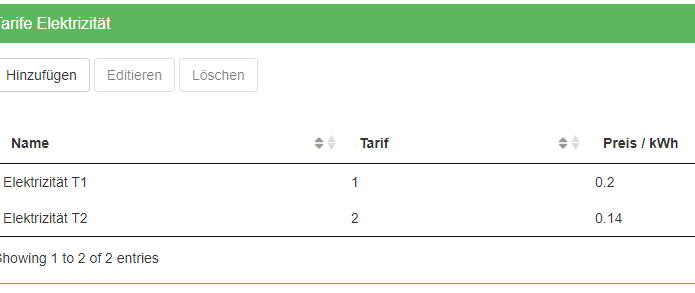
To access the electricity tariff settings, click the property on the left and scroll to the green window Electricity tariffs (Tarife Elektrizität). The two tariffs T1 and T2 are displayed here. Select one of the tariffs and click Edit (Editieren) to change its properties (e.g. name, price etc.)
To be able to work with the electricity tariffs, the tariff signal from the utility must be connected to the tariff input of the corresponding meters.