Creating users
Prerequisite
You need a smart-me Professional subscription to use this function.
In smart-me, you can create new users and grant them the appropriate permissions on meters or folders. These users only have read access.
This allows you to give tenants access to their data for as long as they live in the property.
To create new users, proceed as follows:
Please note that you must first create folders.
-
Log in to the smart-me website.
-
Click Configuration (Konfiguration) at the top right
-
Select User Configuration (Benutzerkonfiguration)
-
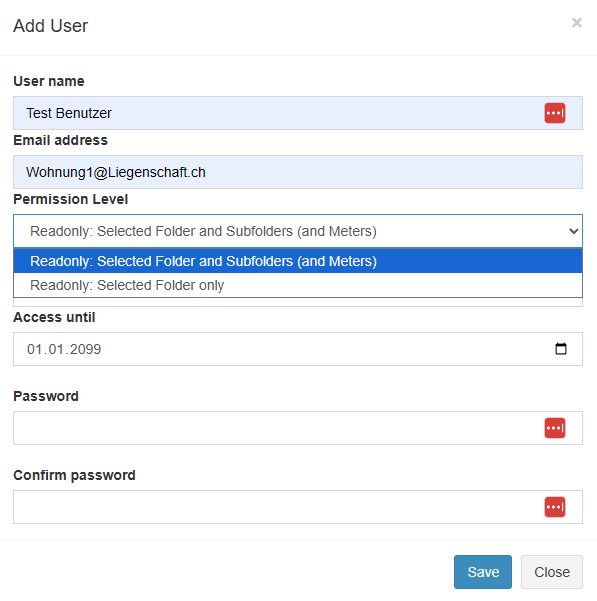
Create a new user by clicking Add user (Benutzer hinzufügen).
-
Drag the user with the mouse onto the folder that should be visible to this user.

Permission levels
Users always have read-only access.
You can share either only the explicit node or the node including all subnodes.
If a visualization that accesses meter data is used on the node, the user must be authorized to see the meters.
Now create the visualizations for the tenants or for the property owner.
View for tenants
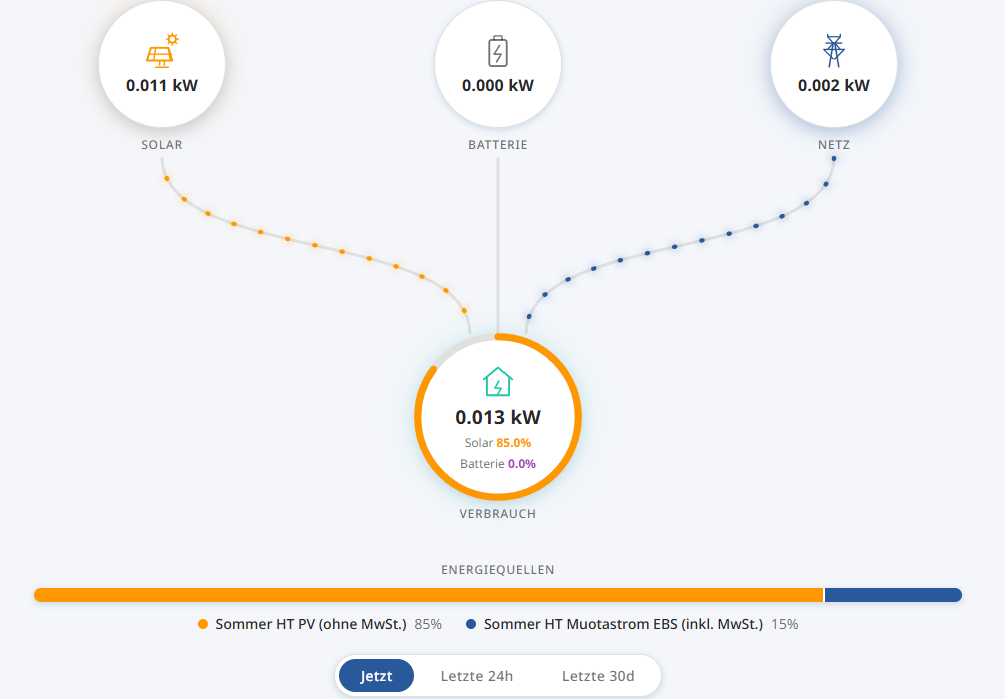
A special view for tenants is available for the virtual tariffs. It shows the current energy consumption (electricity) and its source (solar or grid). In addition, the bar shows the past electricity source.
This view must also be configured for each apartment node.
The visualization is called: "Simple virtual tariffs apartment" ("Einfache virtuelle Tarife Wohnung")